

Epson WorkForce Enterprise AM-C4000 Manual
PDF manual · 704 Pages
English


Quick check
Incorrect answer, please try again.
Chat with your Epson WorkForce Enterprise AM-C4000 manual using AI
Get instant AI answers from your Epson WorkForce Enterprise AM-C4000 manual
Ask anything about the Epson WorkForce Enterprise AM-C4000. Answers come from this manual, with the pages they are based on.
WorkForce Enterprise AM-C4000 Maintenance Schedule
Use the nozzle check function when printing large volumes or if print quality is poor to prevent streaks and pale colors.
Execute automatic cleaning via the control panel when print quality problems occur or after heavy usage.
Wipe the platen glass with a soft cloth if copies or scanned images appear smudged.
Clean the ADF rollers and interior with a damp soft cloth if originals are not fed correctly or images are smudged.
Ask a Question
Do you recommend WorkForce Enterprise AM-C4000?
Yes NoFrequently Asked Questions
This printer supports a wide range of Windows versions including 11, 10, 8.1, 7, and various Server editions. It also fully supports Mac OS X 10.9.5 and higher as well as macOS 11 and newer versions.
Is this answer helpful?
You can connect via Ethernet cable for a wired connection or install an optional Wireless LAN interface for Wi-Fi. Configuration can be done directly through the touchscreen panel or by accessing Web Config via a web browser on your computer.
Is this answer helpful?
Yes, if you have the optional IP Fax functionality enabled. This allows you to send and receive faxes over your network internet connection instead of traditional telephone lines.
Is this answer helpful?
Absolutely. You can enable the Control Panel Lock feature which requires an administrator password to change settings. This prevents unauthorized users from altering configurations or accessing restricted menus.
Is this answer helpful?
The printer has sensors to monitor ink levels. If ink runs low, it will alert you. While some models pause to allow cartridge replacement, continuous operation depends on having sufficient ink reserves or installed spare cartridges ready for quick swapping.
Is this answer helpful?
Yes, the AM-C4000 supports various cloud services allowing you to print documents stored in the cloud directly from the device or scan files to cloud storage destinations without needing a connected computer.
Is this answer helpful?
Advantages and Disadvantages
Advantages

- High-speed multi-color printing suitable for demanding office environments
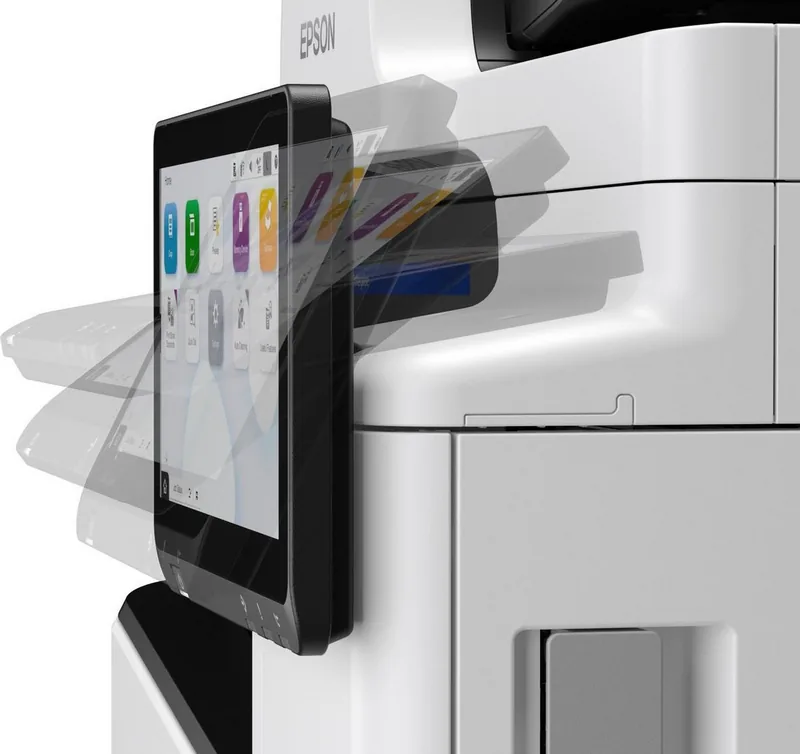
- Intuitive touchscreen interface simplifies complex tasks for all users
- Robust security features protect sensitive corporate data effectively
- Flexible connectivity options support both wired and wireless networks
- Supports a wide range of paper types and optional finishing accessories
Disadvantages

- Initial setup requires careful configuration of network and security settings
- Optional accessories like finishers add significant cost to the base unit
- Larger physical footprint may require dedicated space in busy offices
- Toner replacement involves managing multiple color cartridges simultaneously
- Wireless setup can be complex if firewall or router settings are restrictive
Product Specification
Format
A3 (Print), A3 (Scan)
Type
Printer/Scanner/Copier
Color System
4-color, 4x Single Cartridge
Consumables
C13T08H100, C13T08H200, C13T08H300, C13T08H400, C12C937181
Printing
600x2400dpi - 40/40 ppm (Letter) (ISO)
Scanning
600x1200dpi (CIS) - 60/60 ppm (ISO) (Letter)
Copying
600x600dpi
Paper Input
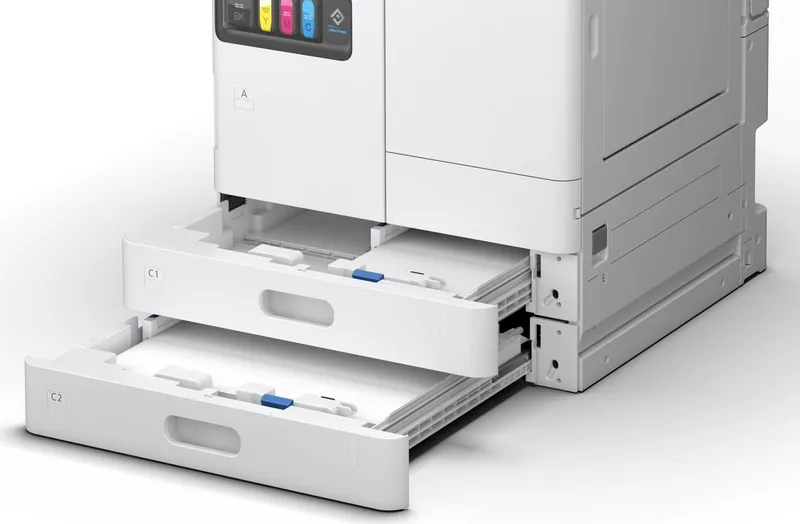
1150 sheets (2x 500 sheets + 1x 150 sheets), RADF (150 sheets), Duplex Unit
Memory
8GB (RAM), 320GB (HDD)
Connectivity
1x USB-B 3.0, 1x USB-A 2.0 (Host)
Network
Gb LAN, AirPrint, Cloud Print, Mobile Print, Mopria
Display
color, 10.1", Touchscreen
Power Consumption
110W (typical), 46W (standby), 1W (sleep), TEC: 0.22kWh/week
Sound Pressure Level
53.0dB(A)
Emulation
PCL 6, PCL 5e, PCL 5c, PostScript 3, PDF 1.7, ESC/P-R, ESC/Page
Chassis Color
gray
Weight
274.0 lbs
Features
USB Direct Scan, Direct Print
Manufacturer Warranty
1 Year
Product Description
Epson WorkForce Enterprise AM-C4000: The Ultimate Multi-Color Printing Solution
The Epson WorkForce Enterprise AM-C4000 represents a pinnacle in office productivity, designed specifically for high-volume environments that demand speed, reliability, and exceptional print quality. This multi-color inkjet printer is not merely a device; it is a comprehensive workflow engine capable of handling complex tasks with ease. Whether your business requires crisp color graphics, detailed technical documents, or secure multi-function operations, this machine delivers consistent results day after day.
At the heart of the AM-C4000 lies advanced ink technology that ensures vibrant colors and sharp text. It supports a wide array of paper types, from standard office stock to heavy cardstock and specialized media, making it versatile for marketing materials, invoices, and reports. The intuitive touchscreen interface allows users to navigate through printing, scanning, copying, and faxing functions effortlessly. Administrators can leverage robust security features, including user authentication and data encryption, to protect sensitive information while maintaining flexible access for authorized staff.
Connectivity is seamless, with built-in Ethernet and optional wireless capabilities ensuring the printer integrates smoothly into any network infrastructure. The inclusion of optional finishers like staplers and hole punchers transforms raw prints into professional finished products right at the source. With its ability to handle large paper capacities and offer cloud printing options, the Epson WorkForce Enterprise AM-C4000 reduces bottlenecks and keeps your team focused on what matters most.
Key Features Overview
- High-speed color printing with enterprise-grade durability.
- Intuitive touchscreen control panel with customizable shortcuts.
- Advanced security protocols for data protection and user management.
- Flexible connectivity options including Wi-Fi and wired LAN.
- Support for various paper sizes and weights for diverse document needs.
Important Notes
Always ensure the printer is placed on a stable, level surface away from direct sunlight and heat sources. Regular maintenance using the provided cleaning tools will extend the lifespan of the device and maintain optimal print quality.
Search for 67,732 Manuals online


Type-in Brand or Model