
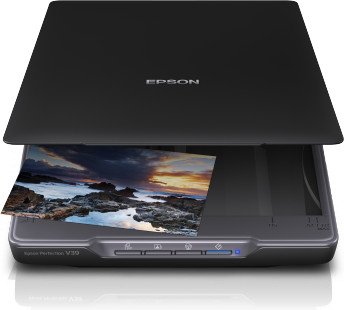
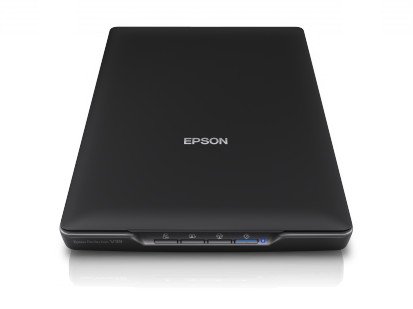
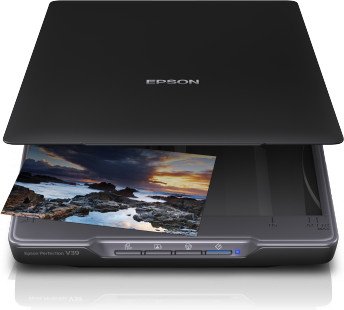
Epson Perfection V39 Manual
PDF manual · 83 Pages
English



Advantages and Disadvantages
Advantages

- Slim, USB-powered design: easy to set up and saves desk space.
- Multiple scan modes: Full Auto, Office, Standard and Professional for flexible control.
- Good image tools: dust removal, color restoration and unsharp mask for photo restoration.
- One-touch buttons with customizable actions via Epson Event Manager.
- Creates multi-page PDFs and, on Windows, searchable PDFs with OCR support.
Disadvantages

- Not ideal for high-volume scanning or sheet-fed workflows.
- Limited to flatbed scanning; bulky or very thick originals need special handling.
- Advanced OCR (searchable PDFs) available only on Windows systems.
- Relatively modest speed compared with dedicated document feeders.
- Requires included software for full feature set; drivers and apps must be installed.
Ask a Question
Frequently Asked Questions
The scanner offers Full Auto Mode for quick automatic scans, Office Mode for text and document scans, Standard Mode for basic preview-and-adjust workflows, and Professional Mode for advanced color, resolution and image corrections.
Is this answer helpful?
Yes. EPSON Scan can combine multiple scanned pages into a single PDF. Searchable (OCR) PDF creation is supported on Windows through the bundled software and PDF plug-in by selecting the appropriate options before saving.
Is this answer helpful?
The V39 is USB-powered, drawing both data and power from the USB connection to a computer, so no separate AC adapter is required under normal desktop use.
Is this answer helpful?
Place photos face-down on the scanner glass aligned to the indicated corner, leave at least 20 mm between multiple photos, avoid pressing down hard on the lid, and keep the glass clean to prevent scratches or sticking.
Is this answer helpful?
EPSON Scan provides automatic exposure, color restoration for faded photos, dust removal, unsharp mask, histogram and tone adjustments, descreening and background/backlight correction. Many features are available in Standard and Professional modes for finer control.
Is this answer helpful?
Yes. Use the Epson Event Manager application to view and change which applications or actions each hardware button launches (Scan, Copy, Send, PDF), tailoring shortcuts to your workflow.
Is this answer helpful?
The scanner supports both Windows and macOS. Drivers and Epson applications vary by OS; some features (like searchable PDFs via OCR) are limited to Windows. Check Epson’s support site for the latest drivers for your OS version.
Is this answer helpful?
Product Description

Epson Perfection V39 — Compact, Accurate Flatbed Scanner
The Epson Perfection V39 is a slim, USB-powered flatbed scanner tailored for home offices, hobbyists, and small businesses that need high-quality scans without bulky equipment. With a low-profile design and easy setup, it connects directly to your computer and offers reliable performance for photos, documents, and delicate originals.
Key features and workflow
The V39 integrates with Epson’s scanning software suite — EPSON Scan, Easy Photo Scan and Document Capture — providing multiple scanning modes to match different needs. Quick, automated scans are available in Full Auto Mode, while Office, Standard and Professional modes give progressively finer control over resolution, color correction, dust removal and image adjustments. The scanner supports creating PDFs (including multi-page PDFs and searchable PDFs on Windows) and offers direct integration for sending scans to cloud services, email or printers via included utilities.
Physical handling is simple: place documents or photos face-down on the glass, align to the reference corner, and close the lid. For thicker originals, the lid can be removed; the scanner can also be positioned upright for space-saving storage or scanning certain items. Four one-touch buttons map to common tasks (Scan, Copy, Send, PDF) and can be customized using the Epson Event Manager.
Image quality tools include automatic exposure, histogram adjustment, tone curve, unsharp mask, dust removal and color restoration for faded photos. Document-specific options help optimize OCR and text clarity with features such as text enhancement, auto area segmentation and dropout/color optimization. Users can preview and fine-tune settings in Standard or Professional modes before committing to scans.
Maintenance and safety are straightforward: keep the glass clean, avoid placing heavy items on it, and follow manufacturer safety guidance regarding placement, cabling and handling. Epson provides comprehensive troubleshooting and support resources covering common scan issues, indicator lights, and software setup across Windows and Mac platforms.
Notes
- The V39 is USB-powered and compact, best suited for single-page or occasional multi-page scanning rather than high-volume industrial use.
- Multi-page PDF settings and searchable PDF creation (OCR) are supported on Windows via bundled software.
- Use Professional Mode for precise color work and advanced corrections; Full Auto Mode for fast, no-fuss scans.
Search for :pdfCount Manuals online


Type-in Brand or Model