
Epomaker EP75 Manual
PDF manual · 18 Pages
English


Quick check
Incorrect answer, please try again.
Chat with your Epomaker EP75 manual using AI
Get instant AI answers from your Epomaker EP75 manual
Ask anything about the Epomaker EP75. Answers come from this manual, with the pages they are based on.
Ask a Question
Do you recommend EP75?
Yes NoFrequently Asked Questions
Long press FN+1/2/3 for 3 seconds until lights flash.
Is this answer helpful?
Yes, Windows, Mac, and Linux are all compatible systems.
Is this answer helpful?
One year for products bought from official Epomaker website.
Is this answer helpful?
Yes, hot-swap sockets allow switch replacement without soldering.
Is this answer helpful?
Long press Fn + ESC for 3 seconds to reset defaults.
Is this answer helpful?
Yes, side light effects can be toggled using Fn + R-CTRL.
Is this answer helpful?
Press Fn + Space when backlight is off to see power ratio.
Is this answer helpful?
Advantages and Disadvantages
Advantages

- Hot-swap sockets allow easy switch replacement without soldering for customization.
- Large 10000 mAh battery provides extended usage without frequent charging interruptions.
- Triple connectivity options including USB-C, 2.4GHz Wireless and Bluetooth 5.0 ensure stability.
- RGB LEDs and side glow effects add significant aesthetic appeal to any setup.
- 75% layout balances space efficiency with essential key functionality for productivity.
Disadvantages

- Warranty coverage is void if purchased from unauthorized resellers or third party stores.
- Software customization requires visiting the official website for manual downloads.
- Battery indicator logic using backlight can be confusing during initial setup periods.
- Some function keys share commands requiring memorization of specific Fn combinations.
- Keyboard weight is heavy at 1160 grams which reduces portability for travelers.
Product Specification
Layout
US
Type
Mechanical
Switch Name
Epomaker Budgerigar
Lighting
RGB, individually per key
Keycap Profile
Standard, with frame
Keycap Format
Standard
Keycap Shape
Concave
Numpad
N/A
Cursor Keys
Staggered
Control Keys
Proprietary
Function Keys
Standard (top row, with downward spacing, in 4-key groups)
Enter Key
Shortened
Delete Key
Standard
Indicator
Capslock (Lock Key)
Wrist Rest
N/A
Case
Plastic
Case Color
Solid, Gray
Keycap Material
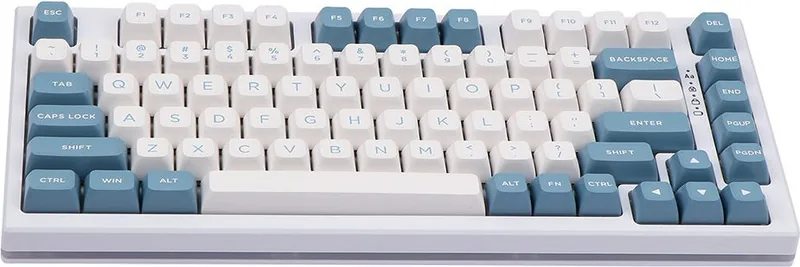
PBT, multi-color, white/blue
Legend Style
Double-Shot, multi-color, blue/white
Connectivity
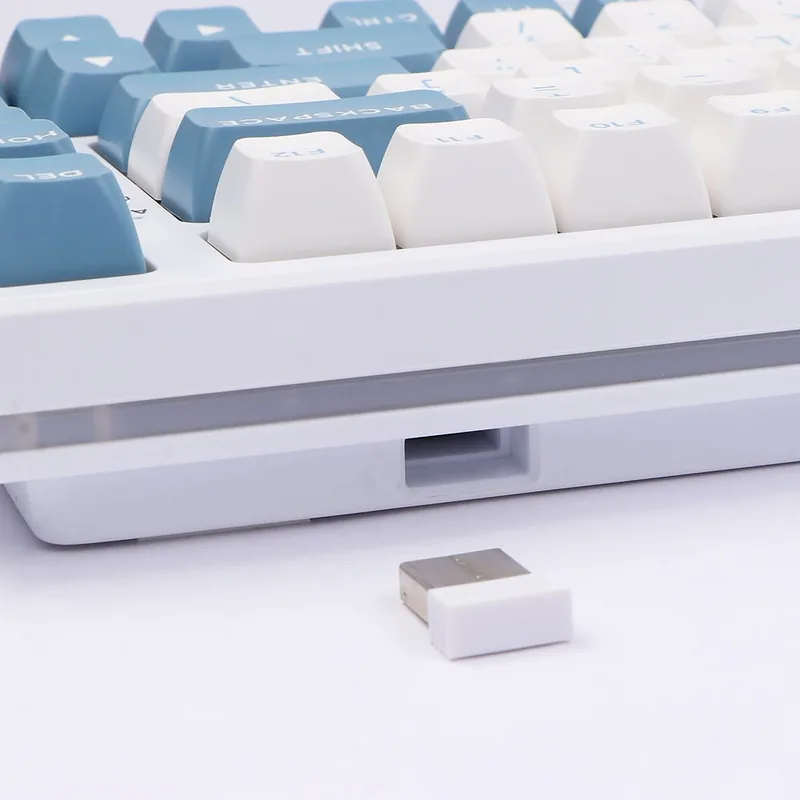
Wired (5.91 ft), USB-A 2.0; or Wireless (2.4GHz, USB-A 2.0 (USB-A 2.0 Receiver)); or Wireless (Bluetooth 5.0), Detachable Cable (USB-C Jack)
Power Source
Battery (built-in, 10000mAh)
Dimensions (WxHxD)
13.00 x 1.26 x 5.43 in
Weight
2.56 lbs
Features
Anti-Ghosting (N-Key Rollover), Bluetooth connections switchable per key (3 devices), Switches swappable (Hot-Swap), FN Key, Sound dampened (Foam)
Switch Manufacturer
Epomaker
Switch Model
Budgerigar
Switch Type
Tactile
Tactile Feedback
None
Damping
None
Actuation Force
0.12 lbs (±0.01 lbs Tolerance) ~ 0.12 lbs (±0.01 lbs Tolerance)
Key Travel
0.15 in
Operating Force
0.13 lbs ~ 0.13 lbs
Pre-travel Distance
0.08 in (±0.02 in Tolerance)
Initial Force
0.12 lbs ~ 0.12 lbs
Switch Lifespan
100 Million
Product Description
Discover the Epomaker EP75 White/Blue ESA Profile
The Epomaker EP75 White/Blue ESA Profile is a top customizable mechanical keyboard. This device features RGB LEDs illuminating your workspace with endless colors. Enthusiasts value the hot-swap capability because it simplifies switch customization without tools. Connectivity is versatile with USB/Bluetooth integration and 2.4GHz wireless modes for stability. The design includes the unique Epomaker Budgerigar theme specifically for bird lovers. A spacious 75 percent layout retains essential keys while saving desk space. Battery life is exceptional with a built-in 10000 mAh cell supporting days of use. Systems supported include Windows, Mac, and Linux without complex driver conflicts.
Users can program functions using the provided manual. Shortcut keys control backlight brightness levels and mode switching effortlessly. Side glow effects enhance visibility during dark gaming sessions or late-night coding. The US layout remains standard for English speakers ensuring immediate usability. Build quality feels solid weighing 1160 grams and measures precisely 330 x 138 x 32mm. Cleaning requires gentle handling of keys to avoid switch damage. Warranty covers manufacturing defects for one year strictly if bought from official stores.
Connectivity and Support
The keyboard offers a blend of style and function perfect for gamers and writers. RGB customization allows personal expression through lighting patterns. Hot-swap sockets ensure switches can be changed quickly for different tactile experiences. Wireless range is sufficient for typical office environments allowing freedom of movement. Charging is simple via the USB-C port included with every unit. Battery indicators show remaining power levels clearly to prevent unexpected shutdowns. Sleep modes automatically save energy during idle periods to prolong battery duration.
Overall this product stands out in the mechanical keyboard market segment. Its mix of features justifies its massive popularity among users seeking versatility for daily tasks. RGB LEDs provide visual feedback and strong aesthetic appeal for setups. Experience premium typing with this mechanical keyboard. It is a great choice for any tech lover. Hot-swap technology ensures long-term usability and extensive customization options available. USB/Bluetooth flexibility aids multitasking across multiple devices seamlessly. The US layout remains standard for English speakers globally.
Community and Warranty
Join the active community forums to learn alongside other keyboard enthusiasts. Support emails are available quickly for technical issues regarding installation. If switches need replacement follow instructions carefully to align pins correctly on the plate. Never apply excessive force when removing or installing keys to prevent damage. Check the official website for in-depth software customization guides. Contact customer service with your purchase order number for efficient assistance. This ensures you receive proper help regarding any factory defects or inquiries.
Search for 67,732 Manuals online


Type-in Brand or Model