
Energizer Energy 500 Manual
PDF manual · 227 Pages
English



Quick check
Incorrect answer, please try again.
Chat with your Energizer Energy 500 manual using AI
Get instant AI answers from your Energizer Energy 500 manual
Ask anything about the Energizer Energy 500. Answers come from this manual, with the pages they are based on.
Energy 500 Maintenance Schedule
Look at the adapter regularly, specifically at the plug and cable layer to detect any damages. Do not use if damaged.
Use a clean and soft rag to clean the device. Do not use chemical products or detergents.
Ask a Question
Do you recommend Energy 500?
Yes NoDo you recommend Energy 500?
Yes NoFrequently Asked Questions
Yes, the device meets the IP-68 standard, making it resistant to water, dust, and drops. However, prolonged immersion or abuse can damage these seals.
Is this answer helpful?
Absolutely. The phone features two SIM card slots, allowing you to insert and switch between two different SIM cards easily.
Is this answer helpful?
Resetting the battery cover or opening and closing the USB door usually restores the speaker function if it was muted by atmospheric pressure.
Is this answer helpful?
It is best to charge the phone in an environment with a temperature ranging from 5°C to 25°C to ensure safety and battery health.
Is this answer helpful?
No, formatting the memory card on a PC may cause incompatibility. You should format the card directly on the phone.
Is this answer helpful?
The phone supports Wi-Fi connectivity for internet browsing and data transfer, but specific VoIP settings depend on your carrier configuration.
Is this answer helpful?
Advantages and Disadvantages
Advantages

- IP-68 rated for water, dust, and drop resistance ensuring high durability
- Dual SIM capability allows managing two phone numbers simultaneously
- Built-in FM radio provides entertainment without using data
- Clear and informative user manual available for quick setup
- Compliant with international safety standards for radio wave exposure
Disadvantages

- Waterproofing may degrade if subjected to intentional abuse or repeated impacts
- Speaker functionality can be temporarily affected by atmospheric pressure changes
- Microphone performance may be reduced after submersion in water
- Must use only the specific manufacturer-approved charger to maintain warranty
- Not suitable for emergency communications where other networks fail
Product Specification
Operating System
Android 4.4 (factory)
Display
5.0", 1280x720 pixels, 16 million colors, IPS, capacitive touchscreen, flat, 294ppi
Rear Camera
13.1MP, Contrast-AF, LED flash
Front Camera
5.0MP
Interfaces
USB Micro-B 2.0, 3.5mm jack, Wi-Fi 4 (WLAN 802.11b/g/n), Bluetooth 4.0, NFC
Sensors
Accelerometer, Gyroscope, Proximity sensor, Light sensor, Compass, Barometer
SoC
Mediatek MT6582
CPU
4x 1.30GHz Cortex-A7
GPU
Mali-400 MP2
RAM
1GB
Storage
8GB, microSD slot (dedicated, up to 64GB)
Navigation
A-GPS
Modem
GSM (0.2Mbps/0.1Mbps), UMTS (21Mbps/5.76Mbps)
Frequency Bands
2G (850/900/1800/1900), 3G (B1/B8)
Battery
3000mAh, removable
Form Factor
Bar
Case Material
Plastic (back), Plastic (frame)
Features
Dual-SIM, FM radio, IP68 certified
Color
Black
Dimensions
6.00x3.17x0.74 inches
Weight
9.67 oz
Screen-to-Body Ratio
56.1%
Product Description
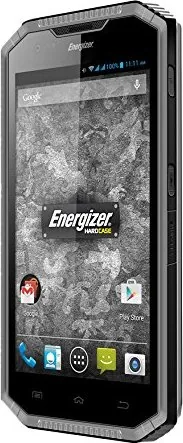
Energizer Energy 500 schwarz: A Rugged Companion for Everyday Life
The Energizer Energy 500 schwarz stands out as a robust mobile device designed for users who demand durability and reliability. Its sleek black finish offers a professional look while housing a chassis built to withstand the rigors of daily use. This manual highlights the phone's core strengths, including its IP-68 rating, which ensures protection against dust, water immersion, and drops. Whether you are navigating construction sites, hiking trails, or simply commuting through busy city streets, this device is engineered to keep up with your active lifestyle without compromising on essential features.
At the heart of the Energizer Energy 500 schwarz is a user-friendly interface that simplifies complex tasks. The device supports dual SIM functionality, allowing you to manage two separate numbers seamlessly. With a dedicated FM radio feature powered by headphones and a versatile camera system, entertainment and communication are always within reach. The battery life is optimized to last through long days, and the included travel adapter ensures you can recharge quickly wherever you go. Safety is paramount, with clear guidelines provided for handling the device near medical equipment like pacemakers and in sensitive environments such as hospitals or fuel stations.
Setup is straightforward, guiding you through installing the SIM card, battery, and optional memory card. The intuitive menu structure makes accessing contacts, messages, and applications effortless. For connectivity, the phone supports Wi-Fi and Bluetooth, enabling easy file sharing and internet access. The screen displays clear icons for signal strength, battery levels, and network status, keeping you informed at all times. While it adheres to strict international safety standards regarding radio wave exposure (SAR), it remains a powerful tool for staying connected.
Important Usage Notes
- Always use the certified charger provided to prevent damage to the battery.
- Keep the device away from extreme temperatures between -10°C and 55°C.
- Do not disassemble the phone yourself as it may void the warranty and compromise water resistance.
- Remove the battery cover or reset the USB door if the speaker mutes due to pressure changes.
- Dispose of old batteries according to local recycling regulations to protect the environment.
Search for 67,732 Manuals online


Type-in Brand or Model