
EM2GO Pro Power Manual
PDF manual · 64 Pages
English


Quick check
Incorrect answer, please try again.
Chat with your EM2GO Pro Power manual using AI
Get instant AI answers from your EM2GO Pro Power manual
Ask anything about the EM2GO Pro Power. Answers come from this manual, with the pages they are based on.
Pro Power Maintenance Schedule
Perform a routine safety inspection of the charging station at least once a week to ensure proper operation and safety.
Verify that the equipment is well grounded and safely mounted. Check for loose terminal points or abnormal connections.
Check for potential safety risks around the station such as high temperatures, corrosion, or flammable/explosive materials nearby.
Clean the housing using only a clean, damp soft cotton or microfiber cloth. Do not use dry cloths or harsh liquids to avoid scratches.
Keep the charging connector clean and dry. Wipe it with a clean, dry cloth if it becomes soiled.
MID meters must be regularly re-calibrated by a state-approved inspection body. In Germany, this is required 8 years after placing on market.
Ask a Question
Do you recommend Pro Power?
Yes NoFrequently Asked Questions
Professional installation is required. Mount the holder on a non-combustible surface above 120cm. Connect supply cables ensuring correct wiring. Secure all connections to prevent damage. Ensure power is off before working.
Is this answer helpful?
Yes, up to five stations can connect via RS485 for local load management. This shares available grid power to prevent overloading the main supply effectively.
Is this answer helpful?
It supports OCPP 1.6-J, ModBus TCP, and local load management via RS485. Ethernet, WiFi, and optional 4G are available for remote monitoring and backend integration.
Is this answer helpful?
Yes, it has IP54 protection. It withstands dust and water jets but should not be used in heavy rain or lightning to ensure safety.
Is this answer helpful?
The device protects itself automatically. The LED stripe flashes red patterns indicating error codes like overvoltage or communication failure for troubleshooting.
Is this answer helpful?
The warranty period is two years. It expires if instructions are not followed, proof of purchase is missing, or damage results from unauthorized modification or force majeure.
Is this answer helpful?
Park and switch off the vehicle. Connect the Type-2 plug to the vehicle port. Swipe an RFID card to start charging. Remove the plug and store it securely when finished.
Is this answer helpful?
Advantages and Disadvantages
Advantages

- Supports OCPP 1.6-J for seamless backend integration
- Built-in local load management shares power across units
- Integrated RFID reader for offline and online authentication
- 4.3-inch LCD display for real-time charging data
- Optional MID meter ensures billing accuracy
Disadvantages

- Requires professional installation due to high voltage risks
- 22kW operation may need notification to electricity provider
- MID meter needs recalibration every eight years
- Web interface initially only via WiFi hotspot
- Cable version is heavier than socket version
Product Specification
Number of Charging Points
1
Charging Mode
IEC 61851-1 (Mode 3)
Number of Phases
3-phase
Voltage
400V (AC)
Connection Type
Type 2
Mounting
Wall Mounting
Authorization
App, RFID
Color
black
Dimensions
10.63x17.13x5.51 in (WxHxD)
Product Description
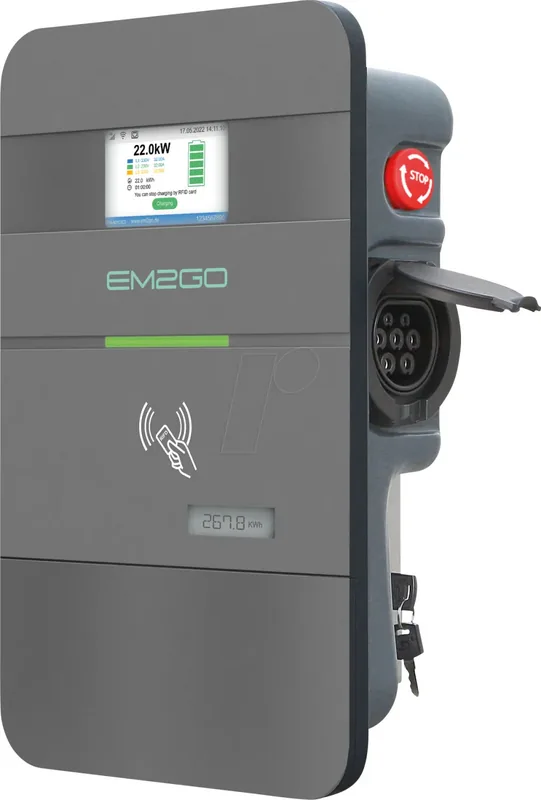
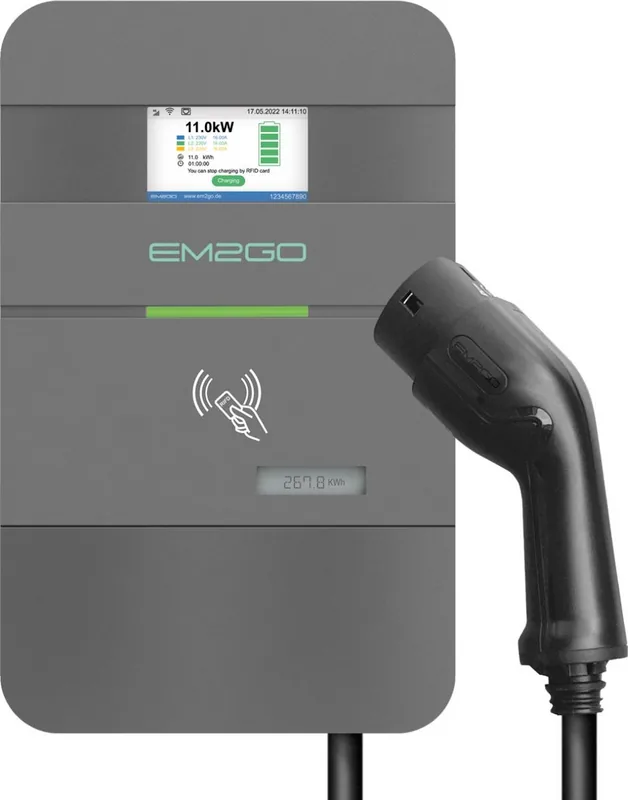
Welcome to the world of efficient electric mobility with the EM2GO AC Wallbox Pro Power. This charging station is engineered for durability and high performance, catering to both private homeowners and business fleet managers. The detailed EM2GO AC Wallbox Pro Power Manual serves as an essential companion, guiding users through every step of the lifecycle. From initial unpacking to final configuration, precision is key for optimal operation and safety.
Comprehensive Connectivity
Modern energy management requires smart connections. This unit supports OCPP 1.6-J, allowing integration with central management systems for monitoring and billing. WiFi and Ethernet ports facilitate network access, while the optional 4G module ensures operation even without local internet connectivity. ModBus TCP is also supported for advanced industrial applications. Users can control load balancing locally to distribute power across multiple units seamlessly without exceeding supply capacity or causing grid instability.
Intelligent Safety Mechanisms
Electrical safety cannot be compromised in any scenario. The device features an all-current sensitive residual current monitoring unit that protects against AC and DC leakage currents. Overvoltage, undervoltage, and overcurrent protections are built into the smart electronics. An emergency stop button provides an immediate cutoff in hazardous situations. The housing is rated IP54, safeguarding internal components from environmental hazards like dust and rain. It also prevents damage from stray currents during charging events.
User Experience and Display
Interaction is intuitive via the 4.3-inch color LCD screen. Real-time data such as charging current, voltage, and total energy consumption is visible instantly on the display. The LED stripe offers status indication at a glance, changing colors for standby, charging, or error states. RFID authentication supports both offline cards for access control and online cards for backend verification. A robust lock mechanism protects the unit from unauthorized removal or theft.
Installation and Maintenance Guidelines
Professional installation is mandatory due to the high voltage nature of the equipment. The wall mount must be secure and placed above 120cm from the floor for safety standards. Cable dimensions must match the rated current to prevent overheating during use. Regular inspections are recommended to check for wear or physical damage. Cleaning should be done with a damp cloth to avoid scratching the glossy front panel. Note that the MID meter requires recalibration every eight years for legal compliance in Germany.
Troubleshooting and Support
If issues arise, the LED stripe flashes error codes to help diagnose the problem effectively. Common issues include communication timeouts or grounding faults. Check cable connections and ensure the vehicle is properly connected before starting. Restarting the unit may resolve temporary glitches automatically. For persistent problems, contact the support team via the website for assistance. Warranty remains valid for two years if guidelines are strictly followed by the owner.
Power Specifications
The system handles up to 32 Amperes, delivering 22kW on three-phase power for fast charging. One-phase configurations offer 7.4kW, suitable for smaller setups or limited capacity circuits. Warranty coverage lasts two years provided instructions are followed diligently. The product complies with standard EN IEC 61851-1 for charging modes globally. Environmentally conscious users will appreciate the recycling instructions included in the documentation for end-of-life disposal. Make the switch to smart charging today.
Search for 67,706 Manuals online


Type-in Brand or Model