
Eltra Kinga 2 Manual
PDF manual · 12 Pages
English



Quick check
Incorrect answer, please try again.
Chat with your Eltra Kinga 2 manual using AI
Get instant AI answers from your Eltra Kinga 2 manual
Ask anything about the Eltra Kinga 2. Answers come from this manual, with the pages they are based on.
Kinga 2 Maintenance Schedule
Regularly inspect the appliance and power cord for any signs of damage. Do not use if damaged.
Wipe with a soft dry cloth. If very dirty, unplug and use a damp cloth with mild detergent. Allow to dry thoroughly before reuse.
Ask a Question
Do you recommend Kinga 2?
Yes NoFrequently Asked Questions
Press the alarm set button at the same time as the hour or minute set buttons until the required time is shown. Turn the alarm on using the alarm on/off button.
Is this answer helpful?
You must use four size C alkaline batteries with a voltage of 1.5 volts each. The Eltra Kinga 2 Manual specifies these must be inserted following the correct polarity signs.
Is this answer helpful?
Yes, a 3.5mm headphone jack is provided. Connect the headphones to lower the listening volume. When connected, the built-in speakers will turn off automatically.
Is this answer helpful?
Wipe with a dry cloth. If dirty, use a damp cloth with mild soap. Always unplug the mains power before cleaning to avoid electrical shock risks.
Is this answer helpful?
No. The instructions state the appliance is designed exclusively for private use and specific designated purposes only. Commercial use is not recommended.
Is this answer helpful?
If wet, unplug the mains power immediately. Do not use the device until it is completely dry. Do not immerse it in water under any circumstance.
Is this answer helpful?
Take them to a local household waste recycling facility. Do not throw them in fire or regular trash as they may explode or damage the environment.
Is this answer helpful?
Advantages and Disadvantages
Advantages

- Clear LCD display for easy reading of time and frequency.
- Dual power options using AC adapter or four size C batteries.
- Headphone jack allows for silent listening without disturbing others.
- Integrated FM and AM radio bands for diverse music and news.
- Built-in buzzer alarm function with icon confirmation on screen.
Disadvantages

- Battery size C is larger than standard AA and less common type.
- No rechargeable battery option supported in the standard design.
- Requires manual tuning which can be less convenient than presets.
- Plastic casing may scratch easily if handled roughly during cleaning.
- No backup power memory for time setting after main power cut.
Product Specification
Power
0.5W Peak
Tuner
FM, Long Wave
Display
LCD
Audio Connectors
Headphones (3.5mm Jack)
Power Supply
C Battery, AC Power
Features
Telescopic Antenna
Dimensions
8.46x4.96x2.20in (WxHxD)
Weight
1.32lb
Product Description
Welcome to Your New Eltra Kinga 2
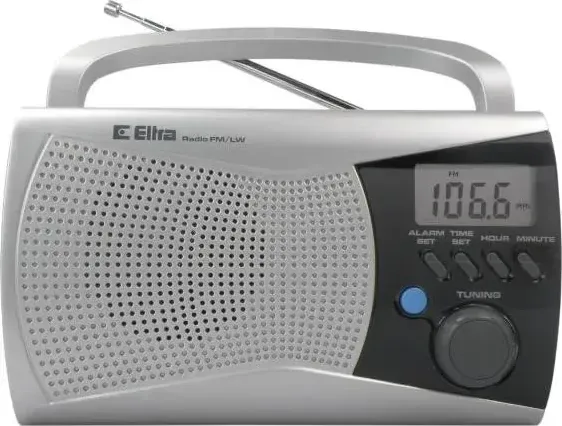
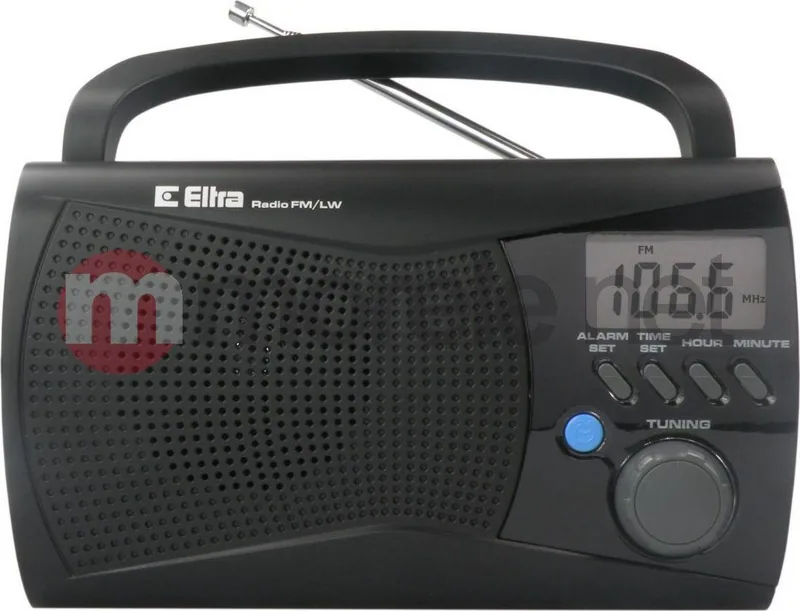
The Eltra Kinga 2 represents reliability in home audio equipment. This compact device functions as a robust alarm clock and a capable radio tuner built specifically for private household use. It is designed to provide essential timekeeping and audio entertainment without complexity. When you consult the official Eltra Kinga 2 Manual, you gain access to comprehensive safety guidelines and detailed operation tips required for optimal performance. The manual highlights that this appliance is not intended for commercial use. It prioritizes user safety and longevity above all else.
Key Features and Setup
The front panel features a clear LCD display. This screen shows the current time and radio frequency settings prominently for easy reading. You can switch between AM and FM wavebands using the dedicated selector switch located on the unit. The tuning is handled by a manual knob for precise frequency selection. An external telescopic antenna improves FM reception significantly. The AM antenna is built-in for convenience. Sound quality is handled by the integrated speaker system which provides clear audio. You can also connect headphones using the 3.5mm headphone jack. This allows for silent listening without disturbing others in the room. When headphones are plugged in, the main speakers automatically mute to prevent duplicate sound output.
Power and Battery Management
Powering the Eltra Kinga 2 offers dual options for your convenience. You may use the AC power cord plugged into a standard wall socket for continuous operation. Alternatively, the unit runs on four size C alkaline batteries for portability. This feature is crucial for use during power outages. Always insert batteries following the polarity signs inside the compartment. Replace all batteries at once if they run out. Never mix old and new batteries as this reduces efficiency. The Eltra Kinga 2 Manual stresses that non-rechargeable batteries must not be charged in this device.
Alarm Configuration
The alarm function allows you to set specific wake-up times accurately. Press the time set button along with the alarm set button to initiate setup. Use the hour or minute selector keys to adjust the desired time. Toggle the alarm on or off using the designated switch button. A buzzer icon will appear on the LCD display when active. The alarm tone activates automatically at the set time. You can silence it by pressing the button once to stop the noise.
Safety and Maintenance
Keep the unit away from heat sources and direct sunlight to prevent damage. Do not place flammable objects like candles on top of the device. Ensure ventilation gaps are not blocked by curtains or papers to maintain airflow. If the unit gets wet, unplug it immediately. Do not attempt to repair the unit yourself under any circumstances. Contact authorized service for technical faults. Clean the casing with a dry cloth regularly. For heavy dirt, use a damp cloth with mild soap. Always unplug the mains power before cleaning to avoid electrical shock risks. Additionally, the Eltra Kinga 2 Manual notes that children should not play with the appliance. Follow these steps carefully to ensure safe operation and long product life.
Search for 67,732 Manuals online


Type-in Brand or Model