
Elsner Remo KNX RF Manual
PDF manual · 38 Pages
English



Quick check
Incorrect answer, please try again.
Chat with your Elsner Remo KNX RF manual using AI
Get instant AI answers from your Elsner Remo KNX RF manual
Ask anything about the Elsner Remo KNX RF. Answers come from this manual, with the pages they are based on.
Ask a Question
Do you recommend Remo KNX RF?
Yes NoFrequently Asked Questions
Connect the included USB cable to a standard charger and plug it into the Micro-B port on the remote. This activates the transport block and charges the integrated battery.
Is this answer helpful?
Yes, you can rename channels directly on the device or configure them in the ETS software. Changes made on the device override the ETS settings if configured correctly.
Is this answer helpful?
Absolutely. The remote can control RGB and RGBW lights using sliders to adjust individual color values and brightness levels seamlessly.
Is this answer helpful?
If the menu is blocked, you cannot access settings. You must unlock it via the ETS application or by sending a specific communication object over the KNX bus.
Is this answer helpful?
No, the lithium battery is integrated into the device and cannot be replaced. When the battery fails, the entire unit must be disposed of and replaced according to regulations.
Is this answer helpful?
Yes, the remote supports window control functions, allowing you to open or close windows and adjust their position via the touch interface.
Is this answer helpful?
Advantages and Disadvantages
Advantages

- Intuitive color touchscreen display with high resolution
- Supports up to 32 wireless channels for comprehensive control
- Real-time feedback shows exact status of devices like blinds and lights
- Rechargeable battery eliminates the need for constant replacements
- Highly customizable labels and channel order directly on the device
Disadvantages

- Not suitable for safety-critical applications such as emergency stops
- Radio range can be limited by thick concrete walls or metal structures
- Battery cannot be removed or replaced by the user
- Requires ETS software configuration for initial setup
- Device must be kept dry to prevent electronic damage
Product Specification
Type
Remote control
Standard
Radio bus (868MHz)
Function
Control
Dimensions
2.52x4.8x0.43in
Features
IP40, Display
Product Description
Elevate Your Smart Home with the Elsner Remo KNX RF Remote Control
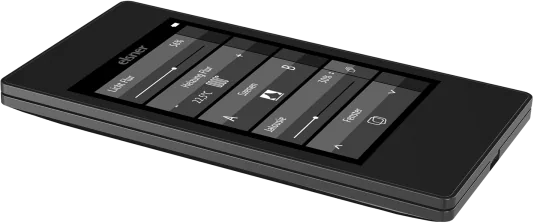
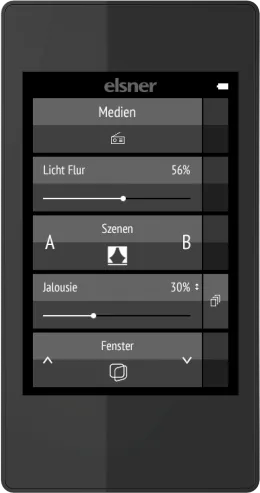
The Elsner Remo KNX RF Remote Control stands as a pinnacle of modern home automation, offering a seamless bridge between your physical environment and digital control. Designed for the sophisticated KNX ecosystem, this device transforms how you interact with your living space. With its sleek black housing and vibrant capacitive color touchscreen, it provides an intuitive interface that feels as premium as the technology it commands.
At the heart of this remote is the ability to manage up to 32 distinct channels wirelessly using the robust KNX RF S standard. Whether you are adjusting the height of motorized blinds, dimming lights to the perfect ambiance, or controlling complex RGBW lighting systems, the Remo handles it all with precision. The display dynamically adapts to show real-time feedback, allowing you to see exactly where your shutters are positioned or what temperature your heating system is set to before you even touch the wall switch.
Customization is effortless. You can rename every channel directly on the device or via the ETS software, ensuring that buttons like "Living Room Lights" or "Garden Gate" appear exactly as you expect. The interface supports various control modes, including sliders for smooth adjustments and buttons for quick actions. Even media playback can be managed through a dedicated page, letting you skip tracks or adjust volume without reaching for a phone.
Powering this intelligent hub is a built-in rechargeable lithium battery, charged conveniently via a USB micro-B connector. A smart low-battery warning ensures you never lose control unexpectedly. The device automatically wakes when moved and sleeps to save energy, making it always ready for use. It is important to note that while powerful, this unit is designed for comfort and convenience, not for safety-critical applications like emergency stops.
Key Features Overview
- Intuitive Touch Interface: High-resolution TFT screen responds instantly to taps and swipes.
- Versatile Control: Handles switching, dimming, shutter movement, and scene activation.
- Smart Feedback: Receive real-time status updates from the bus system for complete awareness.
- Wireless Freedom: Operates reliably over long distances without the clutter of wires.
Important Usage Notes
Ensure that no moisture comes into contact with the device, as water damage is harmful to the internal electronics. Avoid leaving the remote in direct rain or freezing conditions. For optimal performance, maintain a clear line of sight or avoid thick concrete walls that might block the radio signal between the remote and the receiver.
Search for 67,732 Manuals online


Type-in Brand or Model