
Elsner Cala KNX T 201 Sunblind Manual
PDF manual · 42 Pages
English



Quick check
Incorrect answer, please try again.
Chat with your Elsner Cala KNX T 201 Sunblind manual using AI
Get instant AI answers from your Elsner Cala KNX T 201 Sunblind manual
Ask anything about the Elsner Cala KNX T 201 Sunblind. Answers come from this manual, with the pages they are based on.
Ask a Question
Do you recommend Cala KNX T 201 Sunblind?
Yes NoFrequently Asked Questions
The Cala KNX T 201 features one operating zone for controlling sunshades, suitable for single blind or shutter systems. In contrast, the Cala KNX T 202 includes two independent operating zones, allowing simultaneous control of two separate shading channels.
Is this answer helpful?
Yes, the device can calculate a mixed value by combining its own internal sensor reading with an external temperature value received via the bus. You can configure the percentage contribution of each source to determine the final total temperature.
Is this answer helpful?
No, the frame is not included in the scope of delivery. You must purchase a compatible frame separately that matches the switch series used in your building to complete the installation aesthetically.
Is this answer helpful?
Configuration is performed using the KNX software ETS version 5 or higher. You can download the product file from the Elsner Elektronik website or the ETS online catalogue. Detailed parameter settings are managed entirely within this software environment.
Is this answer helpful?
During a power failure, the device sends no messages. Upon restoration of power, it will re-initialize and send outputs according to the configured send behavior parameters, ensuring the system resumes normal operation based on stored settings.
Is this answer helpful?
Advantages and Disadvantages
Advantages

- Integrated PI controller for precise heating and cooling management
- Touch-sensitive glass surface offers elegant and intuitive operation
- Supports multiple shading types including blinds, awnings, and shutters
- Flexible LED configuration for ambient lighting and status display
- Advanced logic capabilities with AND/OR gates for complex automation
Disadvantages

- Requires professional installation and ETS software configuration
- Frame is not included in the scope of delivery
- Sensitive to interference from direct sunlight or air drafts
- Limited to dry interior rooms only due to IP 20 rating
- Initial setup may require technical knowledge of KNX protocols
Product Specification
Type
Hardware Control Unit
Standard
KNX
Function
Control, Temperature, Heating Control, Blind Control
Topology
Bus/Star
Dimensions
2.17x2.17x1.65 in
Features
IP20, Display
Product Description
Elevate Your Smart Home with the Elsner Cala KNX T 201
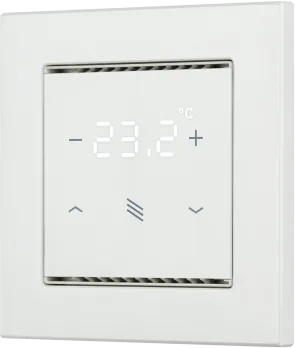
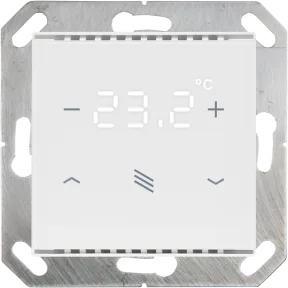
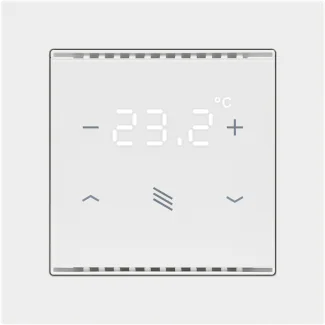
The Elsner Cala KNX T 201 Sunblind Room Temperature Controller with Button represents a seamless fusion of climate control and intelligent shading. Designed for modern building automation, this device serves as a central hub for managing both indoor comfort and solar protection within your KNX network. Its sleek glass surface features touch-sensitive areas that allow users to adjust room temperature settings and operate sunshades with intuitive precision.
At the heart of the Cala KNX T 201 lies a sophisticated PI controller capable of managing heating and cooling stages independently. This ensures that your environment remains at the perfect temperature regardless of external weather conditions. The integrated temperature sensor provides accurate readings, which can be combined with external data sources to create a mixed value for enhanced accuracy. Users can customize setpoints for various modes such as comfort, standby, eco, and building protection, allowing for energy-efficient operation tailored to daily routines.
Beyond temperature regulation, the device excels in controlling shading systems. Whether you are operating blinds, awnings, shutters, or windows, the two dedicated touch zones offer flexible control options. Short taps provide incremental adjustments, while long presses move the drive to its end position. The system supports multiple control modes including standard, dead man switch, and comfort mode, giving installers the flexibility to match specific user preferences.
The aesthetic appeal is equally impressive. With a genuine glass finish available in pure white or deep black, the unit fits seamlessly into any interior design scheme. Integrated LEDs provide visual feedback, configurable as ambient lighting or status indicators for temperature and drive functions. Configuration is straightforward using ETS software, enabling complex logic operations through AND and OR gates for advanced automation scenarios.
Important Notes
- Ensure installation by a qualified electrician to comply with safety regulations.
- Avoid placing the device near direct sunlight or drafts to maintain measurement accuracy.
- Regularly clean ventilation slits to prevent overheating and ensure proper function.
Search for 67,635 Manuals online


Type-in Brand or Model