
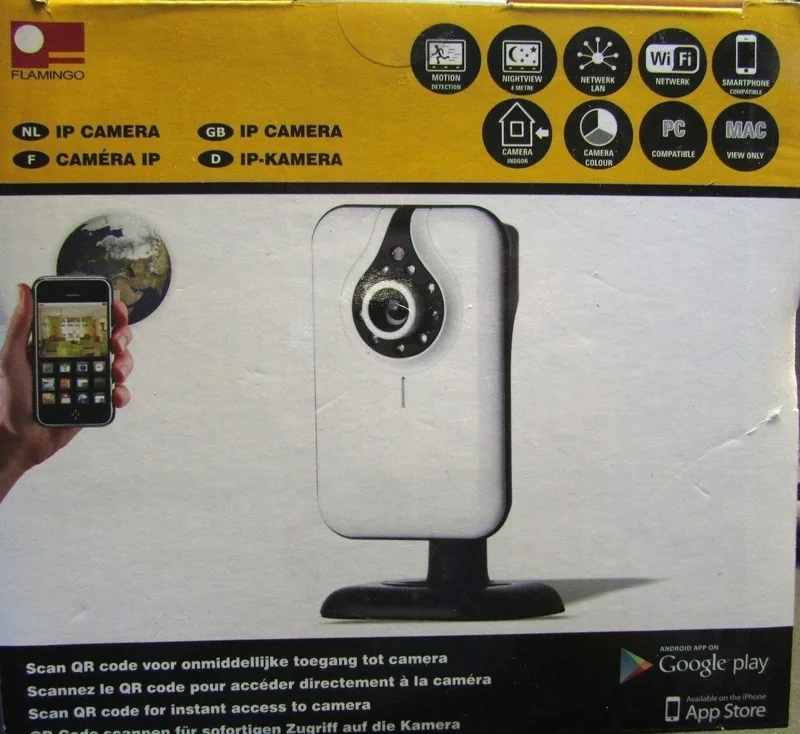
Elro FA703IP Manual
PDF manual · 176 Pages
English



Quick check
Incorrect answer, please try again.
Chat with your Elro FA703IP manual using AI
Get instant AI answers from your Elro FA703IP manual
Ask anything about the Elro FA703IP. Answers come from this manual, with the pages they are based on.
Ask a Question
Do you recommend FA703IP?
Yes NoFrequently Asked Questions
It is a home security camera for viewing live images locally or remotely through a network, internet connection, smartphone app, or PC software. It also supports audio, video, and motion detection.
Is this answer helpful?
Yes. You start with the included Ethernet cable during setup, then switch the camera to a wireless connection if your router supports it. The wired step is required before Wi-Fi can be activated.
Is this answer helpful?
The camera works with Flamingo Plug2View on iOS and p2pcamviewer on Android. These apps let you view the camera, manage settings, take snapshots, record video, and use listening or speaking functions.
Is this answer helpful?
Yes. The FA703IP can record sound, and the app also lets you listen to the camera audio or speak back through the camera speaker. This makes it more interactive than a simple video-only camera.
Is this answer helpful?
Do not install it outdoors, in wet places, in extreme heat or cold, or facing direct sunlight. It should also be kept away from moving branches and from interference sources such as microwaves and cordless phones.
Is this answer helpful?
The camera cannot view through glass at night. If you place it behind a window, night performance will be reduced, so it is better to mount it where the lens has a clear outdoor view without glass in front of it.
Is this answer helpful?
Advantages and Disadvantages
Advantages

- Supports both Ethernet and Wi‑Fi, giving you flexible installation options after setup.
- Works with Android, iOS, and PC software for convenient remote viewing and control.
- Includes motion detection plus audio/video recording for more complete home monitoring.
- Lets you listen, talk, snap photos, and record clips directly from the app interface.
- Comes with mounting accessories, power adapter, and Ethernet cable for quicker installation.
Disadvantages

- 640 x 480 resolution is basic compared with newer high-definition security cameras.
- Night viewing cannot see through glass, which limits placement near windows.
- Wireless setup still requires a wired Ethernet connection first, adding an extra step.
- Only supports older mobile and desktop systems, so compatibility is dated.
- Designed for indoor use only and should not be installed in wet or outdoor locations.
Product Specification
Image Sensor
1/4" CMOS
Resolution
640x480 pixels (25fps)
Lens
(F2.0)
Light Sensitivity
0.5 Lux (Color)
Pan
N/A
Tilt
N/A
Zoom Function
N/A
Compression/Codecs
MJPEG
Connections
1x RJ-45 100Mb LAN
Wireless
Wi-Fi 4 (WLAN 802.11b/g/n)
Illumination
IR Illumination (26.25 ft)
Protection Class
N/A
Control & Operation
Mobile App
Zone & Analysis Functions
Motion Detection
Manufacturer's Warranty
3 Years
Product Description
Elro FA703IP Manual: A Practical Look at a Compact Network Camera
The Elro FA703IP Manual presents the FA703IP as a straightforward network camera built for people who want simple remote monitoring without a complicated setup. It combines wired and wireless connectivity, so you can begin with an Ethernet connection and later move to Wi‑Fi once the camera is paired to your network. That flexibility makes it appealing for bedrooms, entryways, storage areas, or any indoor spot where you want a clear view and quick access from a phone or computer.
What stands out most is the camera’s mix of remote viewing and basic security features. Through the Flamingo Plug2View app on iOS or the p2pcamviewer app on Android, users can check live images, listen to sound, talk back through the camera speaker, take snapshots, and record video clips. Motion detection adds another layer of usefulness by helping you keep track of movement events, while the PC software provides a familiar desktop option for those who prefer managing devices from a computer.
The FA703IP is designed around practical everyday use rather than advanced surveillance. Its 1/4-inch color CMOS sensor offers VGA resolution, which is enough for simple monitoring and checking activity at a glance. The 60-degree viewing angle supports focused coverage, and the camera’s ball-joint mount helps you adjust positioning with ease. Setup accessories such as screws, plugs, Ethernet cable, power adapter, and software CD are included, so the main essentials are already in the box.
At the same time, the camera has clear limits that buyers should understand. It is meant for indoor use and should not be installed outdoors or in wet areas. It also cannot see through glass at night, and wireless performance may be affected by common 2.4 GHz interference sources like microwaves or cordless phones. For best results, the camera should be placed carefully, away from direct sunlight and moving branches that could trigger unnecessary alerts.
Overall, the Elro FA703IP Manual describes a budget-friendly home monitoring camera that focuses on usability, mobile access, and flexible installation. It is a good fit for users who want a simple, app-connected camera with audio and motion detection rather than a high-end smart security system.
Notes
- Best suited for indoor monitoring
- Ethernet setup is required before switching to Wi‑Fi
- Keep the camera away from glass at night
- Use original accessories for safe operation
Search for 67,732 Manuals online


Type-in Brand or Model