

element14 PiDesktop Manual
PDF manual · 22 Pages
English



Quick check
Incorrect answer, please try again.
Chat with your element14 PiDesktop manual using AI
Get instant AI answers from your element14 PiDesktop manual
Ask anything about the element14 PiDesktop. Answers come from this manual, with the pages they are based on.
Ask a Question
Do you recommend PiDesktop?
Yes NoFrequently Asked Questions
It converts a Raspberry Pi 2 or 3 into a desktop-style computer with a case, power control, RTC support, and optional SSD or USB storage expansion. It is aimed at users who want a neater and more capable Raspberry Pi setup.
Is this answer helpful?
No. The SSD is optional. You can run the PiDesktop with a micro SD card only, and later add SSD or USB storage if you want more capacity or a different boot method.
Is this answer helpful?
A stable 5V supply with at least 2A is required, and 5V at 2.5A is recommended for Raspberry Pi 3. Using an underpowered adapter can lead to instability or possible file system damage.
Is this answer helpful?
A short press turns the system on. Holding the button for around 2 seconds triggers shutdown, while a longer press of about 5 seconds forces power off. This helps support safer system handling.
Is this answer helpful?
No. The PiDesktop can sync time from the internet when available, but the onboard RTC keeps time locally when offline. The battery-backed clock helps maintain accurate time between power cycles.
Is this answer helpful?
Yes. The kit supports an optional Raspberry Pi camera installation. The camera must be connected carefully with the ribbon cable in the correct orientation, and the software camera support must be enabled.
Is this answer helpful?
Advantages and Disadvantages
Advantages

- Safe power control helps protect the Raspberry Pi and filesystem during shutdown.
- Integrated RTC keeps time even when the network is unavailable.
- Optional mSATA SSD support adds faster and larger storage possibilities.
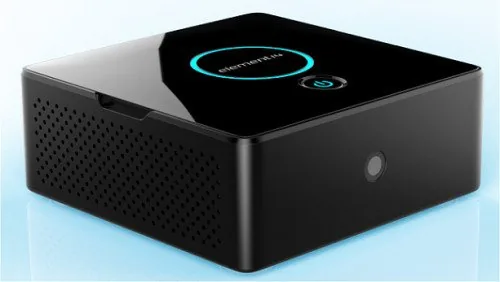
- Compact black enclosure and included heat sink create a cleaner desktop build.
Disadvantages

- Requires additional Raspberry Pi parts and accessories to operate.
- Software setup and storage configuration may feel technical for beginners.
- A reliable 5V power supply is essential; weak chargers can cause issues.
- SSD boot setups need careful device selection and can conflict with extra USB drives.
Product Specification
Platform
Raspberry Pi
Suitable for
Raspberry Pi 2 Model B/3 Model B, additionally: Raspberry Pi Camera, Raspberry Pi Breakout Board
Color
black
Material
Plastic
Dimensions (WxHxD)
4.25x1.70x4.25in
Power Supply
without, external
Cooling
Ventilation slots
Special features
Breakout Board (with mSATA slot and RTC)
Product Description
element14 PiDesktop Kit, Black
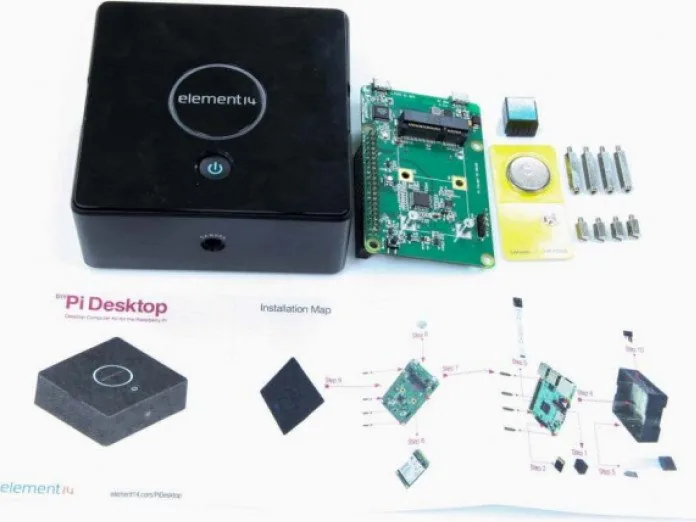
The element14 PiDesktop Kit, black is a clever way to turn a Raspberry Pi 2 or Raspberry Pi 3 into a compact desktop computer. Instead of feeling like a bare board on the workbench, the Pi sits inside a proper enclosure with an add-on board, heat sink, and a cleaner all-in-one desktop layout. It is designed for makers who want a more polished setup without losing the flexibility that makes Raspberry Pi so popular.
What makes this kit especially interesting is the mix of convenience and control. The integrated power management system helps the Pi start up and shut down safely, which is a major benefit when you are running a system from flash storage. The built-in real-time clock adds another layer of usefulness, especially for projects that do not stay online all the time. If the network is unavailable, the clock can still keep time thanks to the onboard battery backup.
The kit also supports optional storage expansion through an mSATA SSD or USB flash drive, making it a practical upgrade for users who want more speed and capacity than a micro SD card alone can offer. In the same spirit, the optional camera setup gives the PiDesktop more project potential, whether you are building a monitoring station, a lightweight media hub, or a small development machine.
The black enclosure gives the whole setup a neat, understated look, while the included parts make assembly straightforward for users who are comfortable with basic hardware installation. The PiDesktop manual walks through the required steps, from fitting the heat sink and mounting the board to installing the software package that enables power control, RTC support, and boot features for SSD or USB storage.
Why it stands out
The PiDesktop is more than a case. It is a functional platform that adds structure, safe shutdown behavior, and expanded storage options to a Raspberry Pi-based build. For users who want a reliable desk-friendly computer, it bridges the gap between a hobby board and a more complete workstation.
It is also a strong choice for educational labs, prototyping spaces, and personal projects where stable power handling matters. The combination of hardware and software support makes it easier to create a system that feels purposeful rather than improvised.
Notes
- Use a stable 5V power supply with at least 2A output.
- SSD booting is optional, not required.
- Keep other USB storage unplugged when booting from SSD.
- Install the software package to unlock the full feature set.
Search for 67,706 Manuals online


Type-in Brand or Model