
ELAC Element EA101EQ-G Manual
PDF manual · 60 Pages
English



Quick check
Incorrect answer, please try again.
Chat with your ELAC Element EA101EQ-G manual using AI
Get instant AI answers from your ELAC Element EA101EQ-G manual
Ask anything about the ELAC Element EA101EQ-G. Answers come from this manual, with the pages they are based on.
Element EA101EQ-G Maintenance Schedule
Clean only with a dry cloth. Do not use cleaning agents, alcohol, or gasoline.
Visit elac.com/firmware regularly to check for updates and install them via USB if available.
Ask a Question
Do you recommend Element EA101EQ-G?
Yes NoFrequently Asked Questions
It works well for a compact stereo or 2.1 setup where you want one amplifier to handle speakers, digital sources, Bluetooth streaming, and optional subwoofer support. It suits users who value flexibility and tuning control.
Is this answer helpful?
Yes. It includes a dedicated subwoofer output, and the app can help with AutoBlend and level adjustments. That makes it easier to match the subwoofer with the main speakers for a smoother low-end response.
Is this answer helpful?
Yes. The amplifier supports Bluetooth audio streaming from compatible phones and tablets. You can also use the remote for basic transport controls on supported devices, such as play, pause, and track skipping.
Is this answer helpful?
It offers stereo analog line inputs, optical inputs, coaxial digital input, USB input, and Bluetooth. This makes it suitable for TVs, CD players, computers, music servers, and mobile devices.
Is this answer helpful?
Yes. The app lets you rename inputs so the labels match your actual devices, such as TV, Blu-ray, Computer, or Server. This makes daily source selection faster and less confusing.
Is this answer helpful?
A factory reset can be done with the recessed reset switch. In general, the unit can also recover from a short by powering down, disconnecting briefly, and reconnecting after a few seconds.
Is this answer helpful?
Yes. The front panel includes a headphone jack. When headphones are connected, the speaker output is muted automatically, which makes private listening simple and convenient.
Is this answer helpful?
Advantages and Disadvantages
Advantages

- Wide input selection covers analog, digital, USB, and Bluetooth sources.
- DSP tools help tune bass, sub integration, and overall room response.
- App control adds source renaming, balance, tone, and level matching.
- Headphone output and sub out make it adaptable for different setups.
Disadvantages

- Advanced features depend on using the app, which adds setup time.
- Optical performance can vary with cable quality and source hardware.
- The front panel is functional, but deep tuning is easier from a phone or tablet.
Product Specification
Channels
2
Power per channel
40W (8Ω), 80W (4Ω), 70W (2Ω)
Audio connectors
Digital Audio In (coaxial), 2x Digital Audio In (optical), 2x Stereo Line In (RCA), Sub Out (RCA), Headphones (0.25in jack)
Other connectors
USB-B
Wireless
Bluetooth, aptX
D/A converter
24bit/192kHz
Power consumption
5.5W mute, 0.9W Standby
Color
grey
Dimensions
8.39x2.13x11.61in (WxHxD)
Weight
5.00lb
Product Description
ELAC EA101EQ-G: Compact Power with Room-Tuning Smarts
The ELAC EA101EQ-G is an integrated amplifier built for listeners who want serious control without a complicated stack of gear. It combines 80 watts per channel of BASH amplification with DSP tools that help the system adapt to real rooms, real speakers, and real-world listening habits. If you are looking into the Elac Element EA101EQ-G Manual, the main takeaway is simple: this amp is designed to be both practical and surprisingly advanced.
What makes it stand out is its balance of power and flexibility. The EA101EQ-G offers multiple analog and digital inputs, including optical, coaxial, USB, Bluetooth, and stereo line inputs. That means it can handle everything from a CD player and music server to a TV or a tablet. It also includes a dedicated subwoofer output, so it can grow into a fuller two-channel or 2.1 setup without replacing the core amplifier.
The app-based control is where the amplifier becomes especially interesting. Through the ELAC app, users can rename sources, adjust bass and treble, fine-tune speaker balance, and match source levels so switching inputs feels smooth and consistent. The AutoEQ and AutoBlend features add a modern layer of convenience by helping integrate a subwoofer and reduce room-related problems. For many systems, that means cleaner bass and a more coherent soundstage with less guesswork.
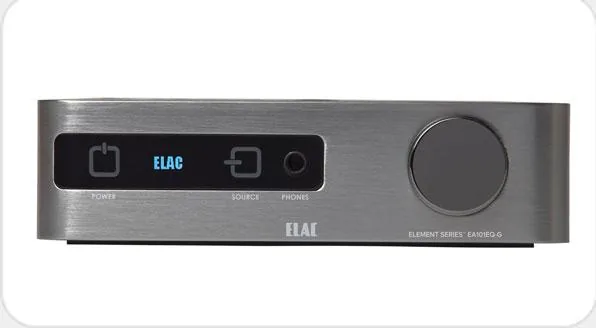
Daily use is straightforward as well. The front panel includes source selection, volume control, headphone output, and a clear display that shows status at a glance. An included remote adds basic control, while the learning function makes it possible to integrate the amp into a broader home setup. For listeners who value neat cables, responsive controls, and a compact footprint, the EA101EQ-G is a thoughtful fit.
Notes
- Best results come from careful speaker placement and proper subwoofer setup.
- Keep the amplifier ventilated and avoid blocking the vents.
- Firmware updates may add refinements over time.
In short, the EA101EQ-G is a smart choice for users who want a high-value amplifier that can do more than just play music. It blends classic stereo fundamentals with modern app control, making it a strong option for both simple systems and more ambitious listening rooms.
Search for 67,706 Manuals online


Type-in Brand or Model