
Eglo Pagino Manual
PDF manual · 1 Pages
English


Quick check
Incorrect answer, please try again.
Ask a Question
Do you recommend Pagino?
Yes NoFrequently Asked Questions
Use the dial labeled TIME to set the duration between 5 seconds and 3 minutes based on your preference.
Is this answer helpful?
Yes, provided you choose the appropriate model rated for outdoor use and ensure proper sealing against moisture.
Is this answer helpful?
The LUX setting determines the ambient light level required before the sensor activates the light, preventing daytime usage.
Is this answer helpful?
While simple wiring allows DIY installation, hiring a licensed electrician is recommended for safety and code compliance.
Is this answer helpful?
Yes, the sensor is designed to trigger immediately once motion is detected regardless of ambient light levels below the set threshold.
Is this answer helpful?
The detection range varies but typically covers a wide angle suitable for hallways and small patios depending on mounting height.
Is this answer helpful?
Advantages and Disadvantages
Advantages

- Automatic motion detection enhances safety and convenience
- Adjustable time delay ranges from 5 seconds to 3 minutes
- Lux sensor prevents activation during daylight hours
- Compact size fits well in tight spaces
- Energy-efficient LED technology reduces electricity costs
Disadvantages

- Sensor range may require careful positioning for full coverage
- Initial setup requires basic electrical knowledge
- Outdoor models may need additional weatherproofing accessories
- Fixed mounting limits flexible repositioning after install
- Battery backup not included for power outages
Product Specification
Type
Wall light
Old EEK built-in lamp
A++ (A++ to E)
Fixed LEDs
yes
Socket
no
Lamp
LED (fixed lamp), 13W, neutral white (5000K), 2300lm
Total power
13W
Total luminous flux
2300lm
Material
Plastic
Design
square
Features
integrated motion sensor
Protection class
IP44
Protection class
Class 2
Dimensions
10.24x7.09x6.30in (WxDxH)
Product Description
Discover the Eglo Pagino Sensor Wall Light
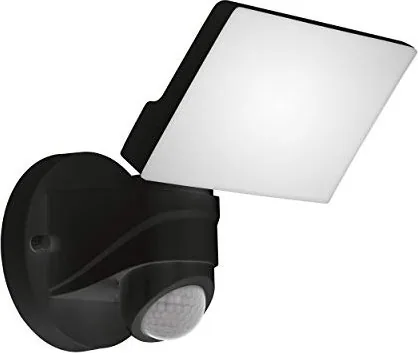
The Eglo Pagino Sensor Wall Light is a modern lighting solution designed to bring both style and functionality to your home. This sleek fixture features an integrated motion sensor that automatically illuminates pathways, staircases, or entryways when movement is detected, ensuring safety and convenience without the need for manual switches. Its minimalist design allows it to blend seamlessly into various interior decors, from contemporary hallways to outdoor porches.
Intelligent Lighting Control
One of the standout features of this light is its advanced sensor technology. The device includes adjustable settings for sensitivity and duration, allowing users to customize how long the light stays on after detecting motion. The time delay can be set anywhere between 5 seconds and 3 minutes, providing flexibility for different scenarios. Additionally, the lux setting lets you adjust the ambient light threshold, meaning the light will only activate in low-light conditions, preventing unnecessary energy use during the day.
Energy Efficiency and Durability
Constructed with high-quality materials, the Eglo Pagino Sensor Wall Light is built to last. It offers reliable performance in various weather conditions if installed outdoors, making it a versatile choice for both indoor and outdoor applications. The efficient LED technology ensures bright illumination while keeping energy consumption low, contributing to cost savings over time. The compact dimensions of 98mm by 177mm make it unobtrusive yet effective.
Installation and Usage
Installing this wall light is straightforward, thanks to its user-friendly design. The clear labeling of terminals and included documentation simplify the process for DIY enthusiasts. Once installed, the automatic operation provides peace of mind, ensuring your path is always lit when needed. Whether you are welcoming guests late at night or simply navigating your garden after dark, this light serves as a dependable companion.
Important Notes
- Ensure the area is well-ventilated during installation.
- Regularly check the sensor lens for dust accumulation to maintain optimal performance.
- Adjust the settings according to your specific environmental needs.
Search for 67,732 Manuals online


Type-in Brand or Model