
Eglo Connect G95 Manual
PDF manual · 2 Pages
English



Quick check
Incorrect answer, please try again.
Chat with your Eglo Connect G95 manual using AI
Get instant AI answers from your Eglo Connect G95 manual
Ask anything about the Eglo Connect G95. Answers come from this manual, with the pages they are based on.
Ask a Question
Do you recommend Connect G95?
Yes NoFrequently Asked Questions
You can download the SmartCONTROL app from the App Store or Google Play. Search for AwoX SmartCONTROL to begin the installation process on your device.
Is this answer helpful?
A long press for three seconds is used to add the bulb to the app or add a remote control into the application ecosystem effectively during setup.
Is this answer helpful?
Yes, the app allows you to adjust light brightness and intensity to suit your current needs and environment preferences easily.
Is this answer helpful?
Yes, it is a 13W LED bulb which saves significant energy compared to traditional lighting solutions and lowers power usage costs.
Is this answer helpful?
Use the color selection tool in the app to choose or pick intermediate colors to fit your mood and decor style precisely.
Is this answer helpful?
The mesh technology creates a stable connection path ensuring signal reliability throughout your entire home setup without weak spots.
Is this answer helpful?
While not explicitly stated, the AwoX app is compatible with various smart home ecosystems for voice integration through the controller.
Is this answer helpful?
Advantages and Disadvantages
Advantages

- Advanced RGBW color control allows unlimited color combinations for any mood.
- Compatible with AwoX SmartCONTROL app for easy management and automation.
- Energy efficient 13W consumption reduces electricity bills significantly over time.
- Mesh network ensures stable connection in larger homes without signal drop.
- Multiple click and long press functions add convenience and quick access.
Disadvantages

- Requires specific app download for full functionality and control options.
- Setup might challenge non-tech savvy users during the initial pairing phase.
- Range dependent on network strength without additional repeaters in house.
- Remote control must be put in specific smartphone mode to pair correctly.
- Some users may need internet connection for certain smart features to work.
Product Specification
Energy Efficiency Class
F (A to G)
Rated Power
13W
Energy Consumption
13kWh/1000h
Socket
E27
Rated Voltage
230V
Luminous Flux
1300lm
Luminous Efficacy (Lumens/Watt)
100
Energy Efficiency Index
0.14
Light Color
Warm White-Daylight White (2700-6500K), RGBW, Adjustable
Color Rendering
Ra 70
Shape
Globe
Finish
Matte
Outer Bulb
G95
Lifespan
25,000h
Switching Cycles
15,000
Start-up Time
Instant
Turn-on Time
< 0.5 s
Diameter
3.74 in
Length
5.35 in
Features
Dimmable, White Tone Control, RGB Color Control, Sleep Mode, Wake Up Mode, Night Mode, Timer, Programmable Lighting Settings
Smart Home
App Control (Bluetooth)
Note
For the full feature set, a manufacturer gateway may be required. It may also change via a firmware update. Please note the manufacturer-specific instructions!
Product Description
Transform Your Home Lighting Experience with Eglo Smart Bulb
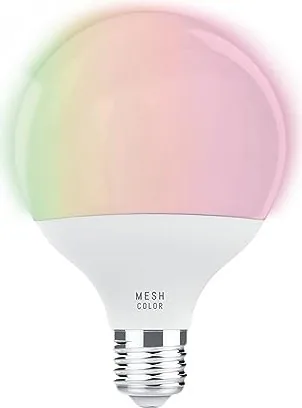
Integrating smart technology into your daily life has never been simpler or more rewarding for modern residents. The Eglo Connect LED Globe E27 13W/RGBW G95 represents a significant step forward in residential lighting solutions using advanced mesh technology. This intelligent bulb allows you to control ambiance with extreme precision, offering a vast spectrum of colors and shades of white light for every mood. By following the recommended Eglo Connect LED Globe E27 13W/RGBW G95 Manual guidelines, users can unlock the full potential of their new smart lighting system. It is designed to fit seamlessly into modern lifestyles where ease of use meets high performance and durability for years of reliable service.
One of the standout features of this device is its deep compatibility with the AwoX SmartCONTROL app ecosystem. This software acts as the ultimate command center for your lighting needs, allowing you to switch between various light effects and adjust brightness levels without leaving your favorite couch. The setup process is surprisingly intuitive for most users. You must download the application first, then enter the specific pairing mode on your remote or bulb interface. The system utilizes a wireless mesh network to maintain a strong connection throughout your house, minimizing signal loss significantly. If you encounter any issues during installation, remember that a long press of three seconds is often required to trigger the discovery mode within the network or add a remote control safely via the app settings.
Energy consumption remains a top priority for eco-conscious consumers everywhere. At only 13W, this bulb delivers efficient illumination that rivals much higher wattage traditional bulbs effectively. The RGBW technology ensures rich saturation for color modes while maintaining a crisp white output for tasks requiring intense focus. The bulb supports multiple clicks and long press actions, providing quick access to saved favorites or specific scenes stored in memory. This functionality reduces the need for repetitive navigation through menus and saves time. You can select intermediate colors easily to fine-tune your desired environment precisely without complex and confusing steps.
Important Setup Instructions for New Users. Always select the correct app controller type before beginning pairing to ensure full compatibility. Verify that your remote is in smartphone mode for optimal communication with the lamp throughout your installation process. Save frequently used settings as favorites for instant access later in your daily routine and schedule. Follow the onboard wizard prompts to ensure every step of the connection process is completed accurately without errors. Download the SmartCONTROL app from the App Store or relevant Android marketplace now to start your journey.
Home automation relies on reliability and speed above all else. With this product, you gain a robust tool for enhancing your living space significantly. The smart capabilities allow for scheduling and remote access, ensuring your home is never dark when you arrive from work. It is the perfect blend of style, functionality, and efficiency for the modern smart home enthusiast who demands the best from their lighting infrastructure and wants a user-friendly experience with their smart globe. Enjoy the convenience of controlling every aspect of your light from anywhere in the world.
Search for 67,732 Manuals online


Type-in Brand or Model