
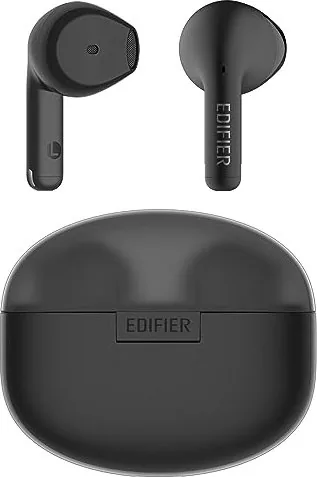


Edifier X2s Manual
PDF manual · 7 Pages
English



Quick check
Incorrect answer, please try again.
Chat with your Edifier X2s manual using AI
Get instant AI answers from your Edifier X2s manual
Ask anything about the Edifier X2s. Answers come from this manual, with the pages they are based on.
Ask a Question
Do you recommend X2s?
Yes NoFrequently Asked Questions
Remove the earbuds from the case. They will enter pairing mode with blinking lights. Open Bluetooth settings on your device and select EDIFIER X2s to connect successfully.
Is this answer helpful?
Hold the touch panel on either earbud for eight seconds until the blue LED blinks six times. This clears records and powers off the units.
Is this answer helpful?
Check the LED indicator on the earbud or case. A steady white light means charging is in progress. If the light turns off, the charge is fully complete.
Is this answer helpful?
Yes. Download the Edifier Connect App from your app store. It allows you to configure touch settings and other preferences beyond factory defaults.
Is this answer helpful?
Safety features shut them down if no Bluetooth connection is detected for ten minutes after powering on to conserve battery life effectively.
Is this answer helpful?
With power on and no Bluetooth connection, tap both touch panels five times slowly. This activates TWS pairing mode for synchronized audio.
Is this answer helpful?
Do not charge if liquids are inside the port. While durable, keeping ports dry prevents damage. Wipe sweat off before storing in the case.
Is this answer helpful?
Advantages and Disadvantages
Advantages

- Intuitive touch panel controls for easy playback management
- Automatic power on and off when removed or placed in case
- Type-C fast charging capability for quick energy replenishment
- TWS linking allows synchronization between left and right buds
- Edifier Connect App provides enhanced customization options
Disadvantages

- Sensitivity to moisture may require careful charging port maintenance
- Automatic power off occurs after 10 minutes of no connection
- Visual indicators rely on LED light patterns for status
Product Specification
Type
In-Ear Headphones (Earbuds)
Form Factor
True Wireless, Hook-Free
Microphone
Built-In
Wireless
Bluetooth 5.3
Controls
Touch Control
Battery Life
6.5h, 26h (with Charging Case)
Battery
USB-C Charging Port, Charging Case, 1.5h Charging Time
Frequency Response
20Hz-20kHz
Sensitivity
94dB
Driver Size
0.51 inches
Device Features
Water-resistant (IP54)
Software Features
EQ Presets, Custom EQ, App Control
Weight
0.13 oz (per earbud), 0.95 oz (Charging Case)
Product Description
Experience Seamless Sound with Edifier X2s
Elevate Your Audio Lifestyle
The Edifier X2s offers a compact yet powerful true wireless audio experience designed for modern listeners who demand portability without sacrificing quality. These headphones integrate intuitive touch controls that allow you to manage playback and calls effortlessly. When you remove them from the charging case, they power on automatically to connect to your device instantly. Placing them inside shuts down power to conserve battery.
Pairing these earbuds is remarkably straightforward for any user regardless of technical proficiency. Upon first extraction, the white and blue indicator lights blink alternately signaling discovery mode readiness. Select EDIFIER X2s within your Bluetooth settings to establish a secure and stable link quickly. For subsequent sessions, the units recall the last connected device ensuring instant audio flow every time. A dedicated reset function clears all pairing records by holding the touch panel for eight seconds until specific LED patterns confirm success. This feature resolves connectivity issues quickly without complex troubleshooting steps required elsewhere.
To synchronize the left and right earbuds manually, tap both touch panels five times slowly until the white LED blinks gently entering TWS pairing mode. Once linked, alternate blinding patterns indicate successful handshaking before searching for external devices. Battery management remains robust through intelligent visual indicators throughout daily usage cycles. A low battery tone prompts users to recharge the units immediately upon hearing the alert. During charging, a steady white light confirms active power flow whereas an off signal denotes a full charge completed. The case supports Type C fast charging capabilities providing ample juice for extended listening sessions away from home outlets.
Users are advised to keep charging ports completely dry to prevent liquid damage which could impair functionality permanently over time. Customization options exist via the Edifier Connect App enhancing personal control preferences beyond default settings available out of the box. The system includes safety mechanisms shutting down the earbuds after ten minutes of inactivity if no Bluetooth connection exists preventing accidental drain scenarios entirely. Whether working out intensely or commuting daily these versatile accessories deliver reliable performance backed by precise engineering standards expected from premium brands today. Reference materials like the Edifier X2s Manual offer deeper insights for maintenance. Enjoy immersive sound quality delivered consistently from start to finish each day now.
Final Thoughts
Investing in high quality wireless gear requires understanding its operation fully to maximize value. These tips ensure longevity and peak performance from your hardware components always. Always clean contacts regularly and store safely when not in use at all times to avoid issues.
Search for 67,706 Manuals online


Type-in Brand or Model