
Edifier X2 Manual
PDF manual · 29 Pages
English



Quick check
Incorrect answer, please try again.
Chat with your Edifier X2 manual using AI
Get instant AI answers from your Edifier X2 manual
Ask anything about the Edifier X2. Answers come from this manual, with the pages they are based on.
Ask a Question
Do you recommend X2?
Yes NoFrequently Asked Questions
Take the earbuds out of the case; red and blue LEDs will blink rapidly. Open your device’s Bluetooth settings and select "EDIFIER X2." After the initial pairing, the earbuds should auto-reconnect to the last paired device.
Is this answer helpful?
With earbuds out of the case and disconnected from any Bluetooth devices, press and hold the touch panel on either earbud for about 8 seconds until the blue LED blinks rapidly. This resets and turns the earbuds off; place them back in the case and take them out again, then reselect "EDIFIER X2" on your device.
Is this answer helpful?
A steady red LED on the earbuds or case indicates charging; the red LED turns off when fully charged. Blue LEDs indicate pairing or status: rapid blinking for pairing and steady for certain connection states.
Is this answer helpful?
To cancel left-right connection, ensure earbuds are disconnected from devices and tap the touch panel on both earbuds five times; the blue LED will stay lit—then return them to the case. To reconnect left and right, take them out while disconnected and tap two times on each touch panel; the blue LED will blink rapidly to indicate linking.
Is this answer helpful?
Recommended input specifications are 5V 200mA for the earbuds and 5V 1A for the charging case. Use the included Type-C cable to charge the case and avoid charging if there is sweat or other liquids in the charging port.
Is this answer helpful?
When you hear the low battery notification tone, place the earbuds into the charging case. The LED will remain red during charging and switch off when charging is complete.
Is this answer helpful?
Do not charge the earbuds or case if there is sweat or other liquids inside the charging port, as this may damage the product. Also follow the specified input ratings and use the supplied Type-C cable.
Is this answer helpful?
Advantages and Disadvantages
Advantages

- Automatic on/off and auto-reconnect to the last paired device for fast everyday use.
- Compact charging case with USB-C input and clear charging LED indicators.
- Simple touch controls and gesture sequences for playback, calls, and pairing.
- Left/right unlink and re-link functions let you pair earbuds to another X2 set.
- Clear reset procedure to resolve pairing issues without extra tools or app.
Disadvantages

- Limited charging input current for earbuds (5V 200mA) may result in slower charging.
- No mention of advanced features (ANC, app support, or codec details) in provided text.
- Touch controls require memorizing multiple tap sequences which may be fiddly.
- Warnings about liquid in ports mean cautious handling during workouts or rain.
- LED-only feedback can be ambiguous for users who prefer voice prompts or an app.
Product Specification
Type
Earbuds
Form Factor
True Wireless, ear-hookless
Microphone
integrated
Wireless
Bluetooth 5.1
Control
Touch Control
Operating time
7h, 28h (with charging case)
Battery
USB-C charging port, charging case (350 mAh)
Frequency range
20 Hz-20 kHz
Impedance
32 ohm
Sensitivity
94 dB
Driver
0.51 in
Device features
water-resistant (IP54)
Product Description
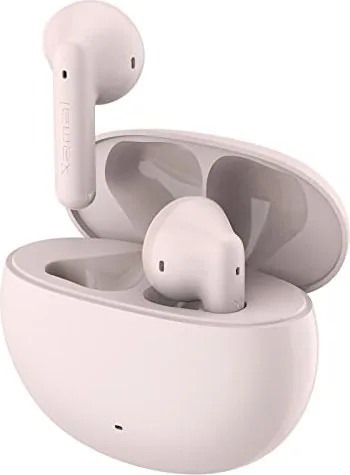
Edifier X2 — Compact True Wireless Earbuds
The Edifier X2 offers a reliable, user-friendly true wireless experience with straightforward controls and stable Bluetooth pairing. Designed for everyday use, these earbuds power on when removed from the charging case and automatically reconnect to the last paired device. The intuitive touch panels on each bud handle playback, calls, and pairing gestures with a few simple taps, making them ideal for commuters, casual listeners, and fitness users seeking uncomplicated wireless audio.
Key Features and Usage
Edifier X2 earbuds feature automatic on/off when taken out of or placed back into the charging case, with clear LED indicators to show pairing, charging, and status. Initial pairing requires selecting "EDIFIER X2" from your device’s Bluetooth settings; subsequent uses typically reconnect automatically. If connections misbehave, a reset sequence—holding a touch panel for about 8 seconds until the blue LED flashes—restores default pairing behavior.
The charging case supports Type-C charging and displays a steady red LED while charging and turns off when fully charged. Earbud charging is indicated by a steady red LED that also goes off when fully charged. Input recommendations are noted (earbuds: 5V 200mA; case: 5V 1A). There are safety reminders to avoid charging if sweat or liquids are present in the charging port to prevent damage.
Connectivity and Left/Right Management
The X2 allows explicit left/right linking and unlinking to pair earbuds to another X2 set. To cancel left-right pairing, tap each earbud’s touch panel five times (blue LED steady). To re-establish left/right connection, take both out, ensure they are disconnected, and tap twice on each touch panel; the blue LED will blink rapidly. Once linked, select "EDIFIER X2" on your device to complete the connection.
Controls and Practical Notes
Touch controls cover common actions (multi-tap sequences for play/pause, skip, and calls). Low battery prompts notify when to return the buds to the case. The product literature highlights that images may differ slightly from the actual product and that firmware or spec updates can occur without notice.
Notes
- Use the included Type-C cable for charging the case. Avoid charging with liquids in the port.
- LED indicators: blue for pairing/status, red for charging.
- Reset by holding a touch panel ~8s when earbuds are out of the case.
Search for 67,706 Manuals online


Type-in Brand or Model