For the need of technical improvement and system upgrade,
information contained herein may be subject to change from time
to time without prior notice.
Products of EDIFIER will be customized for different applications.
Pictures and illustrations shown on this manual may be slightly
different from actual product. Images are for illustrative purposes
only and may differ from the actual product.
V1.3 IB-200-W0820B-04
/1
%
Quick check
I'm not a robot
Incorrect answer, please try again.
Chat with your Edifier W820BT manual using AI
Get instant AI answers from your Edifier W820BT manual
Ask anything about the Edifier W820BT. Answers come from this manual, with the pages they are based on.
Ask a Question
0/1000
Do you recommend W820BT?
YesNo
Frequently Asked
Questions
A
To reset the headphones to factory settings, press and hold the plus button and the multifunction button simultaneously for three seconds until the blue light blinks rapidly. This clears the pairing list, and the device will enter pairing mode again upon restart.
Is this answer helpful?
A
The headphones feature a dual battery setup that allows for up to eighty hours of continuous playback time before needing to be recharged.
Is this answer helpful?
A
Yes, you can connect two Bluetooth devices simultaneously. Pair with the first device, turn off, then press multifunction to pair with the second. Switch between them by managing playback on the respective devices.
Is this answer helpful?
A
A full charge takes about four hours using a five volt one amp input adapter to reach the maximum capacity of the 1340mAh lithium-ion battery.
Is this answer helpful?
A
No, do not wear or keep the headphones in close proximity closer to ten centimeters of a pacemaker to guarantee personal safety.
Is this answer helpful?
A
Check if the headphone is operating, verify the volume level is appropriate, ensure the connection is correctly established, and check if the device is within the normal working range of ten meters.
Is this answer helpful?
M: qwen/qwen3.5-flash-20260224
Advantagesand
Disadvantages
Advantages
Exceptional eighty-hour playback time due to dual battery setup.
Bluetooth V4.1 technology supports stable connections over ten meters.
Foldable design with flexible steel headband ensures portability.
Supports simultaneous connection to two Bluetooth devices.
Includes standard 3.5mm audio cable for wired usage mode.
VS
Disadvantages
No active noise cancellation feature included in the design.
Charging time is approximately four hours which is lengthy.
Volume maximum settings may trigger prompt tones to limit output.
Battery requires proper recycling and cannot be disassembled.
Pairing list clears after factory reset requiring re-connection.
M: qwen/qwen3.5-flash-20260224
Product
Specification
Type
Headphones (Over-Ear)
Form
Headband
Principle
Closed-back
Microphone
Integrated
Connector
3.5mm Jack
Wireless
Bluetooth 4.1
Cable
Single-sided, detachable, angled plug
Controls
3-button remote
Battery Life
80h
Battery
USB Micro-B charging port, 4h charge time
Frequency Range
20Hz-20kHz
Impedance
32 Ohm
Sensitivity
100dB
Drivers
1.57 inches
Device Features
Foldable
Weight
0.57 lbs
M: qwen/qwen3.5-flash-20260224
Product
Description
Examine the Edifier W820BT Manual for Superior Audio Features
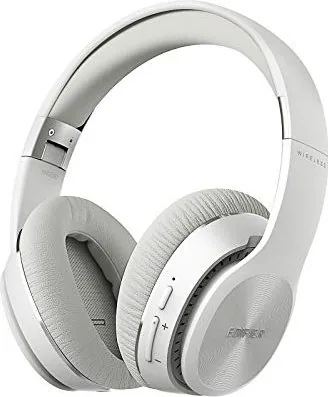
Discovering the right headphones for your lifestyle is difficult. The Edifier W820BT is a standout option that combines excellent battery life with versatile connectivity. Users who prioritize comfort will appreciate the foldable design featuring a flexible steel headband. This construction ensures durability during transport while maintaining a lightweight feel on the ears. The 80-hour playback time is a major highlight, allowing you to listen for weeks without needing a charger. This eliminates the anxiety of a dead battery during long commutes or work sessions.
Comprehensive Control and Connection
Setting up the device is straightforward once you understand the button layout. The manual outlines how to manage calls and music tracks using the multifunction button. Bluetooth V4.1 provides a stable link up to ten meters away. You can connect to two devices simultaneously, which is ideal for juggling work and personal tasks. The included 3.5mm cable offers a wired fallback when wireless power is not an option. The 40mm drivers ensure audio fidelity across all frequencies from bass to treble.
Charging and Maintenance Protocols
Powering the headset requires a five volt direct current input. A full charge takes approximately four hours to reach maximum capacity. During this process, indicator lights display the status clearly. An orange light signifies charging while a blue light indicates connectivity issues or pairing modes. Regular maintenance keeps the lithium-ion battery healthy over time. Do not expose the unit to extreme heat or moisture as this damages internal components. The product is not waterproof, so avoid heavy sweat or rain exposure to prevent failure.
Safety and Operational Warnings
Safety is a primary concern for all electronic audio equipment. Users with pacemakers must maintain a safe distance to avoid interference. Driving or cycling while using headphones is prohibited due to traffic safety risks. High volume levels over extended periods can cause permanent hearing damage. Always start playback from the lowest setting to protect your ears. If the device malfunctions, a factory reset is available by holding specific buttons simultaneously. This clears all paired settings and restores standard operation parameters.
Proper care ensures longevity. Keep the product away from children as it is not a toy. Dispose of batteries according to local environmental laws. Avoid using harsh chemicals to clean the exterior surface. If cleaning is required, use a soft dry cloth. Adhering to these guidelines guarantees the best performance from your new audio gear. Enjoy seamless music playback with confidence and ease using the Edifier W820BT Manual.