
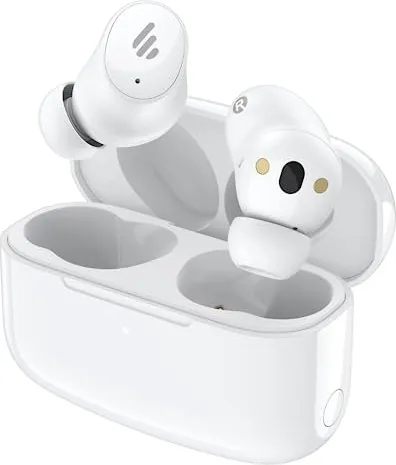

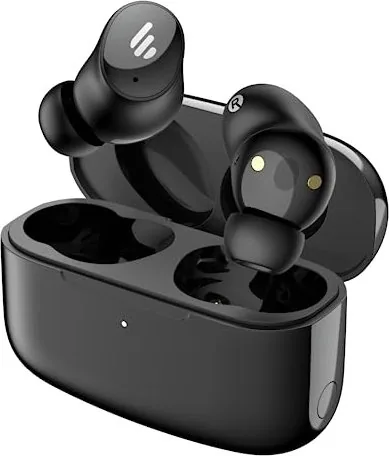
Edifier TWS1 Pro 2 Manual
PDF manual · 7 Pages
English



Quick check
Incorrect answer, please try again.
Chat with your Edifier TWS1 Pro 2 manual using AI
Get instant AI answers from your Edifier TWS1 Pro 2 manual
Ask anything about the Edifier TWS1 Pro 2. Answers come from this manual, with the pages they are based on.
Ask a Question
Do you recommend TWS1 Pro 2?
Yes NoFrequently Asked Questions
Open the case to power on, hold the case button for 3s to enter pairing mode, and select EDIFIER TWS1 Pro 2 in your device settings to connect successfully.
Is this answer helpful?
Press the button on the case three times until the status indicator blinks white, confirming that the headphones have reset and entered automatic pairing mode again.
Is this answer helpful?
Open the case or press the button once, noting that a red light indicates low or charging status while an off light means it is fully charged.
Is this answer helpful?
Yes, settings switch between High Noise Cancellation, Ambient Sound, and Noise Cancellation Off to suit your current environment.
Is this answer helpful?
Yes, customized controls are available via the Edifier Connect App for personalization of your earbud functions.
Is this answer helpful?
Left and right touch panels handle playback and calls, supporting various taps for easy operation during use.
Is this answer helpful?
Visit the official website at www.edifier.com for detailed specifications or contact Edifier International Limited for support inquiries regarding your device.
Is this answer helpful?
Advantages and Disadvantages
Advantages

- Active Noise Cancellation adjusts between high and ambient mode
- Automatic reconnection to the last used device saves time
- Visual LED indicators clearly display charging battery status
- Customized touch controls via the Edifier Connect App offer flexibility
- Case powered on automatically when opened for immediate use
Disadvantages

- Reset process requires multiple button presses on the case
- Touch panel controls require practice to master specific taps
- App connectivity is needed for full control customization
- Power off relies on closing the case lid strictly
- Visual indicators only show battery for the case not buds
Product Specification
Type
Headphones (In-Ear)
Form Factor
True Wireless, neckband-free
Design
Closed
Microphone
Integrated
Wireless
Bluetooth 5.3
Controls
Touch Control
Battery Life
4hr (with ANC), 6hr (without ANC), 16hr (with charging case)
Battery
USB-C charging port, charging case, 1.5hr charge time, fast charging (10min for 1hr battery life)
Frequency Response
20Hz-40kHz
Sensitivity
94dB
Driver
0.39 inches
Device Features
Active Noise Cancellation (ANC), water-resistant (IP54)
Software Features
Equalizer presets, custom equalizer, app control
Weight
1.59 oz
Product Description
Explore Edifier TWS1 Pro 2 Headphones
Experience premium sound quality with the Edifier TWS1 Pro 2 True Wireless Noise Cancellation In-Ear Headphones. These earbuds are designed for seamless audio enjoyment on the go. Whether you are commuting or working out, the active noise cancellation feature helps you focus on your music without unwanted environmental distractions. The design ensures a comfortable fit, allowing for extended listening sessions without fatigue. The audio drivers deliver deep bass and clear highs, making every track sound vibrant.
Power and Connectivity Features
Interface is intuitive. Opening case powers on, closing lid conserves battery. Smart power management extends daily usage time. Charging case features LED indicators for status. Red light signals low or charging, off means full. Visual feedback helps manage device usage efficiently. Press button once on case to check status. Connectivity is a strong point. Pairing is straightforward. Press case button to enter pairing mode indicated by blinking LEDs. Once paired, earbuds automatically reconnect to last device. Memory feature saves time and ensures immediate listening. Resetting connection requires three presses of case button. Status light blinks white until reset is complete.
Customization and Control
Sound customization via Edifier Connect App. Users adjust touch controls and switch between High Noise Cancellation and Ambient Sound modes. This flexibility allows adapt to environments instantly. Touch panels on earbuds control playback and calls. The left and right touch zones handle various functions smoothly. Double and triple taps trigger specific actions to enhance your experience. Referencing the Edifier TWS1 Pro 2 Manual provides technical guidance. The guide details button presses and behaviors. Understanding details ensures optimal device use. Physical build supports daily use. Manufacturer notes technical improvements may change information. Model number EDF200114 identifies hardware generation. Product represents commitment to quality in audio equipment.
Final Thoughts
Additional benefits include the ability to use the earbuds independently if needed. The setup process is quick, making it accessible for all users. The Bluetooth connection remains stable during movement. If you need to verify the battery, the LED behavior is consistent. Low battery alerts you via the red light lasting for two seconds. Charging indicates with the red light remaining on. Complete charge turns the light off. This simplicity reduces anxiety about power running out during important calls. Please visit the official website for more detailed product specifications. The company Edifier International Limited maintains high standards for their audio gear. Support is available for technical inquiries. Enjoy your music with the latest technology integrated into a sleek package. These headphones are ready for your next adventure.
Search for 67,706 Manuals online


Type-in Brand or Model