
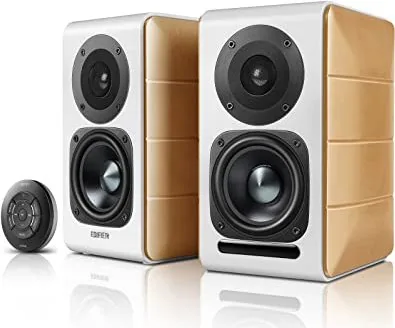
Edifier S880DB Manual
PDF manual · 3 Pages
English



Quick check
Incorrect answer, please try again.
Chat with your Edifier S880DB manual using AI
Get instant AI answers from your Edifier S880DB manual
Ask anything about the Edifier S880DB. Answers come from this manual, with the pages they are based on.
Ask a Question
Do you recommend S880DB?
Yes NoFrequently Asked Questions
Windows natively supports USB Audio Class 1.0, but not USB Audio Class 2.0. A dedicated driver is needed to enable high-speed operation and advanced audio features.
Is this answer helpful?
It is designed for development, testing, and prototyping. It includes a broad feature set and behaves like a full driver, but it is not meant for permanent production use.
Is this answer helpful?
It is best for qualified XMOS customers building stereo products for production runs of up to 10,000 units. It keeps setup simple while covering basic playback and recording needs.
Is this answer helpful?
It only supports stereo audio, has no MIDI support, uses a single clock domain, and allows only one ASIO or WDM client at a time.
Is this answer helpful?
It supports multichannel audio, low latency, ASIO 2.2, MIDI, and customization. Manufacturers can tailor branding, VID/PID settings, and even build a custom control panel.
Is this answer helpful?
Yes, customized packages and multiple product setups can coexist on the same machine, as long as they are configured with the appropriate identifiers and driver package rules.
Is this answer helpful?
Advantages and Disadvantages
Advantages

- Evaluation driver offers full-featured USB Audio 2.0 support for testing and prototyping.
- XMOS Stereo Driver is free for qualified production use and includes easy installation plus DFU updates.
- Thesycon production driver supports multichannel audio, low latency, ASIO 2.2, and customization.
- Clear upgrade path from development use to scalable commercial deployment.
Disadvantages

- Windows does not provide native USB Audio Class 2.0 support, so an extra driver is required.
- XMOS Stereo Driver is limited to stereo, no MIDI, one clock domain, and one client connection.
- Evaluation Driver is not suitable for permanent use because it adds periodic beep tones after long operation.
- Production options may require licensing, VID/PID management, and code-signing steps.
Product Specification
Type
Speaker Set
Channels
2.0
Total Power
88 W RMS
Frequency Range
55 Hz-20 kHz
Audio Connections
Digital Audio In (coaxial), Digital Audio In (optical), 2x Stereo Line In (RCA), AUX In (0.14 in Jack)
Wireless
Bluetooth
Color
white, brown
Consisting of
2x Compact Speakers
Product Description
USB Audio 2.0 Driver Options for Windows
When a USB audio device is designed for modern playback and recording, the driver behind it matters just as much as the hardware itself. Windows still does not natively support USB Audio Class 2.0, so manufacturers often rely on specialized drivers to unlock high-speed transfer, low latency, and advanced audio features. For anyone comparing speaker setups while reading an Edifier S880DB Manual, this is the kind of background that explains why some devices feel effortless while others need a dedicated installer.
The overview highlights three main paths. The Evaluation Driver is the most complete testing option, offering USB Audio Class 2.0 and 1.0 support, multichannel capability, ASIO 2.2 access, MIDI support, and adjustable buffering. It is ideal for prototyping because it behaves like a production driver, yet it includes a small reminder of its temporary nature: a beep tone after extended use. That makes it practical for demos and development, but not for long-term deployment.
For simpler production needs, the XMOS Stereo Driver focuses on a narrow but useful feature set. It is built for stereo input and output, supports Windows installation workflows, and includes firmware update tools through DFU. Its appeal is clear for compact consumer devices and straightforward audio products, especially where reliability and ease of distribution matter more than extra channels or deep customization. However, it is intentionally limited, with no MIDI, one clock domain, and only one active client connection.
The most flexible path is the Thesycon production driver. It is aimed at higher-end products that need multichannel audio, low-latency performance, transparent bit-perfect playback, MIDI integration, and broad Windows compatibility. It can be customized with product branding, unique VID/PID settings, and even a custom control panel through its SDK. That makes it a strong choice for manufacturers building a polished, scalable product line.
Overall, this driver ecosystem shows a clear progression from free evaluation tools to production-ready solutions. Teams can start with a full-featured prototype setup, move to a limited but cost-effective stereo release, and later expand to a fully branded commercial package when the product matures.
Notes
- Windows USB Audio 2.0 setups usually depend on third-party drivers.
- Feature limits often determine whether a driver is best for testing or shipping.
- Licensing, branding, and VID/PID control become more important as production scales.
Search for 67,706 Manuals online


Type-in Brand or Model
Sophie König
10 months ago
Is the sound quality really good, and does the device have enough connections for using it with a PC for music or YouTube and hearing training?
Manual.ly
10 months ago
Yes. Reviewers consistently mention excellent sound quality. They also note versatile connection options, which makes it suitable for use with a PC. It can be used for listening to music and YouTube on your computer, and it supports hearing training as well.