

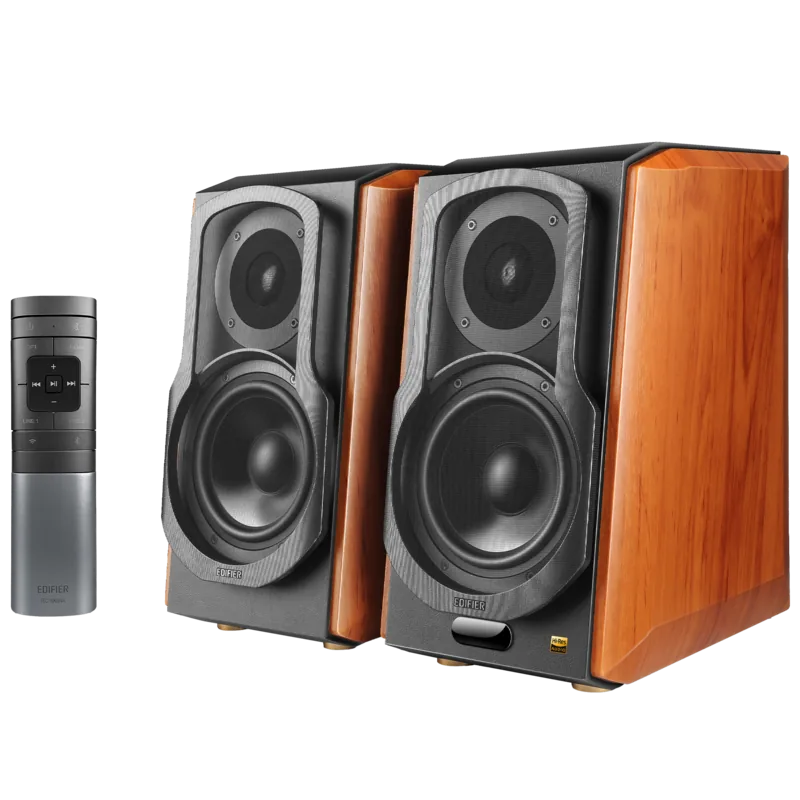
Edifier S1000W Manual
PDF manual · 109 Pages
English



Quick check
Incorrect answer, please try again.
Chat with your Edifier S1000W manual using AI
Get instant AI answers from your Edifier S1000W manual
Ask anything about the Edifier S1000W. Answers come from this manual, with the pages they are based on.
S1000W Maintenance Schedule
Battery life is normally about 6 months. Replace them when the remote is not sensitive or the control distance is shortened.
Turn off and disconnect power before cleaning with a dry cloth. Use only neutral solvent or clear water; never use strong chemicals.
Free maintenance reminders
Timed to your purchase date. Always free, unsubscribe anytime.
Ask a Question
Do you recommend S1000W?
Yes NoFrequently Asked Questions
It supports Wi-Fi, Bluetooth, Line In 1, Line In 2, Optical, and Coaxial inputs for versatile connectivity options.
Is this answer helpful?
Yes, through the Edifier Home App, you can integrate the speaker with Amazon Alexa for voice control.
Is this answer helpful?
Treble output is twenty-five watts and mid-range bass is thirty-five watts per channel.
Is this answer helpful?
Typically, the batteries last around six months before needing replacement due to normal usage.
Is this answer helpful?
No, the manual states the product is designed for indoor use only and should not be exposed to moisture.
Is this answer helpful?
The system supports a frequency response ranging from forty-five hertz to forty kilohertz effectively.
Is this answer helpful?
Press and hold the reset button for three seconds to disconnect Bluetooth and clear pairing records.
Is this answer helpful?
Advantages and Disadvantages
Advantages

- Dual-stage amplifier system delivers twenty-five watts for treble and thirty-five watts for mid-range bass per channel.
- Supports diverse inputs including Wi-Fi, Bluetooth, optical, coaxial, and dual line-in ports.
- Frequency response ranges from forty-five hertz to forty kilohertz for detailed audio performance.
Disadvantages

- Coaxial cable is not included in the standard box contents for user convenience.
- Remote control batteries typically last about six months under normal usage conditions.
- Five gigahertz Wi-Fi band usage may be restricted depending on local regulations.
Product Specification
Power
120W Peak
Tuner
No
Streaming Clients
Apple AirPlay 2, Pandora, Spotify, Tidal
Voice Assistants
Amazon Alexa
Audio Connections
2x Stereo Line In (RCA), Digital Audio In (Coaxial), Digital Audio In (Optical)
Additional Connections
USB-A
Wireless
Bluetooth 5.2, Wi-Fi 4 (802.11b/g/n)
Power Supply
AC Power
Features
Remote Control
Color
Black, Brown
Dimensions
7.80 x 13.58 x 11.61 in (WxHxD)
Weight
36.97 lbs
Product Description
Comprehensive Guide to the Edifier S1000W Speaker System
The Edifier S1000W stands out as a sophisticated choice for audiophiles seeking a blend of wireless freedom and wired reliability. This active bookshelf speaker system is designed to deliver high-fidelity sound in a compact form factor suitable for home offices or living rooms. The device operates effectively within a temperature range of zero to thirty-five degrees Celsius, making it adaptable for most indoor environments.
Advanced Connectivity Options
Connectivity is a major highlight of this unit. It supports Wi-Fi streaming through the Edifier Home App, which allows for seamless integration with smart assistants like Amazon Alexa. For local sources, Bluetooth offers a wireless connection with a standard range of about ten meters. Additionally, physical inputs include optical, coaxial, and dual line-in ports. The display window provides visual feedback regarding the current input mode through different colored LED lights. Blue indicates Bluetooth, white signifies Wi-Fi, while green and red denote line or optical modes respectively. The app interface guides users during network setup steps to ensure a stable connection.
Power Output and Audio Performance
Audio performance is driven by a dual-stage amplifier system. Each channel delivers twenty-five watts for treble frequencies and thirty-five watts for mid-range and bass frequencies. This configuration supports a frequency response ranging from forty-five hertz to forty kilohertz. Users can adjust treble and bass levels directly from the front panel controls to suit their listening preferences. The master volume control also serves a dual purpose for waking the device from sleep mode or selecting inputs.
Important Safety and Maintenance
Operating this equipment requires adherence to safety guidelines to ensure longevity and user protection. The device should not be exposed to rain or moisture to prevent electrical hazards. Ventilation openings must remain unblocked to prevent overheating, with a minimum clearance of five centimeters recommended around the unit. Before cleaning, disconnect the power plug to avoid electric shock risks. Only neutral solvents or clear water should be used for cleaning the exterior surface. Internal repairs must be performed by authorized professionals, as tampering with the housing exposes users to dangerous voltage. The unit is designed for indoor use only and should be kept away from heat sources.
Troubleshooting and Usage Notes
Common issues such as no sound output often stem from incorrect input selection or loose cable connections. Users should verify that their audio source is transmitting a signal and check that the volume is not muted on the remote. Bluetooth connectivity issues can often be resolved by clearing pairing records on both devices. If the unit does not turn on, verify the power outlet is functioning and the cable is securely seated. Remote control batteries typically last around six months and should be replaced with the same type to avoid leakage or explosion risks. Regional restrictions may apply to the five gigahertz frequency band depending on your location.
Search for 67,706 Manuals online


Type-in Brand or Model