
Edifier QR65 Manual
PDF manual · 7 Pages
English



Quick check
Incorrect answer, please try again.
Chat with your Edifier QR65 manual using AI
Get instant AI answers from your Edifier QR65 manual
Ask anything about the Edifier QR65. Answers come from this manual, with the pages they are based on.
Ask a Question
Do you recommend QR65?
Yes NoFrequently Asked Questions
Press the input mode button until the blue LED blinks rapidly to enter pairing mode. Select Edifier QR65 from your phone Bluetooth settings list. Enter the PIN code 0000 if prompted. The light stays solid blue when connected successfully.
Is this answer helpful?
Yes. Connect your device to the USB-A port or USB-C ports on the back of the active speaker. Ensure the main power button is ON. Use a cable supporting 4.5A or higher for efficient charging up to 65W.
Is this answer helpful?
Unplug the audio cables and turn the volume up. Check background noise from other audio devices. If you cannot hear sound one meter away there is likely no issue. Separate cables if they interfere with electronics.
Is this answer helpful?
Yes. The USB audio streaming mode supports Windows 11 Windows 10 Windows 8 and Windows 7. Select Edifier QR65 as the output device in your computer sound settings after connecting via the USB cable.
Is this answer helpful?
In work mode press and hold the Light Effects button for five seconds. All settings and pairing records will be cleared. You will need to pair devices again after performing this reset procedure.
Is this answer helpful?
If no device connects for 30 minutes the speaker enters Bluetooth hidden mode. New devices cannot find it but previously paired devices can reconnect from their lists. Hold the volume button for 1.5 seconds to exit this mode.
Is this answer helpful?
No. The bundled USB connecting cable is intended for audio streaming only. Do not attempt to use it for device charging to ensure proper functionality and prevent potential damage to the connection or device.
Is this answer helpful?
Advantages and Disadvantages
Advantages

- High charging output up to 65W allows powering external devices while using speakers
- Versatile connectivity supports Bluetooth USB streaming and analog LINE IN inputs
- Clear LED indicator lights show active input mode at a glance
- Supports EQ customization and adjustable ambient lighting effects via app
- Wide frequency response from 55Hz to 40kHz delivers full range sound
Disadvantages

- Volume synchronization not supported in LINE IN mode requiring dual adjustments
- Bundled USB cable cannot be used for device charging functions internally
- Bluetooth hidden mode activates after 30 mins limiting spontaneous connections
- Background noise may increase if connected devices produce high interference
- Power switch location requires reaching behind the active speaker unit
Product Specification
Type
Speaker Set
Channels
2.0
Total Power
70W RMS
Frequency Range
55Hz-40kHz
Audio Connections
Stereo Line In (RCA), Sub Out (RCA)
Additional Connections
USB-A
Wireless
Bluetooth 5.3, LDAC
Features
LED Lighting
Dimensions
5.57x8.39x8.54in (WxHxD)
Includes
2x Compact Speakers
Product Description
Overview of the Edifier QR65 Multimedia Experience
Discover the robust audio capabilities of the Edifier QR65 system designed for modern multimedia needs. This versatile setup combines powerful sound with flexible connectivity options catering to diverse entertainment environments throughout your home office or gaming station. Users can enjoy seamless wireless streaming via Bluetooth technology which automatically engages upon initial power up for quick access without manual configuration delays. Alternatively wired connections offer superior stability through USB audio streaming for desktop computers running supported Windows operating systems ranging from version seven to eleven effectively bridging legacy hardware gaps.
The analog input mode supports traditional devices utilizing RCA cables for reliable playback without digital latency concerns often found in compressed wireless streams reducing audio degradation over time. One standout feature is the impressive charging capability found directly on the active unit back panel housing multiple ports simultaneously. These allow concurrent device charging up to sixty-five watts maximum output ensuring your smartphones and tablets stay powered during extended listening sessions alongside creative music production workstations or editing rigs.
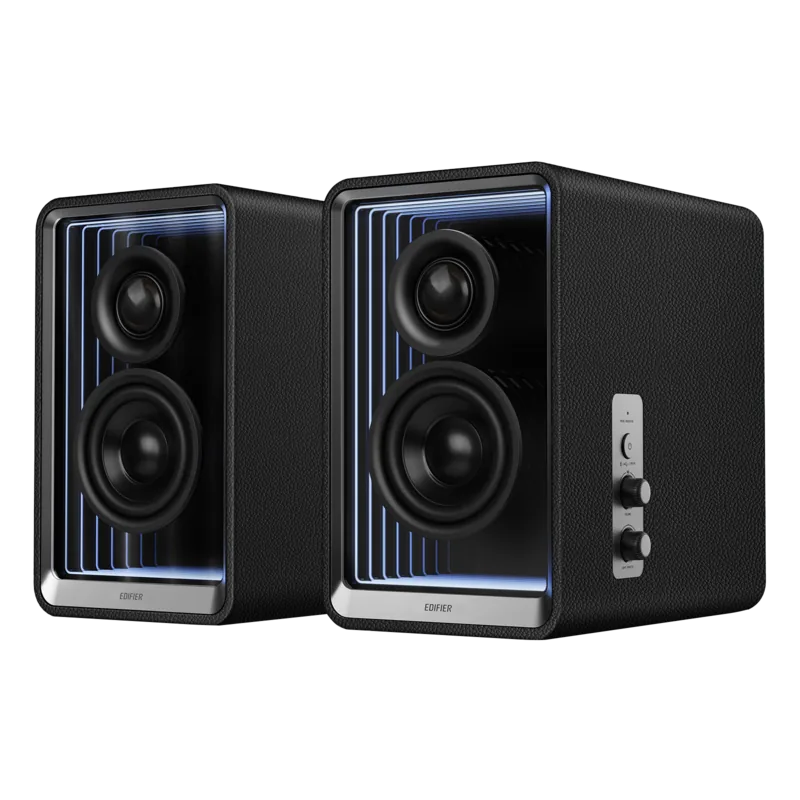
Managing the system is straightforward thanks to intuitive controls located conveniently on the side of the active speaker enclosure surface area. Rotating the main volume knob adjusts levels smoothly while single presses switch input modes instantly indicated by distinct colored light LED rings surrounding buttons for visual clarity. Blue signifies Bluetooth readiness waiting for pairing requests while red alerts users to active USB streaming status inside their computer sound settings menus. Green lights confirm LINE IN connection status for external music players connecting physically via auxiliary jacks.
Visual feedback helps avoid confusion regarding source selection at a glance regardless of ambient room lighting conditions distracting observers nearby. The dedicated EDIFIER ConneX application further enhances functionality by allowing firmware upgrades automatically when updates appear within the software software interface dashboard notification areas. Customization extends to equalizer presets and ambient lighting effects providing personalization for room aesthetics matching user preferences exactly.
Frequency response spans 55Hz to 40kHz covering deep bass frequencies up to high treble ranges delivering full spectrum fidelity across all audio genres played daily. Total output power reaches thirty watts per channel for mid bass drivers plus fifteen watts per channel for tweeters ensuring dynamic loudness even in large open spaces. Hidden bluetooth mode prevents unauthorized device discovery after thirty minutes of inactivity maintaining security protocols. If connectivity issues arise troubleshooting steps are readily available for immediate resolution. Ensure distance remains under ten meters without physical obstacles blocking radio signals between transmitters and receivers. Verify that pairing mode is active before attempting connection from paired mobile devices to restore access quickly and efficiently. Factory resets clear all stored pairings completely if persistent problems require a fresh system configuration start procedure. Please remember that bundled USB cables serve audio transmission purposes rather than charging functions internally due to data protocol limitations preventing high current draw safely. Background hiss may occur naturally if external equipment generates significant electrical interference so isolating audio cables often resolves minor noise complaints heard near driver units.
Visit official manufacturer pages for warranty terms specific to your geographic location including North America or European Union regions where authorized service centers operate dedicated online portals for comprehensive guidance regarding long term ownership satisfaction.
Search for 67,706 Manuals online


Type-in Brand or Model