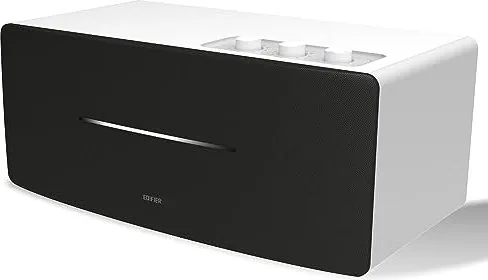
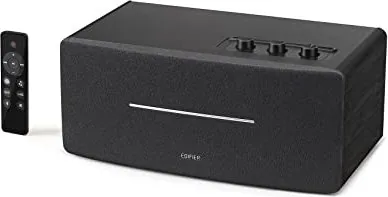
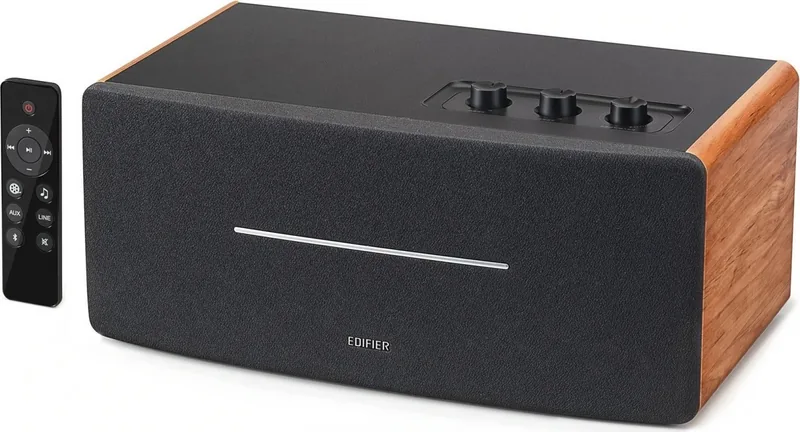
Примечание: Изображение приведено для справки. Конструкция может отличаться.
Иллюстрации
1. Переключатель питания
2. Кабель питания
3. Линейный выход
4. AUX вход
5. Линейный вход
6. Регулятор НЧ
7. Регулятор ВЧ
8. Управление общей громкостью/селектор входа
Переключатель режима входа: нажмите
Отключите Bluetooth: нажмите и удерживайте
(Bluetooth уже подключен)
Включение питания:
нажмите/нажмите и удерживайте
(когда питание выключается дистанционно и
переключатель питания уже включен)
Выключение питания: нажмите и удерживайте
9. Инфракрасный приемник/входной индикатор
Зеленая лампочка непрерывно горит:
AUX/линейный вход
Быстро мигает голубая лампочка:
Bluetooth не подключен
Голубая лампочка непрерывно горит:
Bluetooth уже подключен
Bluetooth вход
Выходная мощность: П/Л (ВЧ): 15 Вт+15 Вт
П/Л (средний диапазон и бас): 20 Вт+20 Вт
Частотный диапазон: 54Hz-20KHz
Звуковой вход: AUX, Линейный вход, Bluetooth
Звуковой выход: Линейный выход
Декларация для ЕС
Частотный диапазон Bluetooth: 2,402 ~ 2,480 ГГц
Радиочастотная выходная мощность: ≤20 дБм (EIRP)
Ограничения на эксплуатацию отсутствуют.
Пульт дистанционного управления (ДУ)
Подключения
Линейный вход
Руководство пользователя
Пульт дистанционного
управления (ДУ)
Колонка
Аудиокабель 3.5 mm-RCA
1. Включение/выключение
2. Увеличение громкости
3. Предыдущая /cледующая запись
(Bluetooth вход)
4. Пауза/воспроизведение
(Bluetooth вход)
5. Уменьшение громкости
6. Режим кино (расширенное
звуковое поле, идеален при
просмотре кинофильмов)
Примечание.
1. Не подвергайте пульт ДУ избыточному нагреву или воздействию влажности.
2. Не заряжайте батарейки.
3. Если изделие не используется длительное время, извлеките из него батарейки.
4. Не подвергайте батарейку сильному нагреву, например, прямой солнечный свет, огонь и т.п.
5. Опасность взрыва при неправильной установке батарейки. Заменяйте использованные батарейки
только на изделия такого же или аналогичного типа.
Установка батареек:
Для открывания отсека для батареек
см. рисунок, вставьте батарейку
CR2032 и закройте отсек.
или
• Нажмите регулятор "volume/input" на колонке для переключения в режим дополнительного
входа AUX (один раз мигнет зеленая лампочка) или в режим входной линии (зеленая лампочка
мигнет два раза).
• Соответственно нажмите кнопку "AUX"/"LINE" дистанционного управления для переключения в
режим дополнительного/линейного входа.
• Нажмите кнопку " " дистанционного управления или регулятор "volume/input" на колонке для
переключения в режим входа Bluetooth – голубая лампочка будет быстро мигать.
• Настройте мобильный телефон на поиск и подключение к "EDIFIER D12", причем после успешного
формирования пары голубая лампочка будет непрерывно гореть.
• Чтобы отключить Bluetooth, нажмите и удерживайте кнопку " " дистанционного управления или
нажмите и удерживайте 2 секунды регулятор "volume/input" на колонке.
Примечание:
• Для использования всех функций Bluetooth данного устройства, пожалуйста, обеспечьте в
подключаемом мобильном устройстве поддержку профиля A2DP(Advanced Audio Distribution
Profile, расширенный профиль распространения аудио) и AVRCP(Audio/Video Remote Control Profile,
профиль дистанционного управления аудио/видео).
• Подключение и совместимость по Bluetooth может отличаться в разных звуковых устройствах в
зависимости от версий программного обеспечения в них.
7. Режим музыки (отлично настроенный
собственный звук, идеален при
прослушивании музыки)
8. AUX вход
9. Линейный вход
10. Bluetooth вход
Hажмите и удерживайте для
отключения Bluetooth
11. Выключение звука
Примечание: В кинорежиме расширение звукового поля будет меняться,
иначе снижается качество звука. Поэтому, пожалуйста, разрешите режим
музыки при прослушивании музыкальных записей.
ПРЕДУПРЕЖДЕНИЕ!
1. Не проглатывать батарейку, Это опасно!
2. Изделие содержит дисковую батарейку. Проглоченная батарейка может вызвать травму или
смерть. Не храните новые или старые батарейки в местах, доступных для детей.
3. Если отсек для батареек закрывается неплотно, прекратите использовать пульт ДУ и храните его
вне доступа детей.
4. В случае подозрений на проглатывание батарейки немедленно обратитесь к врачу.
Устранение
• Проверьте, включен ли динамик.
• Попробуйте увеличить громкость с помощью главного регулятора или на пульте ДУ.
• Убедитесь, что аудиокабели подключены правильно, и в звуковых колонках правильно выбран
вход.
• Проверьте сигнал на выходе источника звука.
Не удается подключиться по Bluetooth
• Убедитесь, что колонка переключена на вход Bluetooth, поскольку в других входных режимах
невозможно создание пары или подключение по Bluetooth.
Отключитесь от Bluetooth-устройства нажав и удерживая кнопку " " в режиме Bluetooth, затем
повторите попытку.
• Рабочий диапазон передачи по Bluetooth составляет 10 метров, поэтому работайте только в этом
диапазоне.
• Попробуйте подключить другое устройство Bluetooth.
Колонка D12 не включается
• Убедитесь, что колонка подключена к сети электропитания, и что розетка сети включена.
Помехи от динамиков
• Колонки фирмы EDIFIER генерируют небольшие помехи, в то время как фоновые помехи
некоторых аудио устройств являются очень большими. Отсоедините аудио кабели и увеличите
громкость, если на расстоянии 1 м из динамика ничего не слышно, значит у этого изделия нет
проблем.
Дополнительные сведения о EDIFIER см. на веб-сайте www.edifier.com
Для запросов к EDIFIER по гарантийным обязательствам посетите страницу соответствующей
страны на www.edifier.com и ознакомьтесь с разделом гарантийных обязательств.
США и Канада: service@edifier.ca
Южная Америка: Информацию о местных представительствах см. на веб-сайте www.edifier.com
(английский язык) или www.edifierla.com (испанский/португальский язык).
Power
Off
On
или
или
Аудиокабель RCA-RCA
SpecificationsTroubleshooting
Box contents
Note: Images are for illustrative purposes only and may differ from the actual product.
Illustration
Bluetooth input
Power output: R/L(treble): 15W+15W
R/L(mid-range and bass): 20W+20W
Frequency response: 54Hz-20KHz
Audio input: AUX, Line in, Bluetooth
Audio output: Line out
Declaration for EU
Frequency Band: 2.402GHz ~ 2.480GHz
RF Power output: ≤20 dBm (EIRP)
There is no restriction of use.
Remote control
Connection
Line in input
User manual
Remote controlSpeaker
3.5mm-RCA audio cable
⑦⑧
⑥
③②①④⑤
⑨
⑦⑧
⑥
③②①④⑤
⑨
⑦⑧
⑥
③②①④⑤
⑨
⑦⑧
⑥
③②①④⑤
⑨
⑦⑧
⑥
③②①④⑤
⑨
⑦⑧
⑥
③②①④⑤
⑨
⑦⑧
⑥
③②①④⑤
⑨
⑦⑧
⑥
③②①④⑤
⑨
1. Power on/off
2. Volume up
3. Previous track/next track
(Bluetooth input)
4. Pause/play
(Bluetooth input)
5. Volume down
6. Movie mode
(extended sound field,
ideal for watching movie)
Note:
1. Do not place the remote control in places that are hot and humid.
2. Do not charge the batteries.
3. Remove the batteries when unused for a long period of time.
4. The battery should not be exposed to excessive heat such as direct sun, fire or similar.
5. Danger of explosion if battery is incorrectly replaced. Replace only with the same or equivalent type.
Battery loading:
Please refer to the illustration to open the battery
compartment, insert the CR2032 battery and
close the compartment.
or
• Press the "volume/input" dial on the speaker to switch to AUX input (green light flashing once) or Line in input (green light
flashing twice).
• Respectively press the "AUX" / "LINE" button on the remote control to switch to AUX/Line in input.
• Press the " " button on the remote control or press the "volume/input" dial on the speaker to switch to Bluetooth input,
blue light will flash rapidly.
• Set your mobile phone to search for and connect to "EDIFIER D12", after pairing is successful, the blue light will be steady lit.
• To disconnect Bluetooth, press and hold the " " button on the remote control or press and hold the "volume/input" dial on
the speaker for 2 seconds.
Note:
• To enjoy all Bluetooth functions of this product, please ensure your audio source device has A2DP (Advanced Audio Distribution
Profile) and AVRCP (Audio Video Remote Control Profile) profile.
• Bluetooth connectivity and compatibility may differ amongst different source devices, depending on the software versions of
source devices.
7. Music mode
(highly restored on-site sound,
ideal for listening to music)
8. AUX input
9. Line input
10. Bluetooth input
Press and hold to disconnect Bluetooth
11. Mute
Note: In Movie mode, the sound quality will be changed or distorted when the sound field is
extended. Therefore, please enable Music mode when listening to music.
WARNING!
1. Don’t swallow the battery; danger of chemical burn.
2. The product includes a wafer battery. Swallowing this battery may lead to injury or death. Do not place the new or old battery
in where children can get to it.
3. Don’t use the product if the battery cover is missing or not closed, and keep the remote inaccessible to children.
4. Please go to the hospital immediately if the battery is swallowed.
No sound
• Check if the speaker is ON.
• Try to turn up the volume using the volume control or remote control.
• Ensure the audio cables are firmly connected and the input is set correctly on the speaker.
• Check if there is a signal output from the audio source.
Cannot connect via Bluetooth
• Make sure the speaker is switched to Bluetooth input. If it is in other audio input modes, Bluetooth will not
connect. Disconnect from any Bluetooth device by pressing and holding the " " button, then try again.
• Effective Bluetooth transmission range is 10 meters; please ensure that operation is within that range.
• Try another Bluetooth device for connection.
The D12 does not turn on
• Check if main power is connected, or if the wall outlet is switched on.
Noise coming from speakers
• EDIFIER speakers generate little noise, while the background noise of some audio devices are too high. Please
unplug audio cables and turn the volume up, if no sound can be heard at 1 meter away from the speaker, then
there is no problem with this product.
1. Power switch
2. Power cable
3. Line out
4. AUX input
5. Line in
6. Bass dial
7. Treble dial
8. Volume control/input selector
Input mode switch: press
Disconnect Bluetooth: press and hold
(Bluetooth already connected)
Power on: press/press and hold
(when powered off via remote control,
and power switch already turned on)
Power off: press and hold
9. Infrared receiver/input indicator
Green light steady lit: AUX/Line in
Blue light flashing rapidly: Bluetooth unconnected
Blue light steady lit: Bluetooth already connected
Power
Off
On
or
or
To learn more about EDIFIER, please visit www.edifier.com
For EDIFIER warranty queries, please visit the relevant country page on www.edifier.com and review the section
titled Warranty Terms.
USA and Canada: service@edifier.ca
South America: Please visit www.edifier.com (English) or www.edifierla.com (Spanish/Portuguese) for local contact
information.
RCA-RCA audio cable
Substituição e instalação da bateria
Rode a tampa da bateria no sentido da seta e
retire-a, instale corretamente a bateria CR2032
no respetivo compartimento e, em seguida,
feche a tampa da bateria.
User manual | Manuel d’utilisateur | Manual de usuario | Bedienungsanleitung | Manuale dell’utente
Manual do utilizador |
ユーザーズガイド | Руководство пользователя
11
Français
12
Français
13
Français
14
Français
15
Français
16
Français
17
Français
20
Français
19
Français
18
Français
21
Español
22
Español
23
Español
24
Español
25
Español
26
Español
30
Español
29
Español
28
Español
27
Español
38
Deutsch
37
Deutsch
31
Deutsch
32
Deutsch
36
Deutsch
35
Deutsch
40
Deutsch
39
Deutsch
34
Deutsch
33
Deutsch
41
Italiano
45
Italiano
48
Italiano
47
Italiano
49
Italiano
46
Italiano
42
Italiano
50
Italiano
44
Italiano
43
Italiano
52
Português
54
Português
56
Português
55
Português
58
Português
57
Português
60
Português
59
Português
53
Português
51
Português
63
日本語
64
日本語
65
日本語
66
日本語
67
日本語
68
日本語
69
日本語
70
日本語
61
日本語
62
日本語
73
Русский
74
Русский
75
Русский
76
Русский
77
Русский
78
Русский
79
Русский
80
Русский
71
Русский
72
Русский
版本号及料号: V1.0/IB-200-D12000-00
名 称: D12(英法西德意葡日俄)说明书
材 质:
尺 寸: 127×127(MM) 校 对:
批 准:
东莞市漫步者科技有限公司
80g书纸
(
封面和底面用100g书纸)
对折,胶装
/1
%
Quick check
I'm not a robot
Incorrect answer, please try again.
Chat with your Edifier D12 manual using AI
Get instant AI answers from your Edifier D12 manual
Ask anything about the Edifier D12. Answers come from this manual, with the pages they are based on.
Ask a Question
0/1000
Do you recommend D12?
YesNo
Frequently Asked
Questions
A
Turn on the speaker and press the input selector dial until the blue light flashes rapidly. On your phone, search for 'EDIFIER D12' in Bluetooth settings and select it. Once connected, the blue light will stay solid.
Is this answer helpful?
A
Movie Mode expands the sound field for a more immersive experience ideal for watching films. Music Mode provides a highly restored, accurate sound signature perfect for listening to musical recordings.
Is this answer helpful?
A
Yes. You can connect external devices using the AUX input with a 3.5mm cable or the Line In input with RCA cables. Simply switch the input mode using the dial or remote.
Is this answer helpful?
A
To disconnect, press and hold the Bluetooth button on the remote or the volume/input dial on the speaker for two seconds while in Bluetooth mode.
Is this answer helpful?
A
First, verify the speaker is powered on and volume is up. Check that audio cables are securely connected and the correct input source is selected. Ensure your source device is actually outputting audio.
Is this answer helpful?
A
No, the remote control uses a CR2032 button battery which is not rechargeable. Replace it with an equivalent type when the battery dies.
Is this answer helpful?
A
The effective transmission range is 10 meters. Ensure your device stays within this distance for a stable connection.
Is this answer helpful?
M: QW-35-FL
Advantagesand
Disadvantages
Advantages
High-quality audio output with 40W total power
Versatile connectivity options including Bluetooth, AUX, and Line In
Dedicated Movie and Music modes for different content types
Includes remote control for convenient operation
Adjustable bass and treble dials for custom sound tuning
VS
Disadvantages
Bluetooth range limited to approximately 10 meters
No built-in rechargeable battery; requires constant power outlet
Remote control uses non-rechargeable button battery
Movie mode may distort sound quality for music listening
LED indicators may be hard to see in bright environments
M: QW-35-FL
Product
Specification
Power
70W RMS
Display
No
Tuner
No
Frequency Range
54Hz-20kHz
Connections
AUX In (3.5mm Jack), Stereo Line In (RCA), Stereo Line Out (3.5mm Jack)
Wireless
Bluetooth 5.0
Power Supply
AC Power
Features
Remote Control
Dimensions
14.13x7.99x6.26 inches (WxDxH)
Weight
10.14 lbs
M: QW-35-FL
Product
Description
Discover the Edifier D12 Stereo Bluetooth Speaker
The Edifier D12 is a versatile stereo speaker designed to bring high-quality audio to your home entertainment setup. Whether you are streaming music wirelessly or connecting via traditional cables, this device offers a seamless listening experience. With its sleek design and robust feature set, it stands out as an excellent choice for audiophiles and casual listeners alike.
At the heart of the D12 lies powerful dual drivers capable of delivering 40 watts of total output. The system separates frequencies effectively, providing crisp highs at 15W per channel and deep, resonant bass and mid-range tones at 20W per channel. This balance ensures that every note from your favorite playlist is reproduced with clarity and depth. The frequency response ranges from 54Hz to 20KHz, covering the vast majority of audible sounds.
Connectivity is where the D12 truly shines. It supports multiple input methods including Bluetooth, AUX, and Line In. The Bluetooth module operates within the standard 2.4GHz band, allowing for a stable connection up to 10 meters away. Once paired with your smartphone or tablet, the blue indicator light confirms a successful link. For those who prefer wired connections, the rear panel features dedicated inputs for RCA and 3.5mm cables, making it compatible with older devices and modern computers alike.
The included remote control adds a layer of convenience, allowing you to manage volume, switch tracks, and toggle between modes without leaving your seat. Two distinct sound profiles are available: Movie Mode expands the sound field for immersive cinematic experiences, while Music Mode restores the original fidelity of your recordings for pure acoustic enjoyment. Users can also adjust bass and treble levels using the dials on the speaker to tailor the sound to their personal preference.
Installation is straightforward, requiring only a power cable and your chosen audio source. The unit features clear LED indicators to show the current input status, ensuring you always know which mode is active. Safety warnings regarding the button battery in the remote are prominent, emphasizing the importance of keeping spare batteries away from children.
Key Features Summary
Powerful Output: 15W treble + 20W bass/mid per channel for rich sound.
Multi-Input Support: Connect via Bluetooth, AUX, or Line In easily.
Remote Control: Full functionality for volume, playback, and mode switching.
Sound Modes: Choose between Movie Mode for films and Music Mode for albums.
Adjustable EQ: Dedicated dials for fine-tuning bass and treble levels.
Important Notes
Always ensure the battery cover is secure on the remote to prevent accidental ingestion hazards. If you experience noise issues, check that no other audio devices are generating excessive background interference. For warranty support, visit the official Edifier website for your specific region.