
Eden WaterParadise 901 Manual
PDF manual · 20 Pages
English



Quick check
Incorrect answer, please try again.
Chat with your Eden WaterParadise 901 manual using AI
Get instant AI answers from your Eden WaterParadise 901 manual
Ask anything about the Eden WaterParadise 901. Answers come from this manual, with the pages they are based on.
WaterParadise 901 Maintenance Schedule
If the feeder will not be used for a long period, remove the batteries or replace them with new ones to ensure proper function.
Dry clean the central pivot if the feeder rotates with difficulties due to dirt or food residue.
Free maintenance reminders
Timed to your purchase date. Always free, unsubscribe anytime.
Ask a Question
Do you recommend WaterParadise 901?
Yes NoFrequently Asked Questions
The feeder supports up to four scheduled feedings per day. Each feeding can be set to 1–3 rations, allowing a maximum of 12 rations distributed over the day.
Is this answer helpful?
The unit runs on 4 AA 1.5V batteries for standalone operation. A 6V adapter is available as an optional accessory; when connected, the feeder will switch to batteries automatically during a mains power failure.
Is this answer helpful?
Crisps and pellet-type foods give the most consistent dosing. Flake foods should be crushed to ensure uniform distribution. Fill the container up to 1 cm from the rim without compressing the food and avoid contaminating the central pivot to prevent jamming.
Is this answer helpful?
Press the SET button briefly to trigger a manual dispense. Use this to provide an extra meal or to test the quantity by letting feed fall onto a sheet of paper before placing the feeder over the aquarium.
Is this answer helpful?
Check battery insertion and orientation or verify adapter voltage and polarity. If using the adapter, confirm correct voltage and polarity. Replace depleted batteries and ensure contacts are clean and secure.
Is this answer helpful?
Remove the food container, perform a manual reset cycle, and reinsert it. Clean the central pivot with a dry cloth to remove debris. If batteries are weak, replace them to restore proper motor performance.
Is this answer helpful?
Yes, a 36-month warranty covers materials and manufacturing defects from the date of purchase. Warranty service requires returning the unit intact with proof of purchase; it excludes damage from misuse, tampering, poor maintenance or modifications.
Is this answer helpful?
Advantages and Disadvantages
Advantages

- Airtight food container protects feed from humidity, mould and toxins.
- Programmable up to 4 daily meals, each adjustable 1–3 rations (max 12 portions/day).
- Runs on 4 AA batteries with optional 6V adapter and automatic battery backup.
- Easy programming via LCD and keypad; manual feed and feed counter functions.
- Optional bracket fits aquarium frames up to 50 mm; compact and low-maintenance.
Disadvantages

- Requires non-rechargeable AA batteries; battery replacement advised after long absences.
- Central pivot can jam if contaminated during filling, causing malfunction.
- Flake food may require crushing for consistent dosing; best with pellets/crisps.
- Optional adapter and bracket sold separately, adding to total cost.
- Maximum of 12 portions/day may be insufficient for very large public or commercial setups.
Product Specification
Category
Automation, Accessories
Type
Automatic feeder (flake food, granules)
Specifications
7.63in³ capacity, 1x feeding chamber
Suitability
Freshwater, Saltwater
Power Source
4x AA Battery
Dimensions
3.07.3.66.4.53in
Special Features
Digital timer
Manufacturer's Warranty
three years
Product Description
Eden WaterParadise 901 Automatic Feeder, black Manual
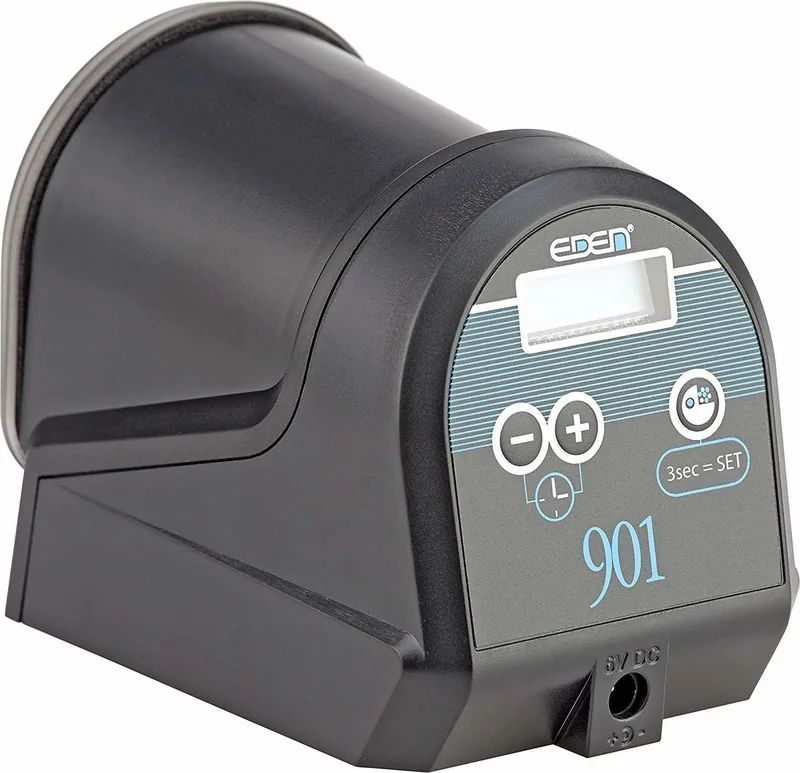
The Eden WaterParadise 901 Automatic Feeder, black Manual is a compact, reliable aquarium feeder designed to keep fish food dry, fresh and dispensed accurately. Its airtight food container protects against humidity, mould and toxins, while a combined translational and rotational movement dispenses food precisely at preprogrammed times. The unit supports up to four feedings per day, each adjustable from one to three rations, offering a maximum of 12 portions per day—ideal for busy hobbyists or aquaria with dense populations.
Equipped with an easy-to-read LCD and simple keypad controls, the feeder lets you set the clock and program feeding events quickly. Default factory settings provide two daily feedings at 08:00 and 18:00 with one ration each, so minimal setup is required for many users. For extended autonomy the 901 runs on four AA 1.5V batteries; a 6V mains adapter is available as an option and the device will seamlessly switch to batteries during a power cut. A bracket attachment can be fitted for secure installation on aquarium frames up to 50 mm thick.
Setup is straightforward: attach adhesive feet or use the optional bracket, insert batteries or connect the adapter (mind voltage and polarity), fill the hopper up to 1 cm from the rim and set the portion slider. The SET key provides manual dispense for testing or extra feed, and combined button presses reveal total feed counts or programmed ration segments. The robust design emphasizes low maintenance: avoid contaminating the central pivot when filling, use crisp or pellet foods for consistent dosing, and remove batteries if unused for long periods.
Programming follows two phases—time and daily feeding schedule—allowing intuitive configuration of hours, minutes and ration counts. Special functions include manual feed, total feed counter and visual indication of rations per feeding. The manual also includes troubleshooting steps for common issues (display off, hopper jamming, sticky rotation) and recommends dry cleaning the pivot and replacing depleted batteries. A 36-month warranty covers manufacturing defects if the unit and proof of purchase are returned intact.
Notes:
- Default program: 2 feedings (08:00, 18:00) with 1 ration each.
- Use non-rechargeable AA batteries; replace after long absences.
- Optional 6V adapter and mounting bracket available.
- Fill hopper to 1 cm from edge and avoid contaminating the central pivot.
- Recommended food: crisps or pellets; crush flakes for uniform distribution.
Search for 67,706 Manuals online


Type-in Brand or Model
Lena Keller
10 months ago
How fast is the shipping, and is the automatic pet feeder easy to fill and set up?
Manual.ly
10 months ago
From customer feedback, shipping is very fast and the overall value for money is strong. The feeder itself is designed to be simple: it is easy to refill and you can set it up quickly without complicated steps. Most users report that filling is straightforward and the settings can be adjusted efficiently right after unboxing.