
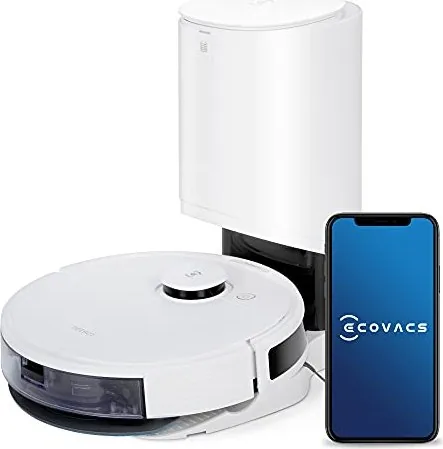
Ecovacs Deebot Ozmo N8+ Manual
PDF manual · 200 Pages
English



Quick check
Incorrect answer, please try again.
Chat with your Ecovacs Deebot Ozmo N8+ manual using AI
Get instant AI answers from your Ecovacs Deebot Ozmo N8+ manual
Ask anything about the Ecovacs Deebot Ozmo N8+. Answers come from this manual, with the pages they are based on.
Deebot Ozmo N8+ Maintenance Schedule
Remove hair and debris from the side brushes twice a month using the provided cleaning tool.
Remove tangled hair and fibers from the main roller brush once a week.
Rinse or tap out dust from the sponge and high-efficiency filters once a week. Ensure they are completely dry before reinstalling.
Wipe the universal wheel, anti-drop sensors, bumper, charging contacts, and station pins with a dry cloth once a week.
If the robot is not used for an extended period, charge it fully every 1.5 months to prevent battery drain.
Install new side brushes every three to six months to ensure effective edge cleaning.
Install new filters every three to six months to maintain suction power and air quality.
Change the main roller brush every six to twelve months depending on wear.
Wash the reusable mopping pad after every use to maintain hygiene and performance.
Swap out the reusable mop pad once it has been washed 50 times.
Remove the water reservoir and empty any remaining water after completing a mopping session.
Free maintenance reminders
Timed to your purchase date. Always free, unsubscribe anytime.
Ask a Question
Do you recommend Deebot Ozmo N8+?
Yes No
Kristopher Morissette
5 months ago
Can the device save more than two floor maps if my home has multiple levels or sections?
Frequently Asked Questions
Yes, it works on carpets. It uses a sensor to detect carpet and will automatically lift the mopping pad to keep it dry while switching to vacuum mode. You can also manually remove the mop plate if you want to vacuum only.
Is this answer helpful?
The auto-empty station holds approximately 30 days of dust. You should replace the dust bag when the indicator light on the station or the app notifies you that it is full.
Is this answer helpful?
No, you should not operate the robot on wet surfaces or areas with standing water. It is designed for dry cleaning or controlled mopping using its own water reservoir.
Is this answer helpful?
The robot supports 2.4GHz Wi-Fi networks. It does not support 5GHz networks. Ensure your router broadcasts a 2.4GHz signal for successful connection.
Is this answer helpful?
Yes, the standard mopping pad is washable and can be reused up to 50 times. However, disposable pads are also available for single-use convenience.
Is this answer helpful?
Advantages and Disadvantages
Advantages

- Auto-empty station holds up to 30 days of dust
- TrueMapping laser navigation for efficient paths
- Intelligent carpet detection lifts mop automatically
- Powerful 2600Pa suction removes deep dirt
- App control allows scheduling and zone setting
Disadvantages

- Requires 2.4GHz Wi-Fi only, not 5GHz
- Mop pads need frequent replacement for best hygiene
- Station takes up significant floor space
- Cannot pick up large objects like stones
- Water tank needs manual refilling for mopping
Product Specification
Cleaning Robot
Battery
14.4V, Li-Ion
Color
white
Capacity
14.08 oz dust, 8.12 oz fresh water
Cleaning Modes
3 cleaning modes: vacuum, vacuum and mop
Navigation
Obstacle sensor, bump sensor, laser sensor, zones, carpet detection, virtual wall (software)
Filtration
yes
Display
no
Features
1 floor brush, 2 side brushes, 1 mop attachment, programmable cleaning times
Smart Home
App control, voice assistant
Runtime
110 min
Charging Time
4 h
Charging System
automatic
Noise Level
67 dB(A)
Dimensions
13.9x3.66 in (D x H)
Package Contents
Station, 2 side brushes, cleaning cloth, 10 disposable cleaning cloths, mop plate, filter, cleaning tool
Station
Station Color
white
Station Display
no
Station Features
automatic charging function, automatic dust emptying
Station Capacity
0.66 gal (dust)
Product Description
Discover the Ecovacs Deebot Ozmo N8+ with Auto-Empty Station
The Ecovacs Deebot Ozmo N8+ represents a significant leap in home automation, combining powerful suction with intelligent mopping capabilities. This all-in-one cleaning solution is designed to handle various floor types effortlessly while maintaining a pristine environment without constant user intervention. The inclusion of the Auto-Empty Station transforms the robot vacuum experience by automatically emptying the dust bin after every cleaning cycle, meaning you can go weeks without ever touching the dirt.
Equipped with TrueMapping technology, the Ozmo N8+ creates precise maps of your home, allowing for efficient navigation and targeted cleaning zones. It intelligently detects carpets and adjusts its performance, automatically lifting the mop when it senses fabric to prevent wetting them. The OZMO mopping system uses a vibrating pad to scrub stubborn stains, ensuring a deep clean on hard floors. With a powerful 2600Pa suction motor, it easily picks up dust, pet hair, and debris from both hard surfaces and carpets.
Control is simplified through the ECOVACS HOME app, which allows you to schedule cleanings, set no-go zones, and monitor progress in real-time. The robot returns to its station to recharge and empty itself, ensuring it is always ready for the next task. Safety features include anti-drop sensors that prevent falls down stairs and an anti-collision bumper to protect furniture. Whether you have pets, children, or just a busy lifestyle, this robot vacuum handles the heavy lifting so you do not have to.
Key Maintenance Tips
To keep your device running at peak performance, remember to replace disposable mopping pads after each use and wash reusable ones every 50 cycles. Side brushes should be cleaned every two weeks and replaced every three to six months. Always ensure the water tank is emptied before charging to avoid battery issues.
Search for 67,706 Manuals online


Type-in Brand or Model
Olivia Hill
5 months ago
Does the mopping function effectively clean dried stains and heavy messes, or is it only suitable for light dusting?
Manual.ly
5 months ago
The Ecovacs Deebot N8+ is designed primarily for maintenance cleaning. While the mopping feature effectively removes light dust and fresh spills, user feedback indicates that it struggles with dried-on stains, sticky residues, or heavily soiled areas. It is best used for daily upkeep rather than replacing manual scrubbing for tough messes.