

e4mobility E4.CC Manual
PDF manual · 12 Pages
English



Quick check
Incorrect answer, please try again.
Chat with your e4mobility E4.CC manual using AI
Get instant AI answers from your e4mobility E4.CC manual
Ask anything about the e4mobility E4.CC. Answers come from this manual, with the pages they are based on.
Ask a Question
Do you recommend E4.CC?
Yes NoFrequently Asked Questions
Press the button to open the charging port without unlocking your phone. It simplifies the process and speeds up access for Tesla owners.
Is this answer helpful?
The cable has an IP54 rating, which provides protection against dust and water splashes for durability.
Is this answer helpful?
No, users are not authorized to repair the device. You must contact a trained person or your dealer for repairs.
Is this answer helpful?
The internal batteries typically last up to five years under normal usage conditions before needing replacement.
Is this answer helpful?
It is compatible with TN-S electrical networks and works with single or three-phase systems.
Is this answer helpful?
Yes, avoid direct fire, do not immerse in water, and do not leave it accessible to children or unauthorized persons.
Is this answer helpful?
Advantages and Disadvantages
Advantages

- Integrated button allows easy charging port access for Tesla vehicles without app usage.
- Robust IP54 rating ensures protection against dust and water splashes.
- Complies with international standards like IEC 62196 for safety and reliability.
- Long battery life of up to five years for the control unit functionality.
Disadvantages

- Requires battery replacement after years which needs specific tools to access.
- Not suitable for vehicles requiring ventilation during the charging process.
- Users cannot repair internal faults without authorized trained personnel.
- Maximum current depends on vehicle characteristics which restricts charging speed.
Product Specification
Infrastructure Connector Type
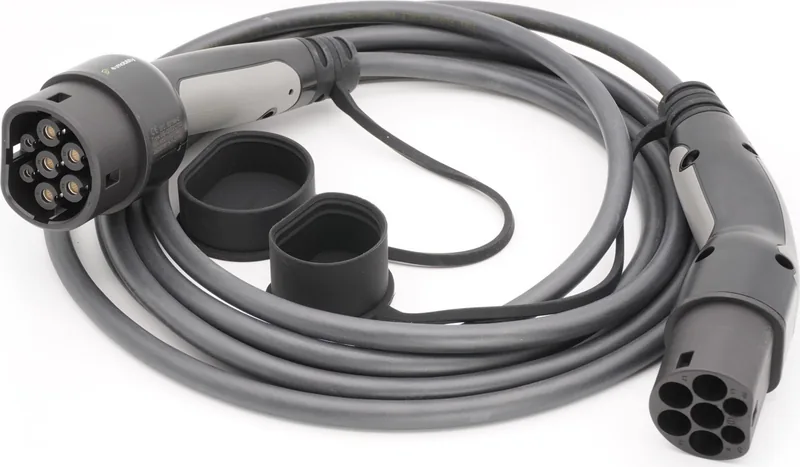
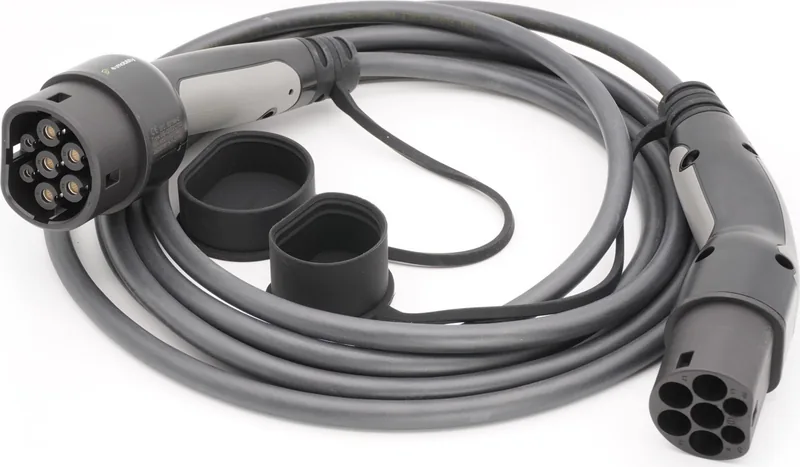
Type 2
Vehicle Connector Type
Type 2
Charging Mode
IEC 61851-1 (Mode 3)
Number of Phases
3-phase
Special Features
Protective caps on both sides
Product Description
Revolutionizing Electric Vehicle Charging
Modern electric vehicle ownership demands efficiency and reliability across the globe. The e4mobility E4.CC. delivers exactly that with advanced engineering and thoughtful design. It is built for those who value convenience without compromising on safety or standards. Every component serves a specific purpose in delivering power efficiently to your battery.
Convenience at the Point of Connection
A notable innovation is the specialized button embedded in the connector assembly. Tesla owners will appreciate the ability to access charging ports effortlessly without delays. There is no need to fumble with phones or unlock apps during the process. This feature speeds up the entire operation significantly for daily users. It reduces friction during daily operations which matters most for time-constrained drivers.
Technical Specifications and Safety Standards
The cable supports various current configurations suitable for different electrical grids. It meets international safety standards like IEC 62196 and 61851-1 completely. Users should review detailed information similar to the e4mobility E4.CC. Manual for full understanding. Durability is ensured through a robust IP54 rating for external elements. It resists dust and water splashes effectively in varied weather conditions.
Operational Guidelines and Care Instructions
Always inspect the cable externally for any visible damage before use. Damage can lead to severe hazards including electric shock or fire. Disconnect from the vehicle before removing the unit from the charging station. Battery life for the control unit reaches up to five years of operation. If needed, replace units using specific tools carefully and strictly follow steps.
Safety Warnings and Compliance
Never expose the unit to direct fire or immerse it in liquids. Ensure no water taps are near the active connection area. Unauthorized modifications to the device can void warranties and cause danger. The user is not authorized to repair the device internally during faults. Only trained persons should attempt installation work on the unit.
Conclusion on Performance and Longevity
This product enhances the overall charging ecosystem for every user. It provides peace of mind through compliance and superior design quality. Regular checks ensure longevity and safety on the road ahead. Embrace modern charging solutions for your electric vehicle today and upgrade your experience.
Battery Replacement Procedure
The control unit relies on standard batteries for its internal power source. The Tesla button function utilizes AAA batteries included within the housing. Lifespan is estimated at five years under normal usage conditions. If the battery fails, disconnect power sources before opening the connector. Use proper tools to access the internal compartment safely.
Network Compatibility and Usage
Compatibility extends to TN-S electrical networks specifically. It works with single or three-phase systems depending on configuration. Maximum current depends on vehicle characteristics and grid capacity. Always verify your grid supports the rated charging current specifications.
Search for 67,706 Manuals online


Type-in Brand or Model