

E-ast CL 500 Manual
PDF manual · 49 Pages
English



Quick check
Incorrect answer, please try again.
Chat with your E-ast CL 500 manual using AI
Get instant AI answers from your E-ast CL 500 manual
Ask anything about the E-ast CL 500. Answers come from this manual, with the pages they are based on.
CL 500 Maintenance Schedule
Inspect the power cord from time to time for damage and other changes. A damaged cord can cause fire or electric shock.
Clean the inverter only with a clean, dry cloth. Never use aggressive liquids.
Ask a Question
Do you recommend CL 500?
Yes NoFrequently Asked Questions
Yes, the unit features a USB port for charging small electronics but sensitive laptops may require the AC output. Note that standard models use a modified sine wave which some sensitive electronics may not handle well. Check your device manual before connecting high value equipment directly to the AC outlet.
Is this answer helpful?
Depending on the specific configuration selected by the user, the unit supports either 12 volt or 24 volt direct current input. Ensure your vehicle or battery system matches the required voltage to avoid damage. Connecting a 12 volt unit to a 24 volt source will cause permanent failure and void the warranty.
Is this answer helpful?
If the internal temperature exceeds 70 degrees Celsius, the unit automatically switches off. A red LED indicator will light up to signal the fault state. Turn off the switch and allow the device to cool for 30 minutes before attempting to restart the system again safely.
Is this answer helpful?
Refer to the official resources provided by the manufacturer on their website. Detailed tables list the rated power, current consumption, and dimensions. Keep the manual handy during setup to verify fuse ratings and electrical limits for your installation type.
Is this answer helpful?
If smoke or noise occurs, disconnect immediately and turn off the unit. Do not attempt to run it again until inspected by a professional. This prevents potential fire hazards and ensures you do not damage your vehicle or property further with a faulty component.
Is this answer helpful?
No, avoid exposing the unit to moisture or extreme temperatures during storage. Do not operate it in proximity to water or under rain. Submersion will cause immediate failure and void all coverage guarantees provided with the purchase from the authorized dealer.
Is this answer helpful?
No, the warranty is voided if authorized personnel do not perform the repairs. Unauthorized repairs or non-authorized modifications exclude you from statutory warranty claims. Always use authorized dealers for service needs to maintain your legal rights and product coverage.
Is this answer helpful?
Advantages and Disadvantages
Advantages

- Built-in USB port provides convenient charging for small devices with minimal power draw requirements for users
- High efficiency rating of 85 percent ensures minimal energy loss during operation to save battery power
- Multiple safety protections including overload and overheating shutdown mechanisms prevent damage to connected equipment
- Compatible with both 12 volt and 24 volt DC input sources for flexible vehicle or system integration
- Compact size allows easy transportation and storage in mobile environments like cars or boats
Disadvantages

- Standard models produce modified sine wave which may not work with highly sensitive electronic equipment
- Installation requires strict attention to polarity to prevent irreversible damage to the internal circuitry
- Direct battery connection required for higher power models to ensure safety and proper current handling
- Warranty is voided if unauthorized personnel attempt to open the housing for repairs or modifications
- Fuses must be replaced with exact specifications to maintain safety ratings and prevent fire hazards
Product Specification
Output Voltage
230V AC Modified Sine Wave
Continuous Power
500W
Peak Power
1000W
Inputs
1x Terminals
Outputs
1x Power Outlet
Average Efficiency
85%
Features
Remote Control, Overheat Protection
Dimensions
4.33x9.45x2.36 in
Weight
2.09 lbs
Product Description
The E-ast CL 500 Overview
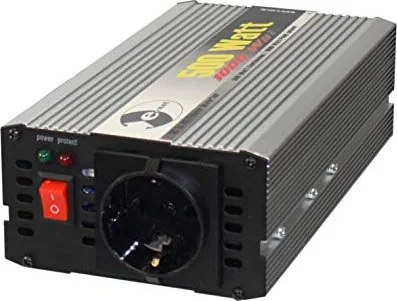
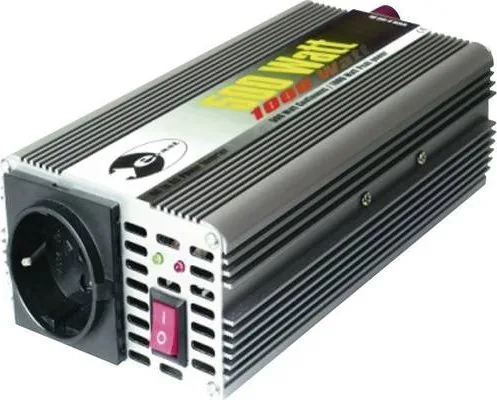
The E-ast CL 500 represents a robust power solution for mobile and off-grid applications. Understanding the E-ast CL 500 Manual is crucial for maximizing the lifespan and safety of this inverter. This device transforms direct current from vehicle batteries or storage systems into standard AC power. With a nominal power rating of 500 Watts, it efficiently runs essential electronics without complex installation procedures. It is a very standout choice for users. Equipment is designed to handle loads found in cars, trucks, or boats. It supports 12 volt and 24 volt input systems depending on the specific configuration selected by the user. The unit integrates a USB port to charge small devices like mobile phones or laptops easily.
Performance and Efficiency
Performance and efficiency remain at the core of the design philosophy. The internal efficiency stands at 85 percent, ensuring minimal energy loss during conversion. For users with sensitive equipment, it is important to note that standard models produce a modified sine wave. Highly sensitive electronics may behave differently compared to pure sine wave models. Check the technical specifications to confirm the correct output type for your specific unit.
Installation and Operation
Maintenance ensures longevity for this electronic gear. Avoid exposing the unit to moisture or extreme temperatures during storage. For further details on troubleshooting and technical data, refer to the official resources provided by the manufacturer. Following the guidelines ensures safe operation for years to come. Keep the invoice safe for future reference in case of issues. Installation varies by specific series. Lower wattage models can plug directly into a cigarette lighter socket safely. Higher wattage models require direct battery connection with heavy duty cables always. Always disconnect the power source before servicing the unit properly. Never allow children to operate the equipment unsupervised ever. Regular inspection of cables prevents wear and tear accidents completely. If smoke or noise occurs, disconnect immediately now.
Search for 67,732 Manuals online


Type-in Brand or Model