
Ducky Origin Manual
PDF manual · 32 Pages
English



Quick check
Incorrect answer, please try again.
Chat with your Ducky Origin manual using AI
Get instant AI answers from your Ducky Origin manual
Ask anything about the Ducky Origin. Answers come from this manual, with the pages they are based on.
Ask a Question
Do you recommend Origin?
Yes NoFrequently Asked Questions
Some models available in the series are non-backlit to maximize battery life or reduce distractions. Check the specific model number like DKOR2308A for regional differences regarding lighting features before purchase.
Is this answer helpful?
Yes, the keyboard features hot-swap sockets. You can use a switch puller to remove and replace mechanical switches without needing a soldering iron to modify the circuit board permanently.
Is this answer helpful?
Hold specific combination keys for three seconds like Windows keys together. The indicator lights will flash three times to confirm the device has been reset and cleared all custom macros.
Is this answer helpful?
Modifications such as changing hardware components or opening the case will void the warranty immediately. Warranty coverage lasts one year from purchase date via official vendors only.
Is this answer helpful?
No, you do not need a PC for basic settings. However, recording complex macros requires inputting sequences on the device itself using function keys and profile switches.
Is this answer helpful?
The unit weighs approximately 1250 grams. This heavy build ensures the keyboard remains stable and does not slide across your desk during intense typing or gaming sessions.
Is this answer helpful?
Yes, you can use DIP 2 to switch away from 6-key rollover for better compatibility. This setting helps utilize NKRO mode which is often useful for Unix based systems.
Is this answer helpful?
Advantages and Disadvantages
Advantages

- Supports 100% hot-swappable switches for easy customization without soldering
- Includes Ducky Macro V2.1 system for complex key recording and automation
- Features DIP switches for hardware-level configuration like NKRO and VID
- Built in Taiwan with high-quality PBT or ABS keycap materials
- Full size layout provides stability with 1250g weight
Disadvantages

- Some models are non-backlit which may limit visibility in dark rooms
- Changing DIP switch settings requires unplugging and replugging the cable
- Any hardware modifications immediately void the one-year warranty
- Requires careful handling to avoid liquid damage which is not covered
- Windows lock function requires key combinations or DIP switches to toggle
Product Specification
Keyboard Layout
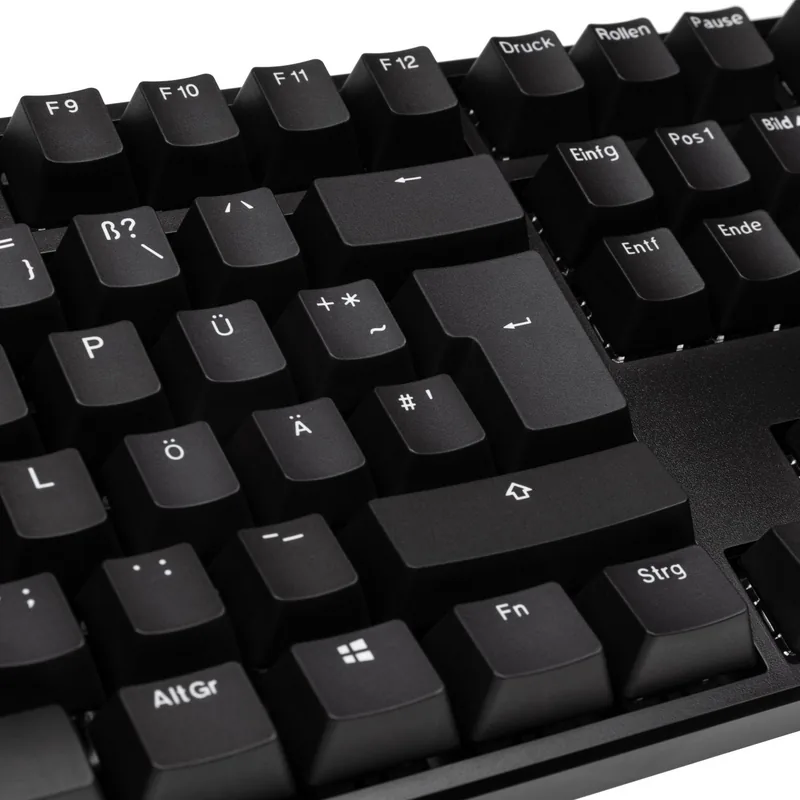
German
Type
Mechanical
Backlight
Not Applicable
Keycap Profile
Standard, with frame
Keycap Shape
Standard
Keycap Dome
Concave
Numpad
Standard
Arrow Keys
Standard
Control Keys
Standard
F Keys
Standard (top row, staggered, 4 groups)
Enter Key
Standard
Delete Key
Standard
Status Indicators
Caps Lock, Num Lock, Scroll Lock
Wrist Rest
Not Applicable
Chassis
Plastic
Connection
Wired, USB-A 2.0, Detachable cable (USB-C port)
Power Source
USB Powered
Dimensions (WxHxD)
17.72 x 1.57 x 5.51 in
Weight
2.76 lbs
Features
4 Multimedia Keys, Anti-Ghosting (N-Key Rollover), Swappable Switches (Hot-Swap only on ESC, Backspace, Enter, L-Shift, R-Shift, Spacebar, Num 0, Num +, Num Enter), FN Key
Switch Manufacturer
Cherry
Switch Series
MX
Lifespan
50 Million
Product Description
Experience the Ducky Origin
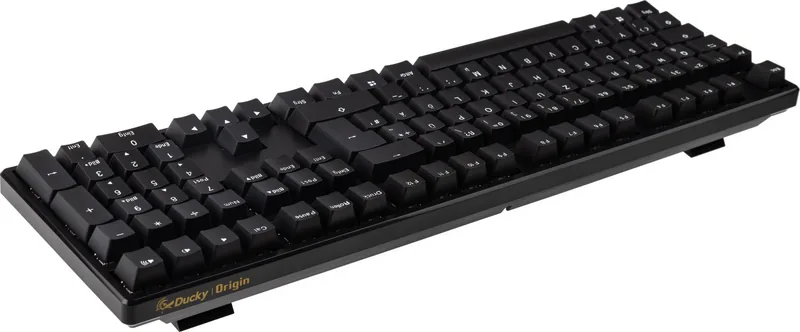
The Ducky Origin keyboard represents a significant step in mechanical typing for modern professionals and gamers. Users appreciate the flexibility offered by this hardware platform for various workloads and daily tasks. Many professionals rely on the Ducky Origin DE Manual to understand specific configurations found in the provided guide. This resource helps users unlock hidden settings effectively during the initial setup process. The design emphasizes utility over flashy aesthetics for a clean desk environment without distractions for focused work sessions.
Customization Capabilities and Features
Hot-swap sockets are integrated into the PCB allowing switch changes without soldering tools or special equipment. This process lets users experiment with different tactile profiles easily without permanent damage to the circuit board. The Ducky Macro V2.1 system provides advanced programming options for repetitive tasks and gaming macros. You can record complex sequences for specific tasks efficiently using the recorded profiles and lighting indicators for feedback. The system supports multiple profiles for different workloads simultaneously and changes via function keys easily. DIP switches allow toggling NKRO modes or configuring Windows key locks from the back of the unit. Note that changes require re-plugging the cable to take effect on the hardware directly.
Hardware Specifications and Build Quality
The physical size measures 450 by 140 by 40 millimeters total for a full size layout. It weighs approximately 1250 grams to ensure stability during intense usage sessions and gaming. Keycaps are available in PBT or ABS materials for maximum durability and longevity on the surface. Production originates from Taiwan with high manufacturing standards for quality control and consistency. Some models offer non-backlit versions for focus while others vary by region depending on distributor choices. This ensures the device meets regional layout requirements accurately for US or EU standards like ANSI or ISO.
Windows Lock Functionality
Windows key lock is controlled by DIP switches or key combinations for security. Left and Right Windows keys combined reset the lock state quickly. This prevents accidental activation of the Start menu during productivity. Use Fn Alt Windows keys to toggle the setting rapidly during use. This helps focus on typing without window interruptions or unwanted menu popups.
Usage Guidelines and Service Policy
DIP switches are located on the underside of the base panel near the cable entry point. They control advanced functions like NKRO and Windows lock for improved productivity settings. Resetting the device requires holding specific keys for three seconds to clear memory and reset defaults fully. Warranty covers one year from purchase via official vendors only for valid warranty claims. Modifications to the hardware void the warranty immediately upon detection by quality inspectors or support teams. Keep liquids away from the board to prevent liquid damage and circuit failure from accidental spills or accidents. This ensures longevity for years of consistent service and enjoyment from the device. Recording macros involves holding Fn Alt Tab and pressing keys sequentially for customization.
Search for 67,706 Manuals online


Type-in Brand or Model