
Ducky One 3 SF Manual
PDF manual · 24 Pages
English



Quick check
Incorrect answer, please try again.
Chat with your Ducky One 3 SF manual using AI
Get instant AI answers from your Ducky One 3 SF manual
Ask anything about the Ducky One 3 SF. Answers come from this manual, with the pages they are based on.
Ask a Question
Do you recommend One 3 SF?
Yes NoVideo Manual
Ducky One 3 Macro Guide
Frequently Asked Questions
This model features hot-swappable Kailh sockets. You can use different mechanical switches without soldering. This allows for customization of tactile and sound profiles.
Is this answer helpful?
Yes, it has full RGB backlit modes with zone customization. Adjust brightness for red, green, and blue. Color palettes and breathing effects are supported.
Is this answer helpful?
You can store up to five distinct profiles on the onboard hardware. Switch profiles easily during work or gaming sessions without external software.
Is this answer helpful?
Yes, it features a true USB Type-C interface. It is compatible with all Type-C devices ensuring modern connectivity for both power and data.
Is this answer helpful?
The warranty covers manufacturing defects for one year from the date of purchase via official vendors. Liquid damage voids this coverage.
Is this answer helpful?
Yes, it includes mouse cursor functions accessible via function combinations. This feature allows navigation without leaving the keyboard area.
Is this answer helpful?
Advantages and Disadvantages
Advantages

- Hot-swap Kailh sockets allow users to change switches effortlessly without soldering.
- N-Key Rollover mode ensures every keystroke registers instantly for gaming.
- Record macros directly on the keyboard using the onboard hardware for customization.
- High-quality PBT keycaps with dye-sublimation printing ensure longevity.
- Compact 65% layout retains navigation keys while saving desk space.
Disadvantages

- DIP switch settings require physical access to the PCB for changes.
- Warranty coverage is voided if the product is exposed to liquid damage.
- Complex macro recording process might confuse beginners initially.
- Mouse cursor functions require specific key combinations to utilize.
- Firmware customization for zones can be time-consuming to perfect.
Product Specification
Layout
DE
Type
Mechanical
Lighting
RGB, per-key individually
Keycap Profile
standard, with frame
Keycap Size
standard
Keycap Dome
concave
Numpad
N/A
Cursor Keys
offset
Control Keys
N/A
F Keys
N/A
Enter Key
Standard
Delete Key
N/A
Status Indicator
N/A
Wrist Rest
N/A
Housing
Plastic
Connection
wired, USB-A 2.0, detachable cable (USB-C port)
Power
USB
Dimensions (WxHxD)
13.19x1.57x4.33 inches
Weight
1.38 lbs
Product Description
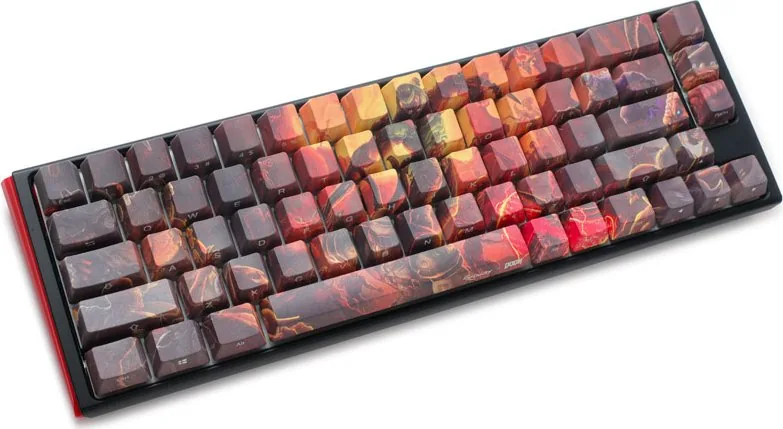
Experience Premium Mechanical Typing with Ducky One 3 SF DOOM Edition
The Ducky One 3 SF DOOM Edition merges robust engineering with a bold visual identity. Designed for serious gamers and productivity users, this mechanical keyboard delivers exceptional performance. The compact form factor frees up desk space while maintaining essential functionality. Players benefit from the tenkeyless layout that positions the cursor closer to the body. The 65% configuration retains navigation keys without the bulk of a full-sized unit.
Robust Build and Materials
Construction utilizes high-quality PBT keycaps with dye-sublimation printing. This method ensures legends remain visible after years of heavy use. The chassis offers stability during intense gaming sessions. Hot-swap Kailh sockets allow users to change switches effortlessly. You do not need to solder to modify your tactile feel or auditory feedback. This flexibility extends the lifespan of the device significantly.
Advanced Lighting and Aesthetics
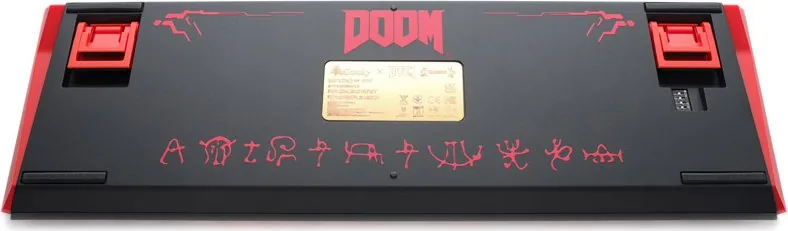
RGB backlit modes bring your setup to life. Customize individual keys or zones with precision. The firmware supports color palettes and breathing effects. You can adjust RGB brightness levels for each primary color channel. Detailed steps in the Ducky One 3 SF, DE Manual explain how to record colors for specific keys. This level of personalization creates a unique atmosphere on your desk. The DOOM themed graphics add a distinctive touch.
Hardware Macro Capabilities
Record macros directly on the keyboard using the onboard hardware. Store up to five distinct profiles for different workflows. Switch profiles quickly during work or gaming. Mouse cursor functions and media keys are integrated into the layout. This reduces the need to reach for external peripherals. Navigation shortcuts are assigned to function key combinations. You can map mouse movements to specific key presses.
System Configuration and Setup
N-Key Rollover mode ensures every keystroke registers instantly. Debounce time settings allow fine-tuning of actuation speed. DIP switches provide options for disabling the F-row toggle or changing vendor identifiers. These settings can be adjusted physically on the PCB for permanent changes. The Windows key lock feature prevents accidental interruptions during gameplay.
Durability and Warranty
Reliability is paramount for high-performance gear. The product comes with a one-year warranty against manufacturing defects. Proper handling prevents liquid damage which voids coverage. Regular maintenance keeps the hot-swap switches functioning correctly. The USB Type-C interface ensures compatibility with modern systems. Contact official vendors for support procedures.
In summary, the Ducky One 3 SF DOOM Edition stands out in the crowded market. It balances style with practical features effectively. Whether you are engaging in competitive matches or writing code, this device excels. The combination of durability, customization, and compact size makes it a preferred choice for enthusiasts.
Search for 67,706 Manuals online


Type-in Brand or Model