
Ducky One 3 Mini Manual
PDF manual · 48 Pages
English



Quick check
Incorrect answer, please try again.
Chat with your Ducky One 3 Mini manual using AI
Get instant AI answers from your Ducky One 3 Mini manual
Ask anything about the Ducky One 3 Mini. Answers come from this manual, with the pages they are based on.
Ask a Question
Do you recommend One 3 Mini?
Yes NoFrequently Asked Questions
Switch to Profile 2–6, then press Fn + Alt + Tab for 3 seconds to start recording. Press the key to assign, input the sequence or multimedia action, press Fn + Alt to jump to another key if needed, and press Fn + Alt + Tab for 1 second to finish and save.
Is this answer helpful?
Yes. The One 3 Mini DE uses hot-swappable Kailh-compatible sockets. Use a keycap puller, switch puller, align switch pins with the PCB holes, and press the switch vertically into the socket while supporting the socket to avoid PCB stress.
Is this answer helpful?
Enter CM recording with Fn + Alt + Caps Lock held for 3 seconds, choose CM1 or CM2, adjust color via Caps Lock + Z/X/C/V, select keys to assign colors, and press Caps Lock + Left Shift to finish. Use Fn + Alt + Space to open the color palette.
Is this answer helpful?
Debounce time can be set to 5, 10 (default), 15, or 25 ms via Fn + Alt + Y/U/I/O combinations. Shorter debounce reduces actuation delay but may risk accidental double-presses; keep default unless specific issues arise.
Is this answer helpful?
Hold Fn + any Alt key + any Windows key for 3 seconds. The keyboard backlight will flash three times to indicate the Windows key has been enabled or disabled.
Is this answer helpful?
DIP switches control behaviors like enabling N-key rollover, toggling F-row function behavior (Fn+\), changing right Windows key to Menu, and enabling a custom vendor ID. Note: DIP state changes often require unplugging the keyboard.
Is this answer helpful?
Yes. Onboard memory stores lighting profiles (including CM1/CM2) and macros tied to selected profiles, so settings persist without external software until you reset or overwrite them.
Is this answer helpful?
Advantages and Disadvantages
Advantages

- Hot-swappable Kailh sockets allow easy switch swaps without soldering.
- Comprehensive onboard RGB with per-key zone customization and color palette.
- Hardware macro recording across multiple profiles and layers—no software needed.
- Compact 60% form factor with true USB-C for portability and compatibility.
- Durable PBT double-shot or laser-engraved keycaps for long-lasting legends.
Disadvantages

- 60% layout omits dedicated arrow and function keys, requiring layer use.
- Onboard programming key sequences can be complex for new users.
- Changing DIP switch states may require unplugging the keyboard to take effect.
- Warranty voided by liquid damage or user modifications—limited flexibility for modders.
- Macro recording limited to Profiles 2–6; Profile 1 reserved for default functions.
Product Specification
Layout
DE
Type
mechanical
Lighting
RGB, per-key customizable
Keycap type
regular, with frame
Keycap format
regular
Keycap shape
concave
Numpad
N/A
Arrow keys
N/A
Control keys
N/A
Function keys
N/A
Enter key
Standard
Delete key
N/A
Status indicator
N/A
Palm rest
N/A
Case
Plastic
Connection
wired, USB-A 2.0, detachable cable (USB-C socket)
Power supply
USB
Dimensions (WxHxD)
12.20x1.57x4.33in
Weight
1.31lb
Product Description
Ducky One 3 Mini DE — Compact Powerhouse
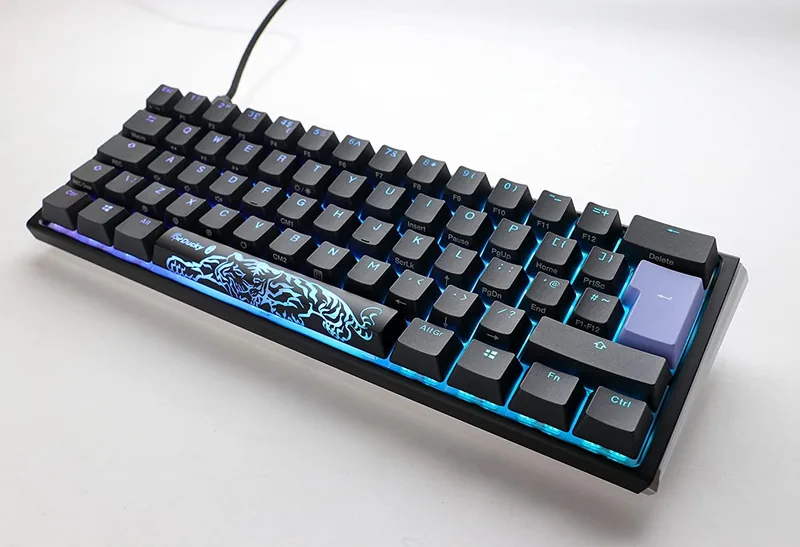
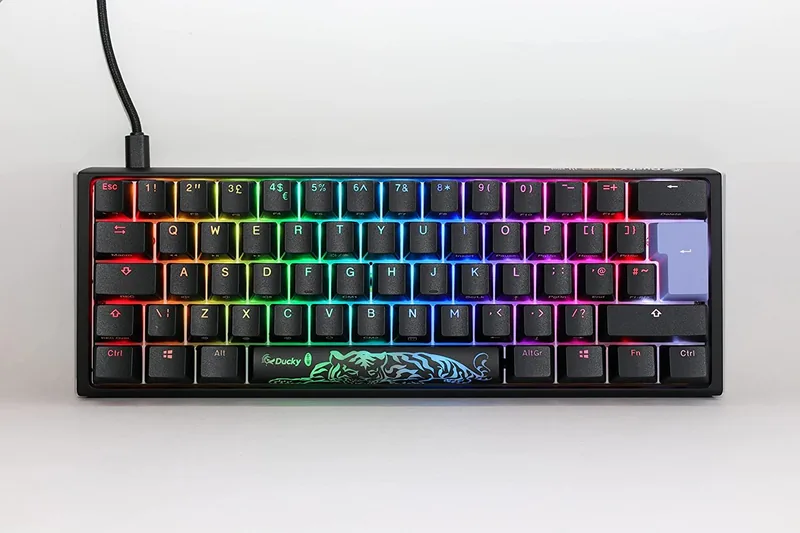
The Ducky One 3 Mini DE is a 60% mechanical keyboard that packs full customization and premium build quality into a travel-friendly form factor. Measuring 310 x 110 x 40 mm and weighing about 650 g, it blends a hot-swappable mechanical design with robust PBT or ABS keycaps (double-shot or laser-engraved printing) and a true USB Type-C interface. Built in Taiwan, the One 3 Mini DE caters to typists, gamers, and creators who want a compact layout without sacrificing features.
Beyond the compact footprint, this keyboard offers full RGB lighting control with multiple built-in modes and per-key zone customization. Two custom memory zones (CM1 and CM2) let users record multi-step lighting profiles, and a palette mode enables on-the-fly color selection. Lighting adjustments include separate R/G/B brightness levels and speed controls, plus a display mode for store or showcase presentations.
Hardware-wise, the hot-swap Kailh-compatible sockets let you change switches freely without soldering. DIP switches provide alternate behaviors like enabling N-key rollover, toggling F-row function behavior, remapping the right Windows key to Menu, and setting a vendor ID. A Windows Lock toggle and factory reset are performed by simple key holds, making configuration quick even without software.
A robust hardware Macro system supports up to six profiles (Profile 1–6), with Profiles 2–6 open for Macro recording. Macros can be recorded across three keyboard layers (standard, Fn, Fn+Alt) and can include multimedia commands, mouse actions, and Windows shortcut sequences. Recording is entirely onboard: press the macro-record combinations to start, assign keys, input sequences, and finish to save. Debounce time is adjustable (5/10/15/25 ms) to fine-tune key response.
Key remapping and special functions are accessible via dedicated key sequences. You can swap modifier keys, change Caps Lock into Fn or Ctrl, and customize specific keys with quick hold-and-press routines. The keyboard also includes clear hot-swap guidance: use a keycap puller and switch puller, align pins, and press switches in vertically to avoid PCB damage.
Whether you want a minimalist desktop, a portable gaming rig, or a programmable compact board for workflows, the Ducky One 3 Mini DE delivers a polished typing experience, deep onboard customization, and durable keycap options. Its hardware-first approach is ideal for users who prefer device-level control and tactile personalization.
Notes
- Macro recording requires switching to Profile 2–6 before recording.
- CM1 has priority over CM2 when zones overlap.
- Changing DIP switch states typically requires replugging the keyboard.
- Liquid damage or hardware modifications void warranty (1 year via official vendors).
Search for 67,706 Manuals online


Type-in Brand or Model