
Dual CS 618Q Manual
PDF manual · 22 Pages
English


Quick check
Incorrect answer, please try again.
Chat with your Dual CS 618Q manual using AI
Get instant AI answers from your Dual CS 618Q manual
Ask anything about the Dual CS 618Q. Answers come from this manual, with the pages they are based on.
CS 618Q Maintenance Schedule
Clean the stylus with a brush from back to front and wipe the record with a carbon fiber brush before playing to prevent wear.
Perform regular inspections of the stylus as it is exposed to natural wear during playback. Replace if worn or damaged.
Ask a Question
Do you recommend CS 618Q?
Yes NoFrequently Asked Questions
Place the platter on the bearing and attach the mat. Connect the power supply and verify the unit is on a level surface to ensure proper operation and alignment.
Is this answer helpful?
Yes it connects to Phono or Line inputs using the rear switch. Select Phono for built-in preamp or Line if your amp has its own preamp.
Is this answer helpful?
Yes you can enable auto-stop via the rear switch. The motor stops automatically at the end of the record to protect the stylus.
Is this answer helpful?
Regularly check for wear. Replace if distorted to avoid damaging your collection. The recommended tracking force helps longevity.
Is this answer helpful?
Set the tracking force between 1.6g and 2.0g for the supplied Ortofon cartridge. Adjust via the counterweight dial for optimal sound.
Is this answer helpful?
The dust cover is designed for the specific chassis. Careful removal and storage maintain its condition for future protection needs.
Is this answer helpful?
Advantages and Disadvantages
Advantages

- Quartz stabilized direct drive ensures consistent speed accuracy
- Built-in phono preamplifier simplifies amplifier connections
- Brushless motor runs quietly without interference noise
- Auto-stop功能 protects records and stylus from wear
- Easy to access setup adjustments for tracking force
Disadvantages

- Manual setup required for correct tonearm balancing
- Stylus wears down over time needing replacement
- Dust cover hinges require careful handling to prevent breakage
- Power supply cable length may limit placement options
- Non-replaceable main housing limits cosmetic customization
Product Specification
Drive Type
Direct
Operation
Manual
Playback Speed
33 rpm, 45 rpm, 78 rpm
Tonearm
Straight
Effective Tonearm Length
8.72 inches
Overhang
0.75 inches
Wow & Flutter
0.07%
Platter
12.01 inches, 3.20 lbs, Aluminum
Cartridge
Ortofon 2M Blue
Audio Connections
Phono Out (RCA), Stereo Line Out (RCA)
Features
Dust cover
Color
Black
Dimensions
17.13x5.71x14.45 inches (WxHxD)
Weight
16.53 lbs
Product Description
Discover the Dual CS 618Q Experience
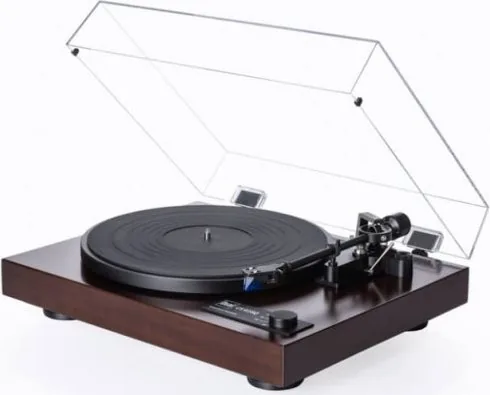
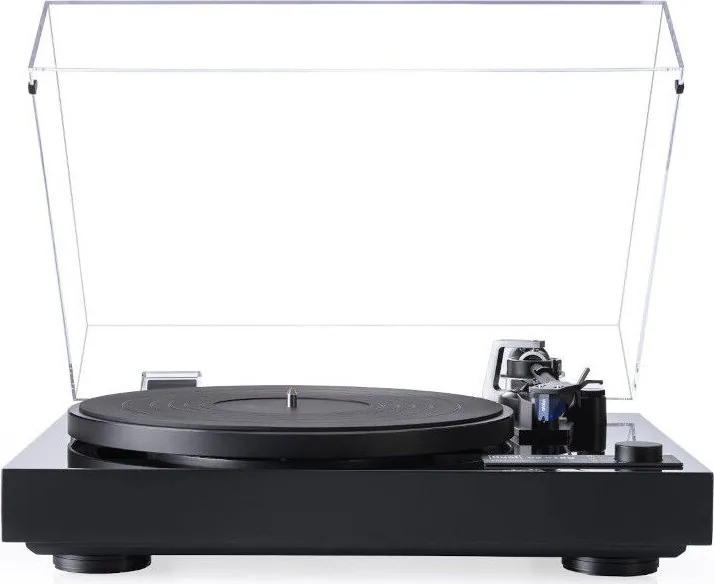
The Dual CS 618Q is a high-quality turntable designed for audiophiles who demand precision and reliability. This direct-drive system offers quartz stabilization, ensuring consistent playback speeds without fluctuations. You will find that the build quality supports vinyl enthusiasts looking for long-term durability. The device features a brushless motor which runs remarkably smoothly without audible noise transmission to the plinth. The aluminum die-cast platter adds mass to enhance frequency response and stability. This machine is crafted to handle the nuances of analog sound reproduction with ease.
Setting Up Your Turntable
Installation is straightforward but requires attention to specific details for the best auditory results. Refer to the Dual CS 618Q Manual guidelines during the setup phase to ensure proper mechanical alignment. Balancing the tonearm is crucial for optimal sound quality and tracking accuracy. You must adjust the anti-skating settings to match the tracking force specifications. This specific process protects your valuable records from unnecessary wear over time. The cartridge comes pre-installed but requires verification of the stylus guard removal before starting playback sessions.
Connectivity and Features
The turntable includes a built-in phono preamplifier providing significant flexibility for audio configurations. It connects via high-quality RCA cables to various amplifiers or receivers. You can switch between line and phono modes easily using the rear switch. The system supports standard vinyl records at 33 45 and 78 RPM simultaneously. The clear dust cover protects the stylus mechanism when not in use by the user. Internal electronics manage power efficiently to maintain performance standards.
Maintenance Requirements
Regular cleaning routines extend the life of your stylus and preserve your cherished records effectively. Use a carbon fiber brush gently on the surface before playing each side. Keep the dust cover on when idle to prevent lint accumulation and dust settling. The rubber platter mat provides essential damping for better sound isolation and reduced resonance. Ensure the device sits on a perfectly level surface for consistent tracking performance.
Important Considerations
Always use the included power supply to avoid potential electrical issues or voltage damage. Check the ground wire connection to reduce hum noise during playback sessions. If you need assistance official support channels provide necessary troubleshooting steps. Keep these operating instructions accessible for future reference and resale value preservation. Enjoy the music with clarity and depth using this robust audio component.
Advanced Playback Functions
Auto-start and auto-stop capabilities add significant convenience to your overall listening experience. The motor stops automatically when the record ends if the specific feature is engaged correctly by the user. A visible LED indicator shows the operational status during all active operation phases. This feature helps prevent accidental playback errors and protects the needle from physical damage over time. You can disable this function manually for extended playback sessions if required by the specific music genre being played.
Final Thoughts
Proper care ensures longevity and maintains high fidelity sound quality for years. The included accessories simplify the process so you can begin playing immediately. Whether you are a beginner or an expert this turntable meets diverse needs. Follow recommended voltage settings and ensure stable connections for optimal results. This device represents a solid investment in high-quality analog audio equipment.
Search for 67,732 Manuals online


Type-in Brand or Model