Manual.ly Logo

Dremel Stylo+ 2050 Manual

4.0 · 4 Ratings

PDF manual · 164 Pages

English

M: OA-GPT-54-NAN
page

/ 164

Loading...
9c8eef9c2a66ff041a179419530e90183af9 page 9
SAFETY INSTRUCTIONS FOR
ALL OPERATIONS
SAFETY WARNINGS COMMON FOR GRINDING,
SANDING, WIRE BRUSHING, POLISHING, CARVING OR
ABRASIVE CUTTING-OFF OPERATIONS
a. This power tool is intended to function as a grinder,
sander, wire brush, polisher, carving or cut-off tool.
Read all safety warnings, instructions, illustrations

Failure to follow all instructions listed below may result
in electric shock, re and/or serious injury.
b. 
designed and recommended by the tool
manufacturer. Just because the accessory can be
attached to your power tool, it does not assure safe
operation.
c. The rated speed of the grinding accessories must
be at least equal to the maximum speed marked on
the power tool. Grinding accessories running faster
than their rated speed can break and y apart.
d. The outside diameter and the thickness of your
accessory must be within the capacity rating of
your power tool. Incorrectly sized accessories cannot
be adequately controlled.
e. The arbour size of wheels, sanding drums or any

collet of the power tool. Accessories that do not
match the mounting hardware of the power tool will run
out of balance, vibrate excessively and may cause loss
of control.
f. Mandrel mounted wheels, sanding drums, cutters
or other accessories must be fully inserted into
the collet or chuck. If the mandrel is insufciently
held and/or the overhang of the wheel is too long, the
mounted wheel may become loose and be ejected at
high velocity.
g. Do not use a damaged accessory. Before each use
inspect the accessory such as abrasive wheels for
chips and cracks, sanding drum for cracks, tear or
excess wear, wire brush for loose or cracked wires.
If power tool or accessory is dropped, inspect for
damage or install an undamaged accessory. After
inspecting and installing an accessory, position
yourself and bystanders away from the plane of
the rotating accessory and run the power tool at
maximum no-load speed for one minute. Damaged
accessories will normally break apart during this test time.
h. Wear personal protective equipment. Depending
on application, use face shield, safety goggles or
safety glasses. As appropriate, wear dust mask,
hearing protectors, gloves and workshop apron
capable of stopping small abrasive or workpiece
fragments. The eye protection must be capable of
stopping ying debris generated by various operations.
The dust mask or respirator must be capable of
ltrating particles generated by your operation.
Prolonged exposure to high intensity noise may cause
hearing loss.
i. Keep bystanders a safe distance away from work
area. Anyone entering the work area must wear
personal protective equipment. Fragments of
workpiece or of a broken accessory may y away and
cause injury beyond immediate area of operation.
j. Hold power tool by insulated gripping surfaces
only, when performing an operation where the
cutting accessory may contact hidden wiring or its
own cord. Cutting accessory contacting a “live” wire
may make exposed metal parts of the power tool “live”
and could give the operator an electric shock.
k. 
the start-up. The reaction torque of the motor, as it
accelerates to full speed, can cause the tool to twist.
l. Use clamps to support workpiece whenever
practical. Never hold a small workpiece in one
hand and the tool in the other hand while in use.
Clamping a small workpiece allows you to use your
hand(s) to control the tool. Round material such as
dowel rods, pipes or tubing have a tendency to roll
while being cut, and may cause the bit to bind or jump
toward you.
m. Position the cord clear of the spinning accessory.
If you lose control, the cord may be cut or snagged
and your hand or arm may be pulled into the spinning
accessory.
n. Never lay the power tool down until the accessory
has come to a complete stop. The spinning
accessory may grab the surface and pull the power
tool out of your control.
o. After changing the bits or making any adjustments,
make sure the collet nut, chuck or any other
adjustment devices are securely tightened. Loose
adjustment devices can unexpectedly shift, causing
loss of control, loose rotating components will be
violently thrown.
p. Do not run the power tool while carrying it at your
side. Accidental contact with the spinning accessory
could snag your clothing, pulling the accessory into
your body.
q. Regularly clean the power tool’s air vents. The
motor’s fan will draw the dust inside the housing and
excessive accumulation of powdered metal may cause
electrical hazards.
r. 
materials. Sparks could ignite these materials.
s. Do not use accessories that require liquid coolants.
Using water or other liquid coolants may result in
electrocution or shock.
KICKBACK AND RELATED WARNINGS
Kickback is a sudden reaction to a pinched or snagged
rotating wheel, sanding band, brush or any other
accessory. Pinching or snagging causes rapid stalling
of the rotating accessory which in turn causes the
uncontrolled power tool to be forced in the direction
opposite of the accessory’s rotation.
For example, if an abrasive wheel is snagged or pinched
by the workpiece, the edge of the wheel that is entering
into the pinch point can dig into the surface of the material
causing the wheel to climb out or kick out. The wheel may
either jump toward or away from the operator, depending on
direction of the wheel’s movement at the point of pinching.
Abrasive wheels may also break under these conditions.
Kickback is the result of power tool misuse and/or incorrect
operating procedures or conditions and can be avoided by
taking proper precautions as given below.
a. 
your body and arm to allow you to resist kickback
forces. The operator can control kickback forces, if
proper precautions are taken.
b. Use special care when working corners, sharp
edges etc. Avoid bouncing and snagging the
accessory. Corners, sharp edges or bouncing have
a tendency to snag the rotating accessory and cause
loss of control or kickback.
c. Do not attach a toothed saw blade. Such blades
create frequent kickback and loss of control.
d. Always feed the bit into the material in the same
direction as the cutting edge is exiting from the
material (which is the same direction as the chips
are thrown). Feeding the tool in the wrong direction
causes the cutting edge of the bit to climb out of the
work and pull the tool in the direction of this feed.
9

Chat with your Dremel Stylo+ 2050 manual using AI

Get instant AI answers from your Dremel Stylo+ 2050 manual

Ask anything about the Dremel Stylo+ 2050. Answers come from this manual, with the pages they are based on.

Stylo+ 2050 Maintenance Schedule

Regular
Clean ventilation openings and switch levers

Keep air vents and switch levers clean and free of foreign matter using compressed dry air. Do not insert pointed objects.

Show in the manual (page 12)
Before each use
Inspect accessories for damage

Check grinding wheels for chips and cracks, sanding drums for tears or wear, and wire brushes for loose wires before every operation.

M: QW-35-FL

Ask a Question

0/1000

Do you recommend Stylo+ 2050?

Yes No
0
User Pic

Benoît Hamel

8 months ago

I find the chuck lock button awkward. When I switch off, I accidentally press it with the power button and it makes a creaking sound. Is this normal, and how can I prevent it?

0
User Pic

Manual.ly

8 months ago

The chuck lock switch is positioned opposite the power button, so pressing both at once can cause a brief mechanical noise. To prevent it, make sure the chuck lock is not engaged when turning the device off: power down first, then release the lock with your other hand (or briefly pause so your fingers are not on both buttons). After that, resume normal operation. If the noise continues even when you are careful not to press both buttons simultaneously, try cleaning around the switch area and check for any visible obstruction. If it still persists, please contact support with a short video so we can review the device.

M: OA-GPT-5-NAN
M: OA-GPT-5-NAN

Frequently Asked Questions

A

It is best for detailed tasks such as engraving, polishing, sanding, carving, cleaning, and light cutting. Its slim shape makes it especially useful when precision matters more than power.

Is this answer helpful?

A

Yes, this version includes accessories, making it ready for a variety of small projects. The included tools expand its use beyond a basic grinder and support more creative applications.

Is this answer helpful?

A

Yes. The tool features variable speed control, so you can adjust performance to suit the material and the task. Lower speeds are useful for polishing; higher speeds suit harder materials.

Is this answer helpful?

A

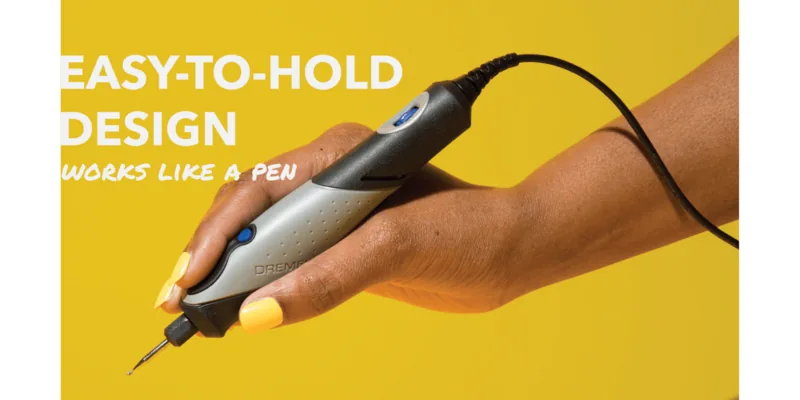
Yes. Its tapered, pen-like design is made for control and comfort. It feels natural in the hand and is ideal for fine, guided movements over small surfaces.

Is this answer helpful?

A

Use proper eye and dust protection, avoid excessive pressure, and make sure accessories are mounted securely. Also choose the correct speed for the material to prevent damage.

Is this answer helpful?

A

It is better suited to precision and light-duty work than heavy grinding. For demanding material removal, a larger and more powerful tool would be a better choice.

Is this answer helpful?

M: OA-GPT-54-NAN

Advantages and Disadvantages

Advantages

  • Slim pen-style grip makes detailed work easier and more comfortable.
  • Variable speed control helps match different materials and tasks.
  • Compatible with multiple accessories for polishing, carving, sanding, and engraving.
  • Lightweight build reduces fatigue during longer projects.
VS

Disadvantages

  • Not ideal for heavy-duty grinding or aggressive material removal.
  • Best results require careful speed selection and a light touch.
  • Some accessories may need practice to mount and balance correctly.
  • Dust, noise, and safety precautions are still important during use.
M: OA-GPT-54-NAN

Product Specification

Type

Straight grinder

Power

9W (230V)

No-load speed

5000-22000/min

Tool holder

0.03-0.13 in quick-release drill chuck, collet

Special features

Speed regulation

Weight

0.24 lb

Scope of delivery

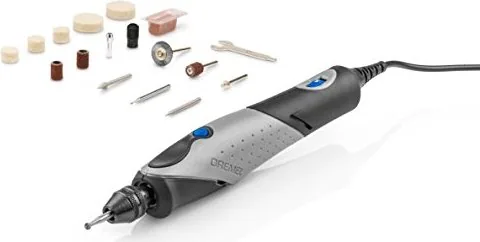
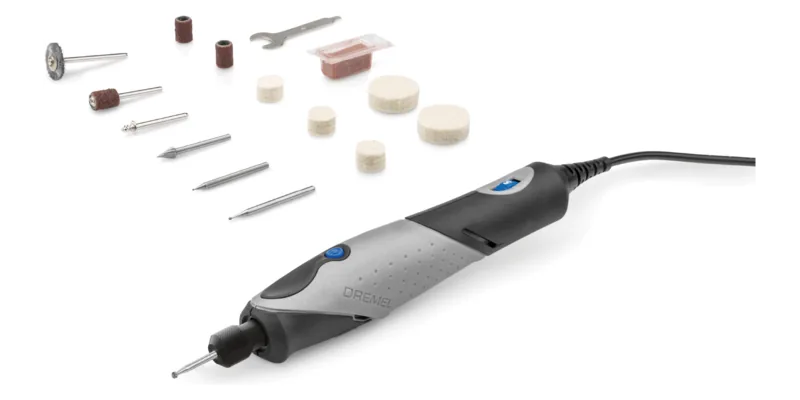
15-piece accessory set

M: OA-GPT-54-NAN

Product Description

Dremel Stylo+ Electric Straight Grinder with Accessories (2050-15)

The Dremel Stylo+ electric straight grinder is designed for people who want precision in a slim, easy-to-hold format. Its pen-like body makes it feel natural in the hand, which is especially helpful for detail work that demands control rather than brute force. With the included accessories, this compact tool becomes a flexible companion for polishing, cleaning, carving, sanding, engraving, and light cutting tasks.

A small tool with big versatility

One of the most appealing things about the Stylo+ is how approachable it feels. Instead of a bulky housing, it offers a tapered shape that supports fine, guided movements. That makes it a smart choice for hobby projects, craft finishing, model work, and delicate repair jobs. The variable speed control adds another layer of usefulness, letting you adapt the tool to the material and the task.

Built for detailed work

The included manual emphasizes proper speed selection and safe handling, which says a lot about the tool’s purpose: it is made to perform best when used with a light touch. The grinder works with a range of Dremel accessories, and the chuck system helps make accessory changes faster and easier. For users who want more precise holding power, the collet system is also available. That flexibility is a real advantage when switching between polishing felt, sanding drums, cutters, or engraving bits.

Practical performance in everyday use

At its core, the Stylo+ is about convenience and control. It is lightweight, easy to maneuver, and suitable for long sessions where hand fatigue matters. The tool’s speed range helps match the workpiece: lower speeds are better for polishing and sensitive materials, while higher speeds suit wood, metal, glass, and shaping work. That makes it a dependable option for creators who move between different surfaces and techniques.

Safety and care matter

Like any rotary tool, the Stylo+ rewards careful use. The manual highlights protective eyewear, dust protection, and proper accessory mounting as essentials. It also reminds users to avoid excessive pressure, because the tool is designed to let the accessory do the work. Regular cleaning and correct storage will help keep it running smoothly over time.

Notes

  • Best results come from choosing the right accessory and speed.
  • A gentle touch improves accuracy and reduces wear.
  • Use appropriate protection when dust or sparks may occur.

In short, the Dremel Stylo+ is a neat solution for precision-driven projects. It combines portability, control, and accessory flexibility in a format that feels well suited to detailed creative work.

M: OA-GPT-54-NAN

© Copyright 2026 Manual.ly
