
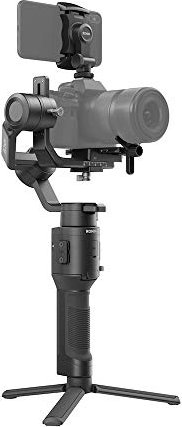
DJI Ronin-SC Manual
PDF manual · 30 Pages
English



Advantages and Disadvantages
Advantages

- Compact 3-axis stabilization designed for mirrorless cameras with a 2.0 kg payload capacity.
- Detachable grip with 2450 mAh battery offering up to 11 hours standby when balanced.
- Rich Ronin app features: ActiveTrack 3.0, Force Mobile, Panorama, Timelapse, Motionlapse, Motion Control.
- Physical axis locks and individual axis balancing for reliable setup and transport.
- Accessory ports (RSA, USB-C) allow focus motors, phone holder, and camera control integration.
Disadvantages

- Not waterproof—requires careful protection from dust and moisture.
- Payload limit (2.0 kg) restricts use with heavier DSLR setups and larger accessories.
- Some features (ActiveTrack 3.0, Force Mobile) require correct phone-holder mounting and compatible devices.
- Balancing and Auto Tune needed after payload changes; learning curve for optimal tuning.
- Camera control compatibility depends on model and proper cable connections; playback may be limited with USB-C.
Ask a Question
Frequently Asked Questions
Ronin-SC supports mirrorless cameras and smaller setups with a combined payload up to 2.0 kg. Refer to DJI's Ronin-SC Camera Compatibility List on the official product page for the most current supported models and recommended configurations.
Is this answer helpful?
The grip houses a 2450 mAh battery with a maximum standby time up to 11 hours when the gimbal is well balanced and has no accessories attached. Real-world runtime varies with payload, usage mode, and motor load.
Is this answer helpful?
Mount the phone holder to the camera hot shoe and secure your phone in landscape mode, connect to the Ronin app, select ActiveTrack, and follow on-screen prompts. ActiveTrack 3.0 requires the phone holder placed on the camera and works best in plain backgrounds.
Is this answer helpful?
Auto Tune automatically calculates optimal motor stiffness based on your mounted payload. Use Auto Tune after balancing and whenever the camera, lens, or accessories change to ensure stable motor performance and prevent excessive power draw.
Is this answer helpful?
Yes — Roll 360 is available in Flashlight mode with channel remapping in the Ronin app (map CH3 to roll and set CH1 to N/A). Follow app instructions and safety guidance to perform continuous roll maneuvers.
Is this answer helpful?
Charge the grip using a 5V/2A USB adapter via USB-C. Avoid charging above 40°C or below 5°C. For long-term storage, keep the battery at 30–50% charge and store in a cool, dry place; discharge to below 30% before air travel per regulations.
Is this answer helpful?
Wipe the gimbal with a soft dry cloth after use, protect it from water and dust, avoid using non-DJI batteries, calibrate via the Ronin app if drift occurs, update firmware regularly, and follow safety guidelines for battery handling and disposal.
Is this answer helpful?
Product Description

DJI Ronin-SC Manual: Compact Professional Gimbal
The DJI Ronin-SC is a lightweight, single-handed 3-axis gimbal engineered for mirrorless cameras and creators who need smooth, cinematic motion without bulk. Designed to support up to 2.0 kg of payload, the Ronin-SC brings pro-level stabilization, multiple operation modes, and an app-driven workflow into a compact package. With detachable grip and gimbal, a 2450 mAh built-in battery, and a host of accessory ports, it balances portability with extensibility.
The gimbal offers SmoothTrack, Lock, and Sport modes for adaptable shooting. SmoothTrack provides silky transitions following handheld movement, Lock holds framing steady, and Sport mode increases responsiveness for fast action. The updated 360 Roll algorithm and Roll 360 capability (with proper channel mapping and Flashlight mode) enable continuous rotation for creative, dynamic shots. Physical axis locks on pan, tilt, and roll make setup and transport simple, and each axis can be individually balanced for optimal motor performance and battery life.
A robust app ecosystem (Ronin app for iOS and Android) unlocks ActiveTrack 3.0, Force Mobile, Panorama, Timelapse, Motionlapse, Motion Control, virtual joystick control, motor auto-tuning, and detailed motor parameter adjustments (stiffness, power, and diagnostics). ActiveTrack 3.0 leverages deep learning to follow human subjects reliably when the phone holder is mounted in the correct position. Force Mobile lets users steer the gimbal by tilting a phone. Auto Tune simplifies motor setup after balancing, while user profiles and custom channel mapping let operators tailor responsiveness and control mapping.
Mounting and balancing are emphasized: prepare camera, attach riser plate or dovetail plate as needed, secure lens support, and balance depth, vertical tilt, roll, and pan axes before powering on. Proper balance reduces motor strain and extends runtime. The camera control port supports shutter, recording, and focus control via provided cables (follow compatibility list). The Ronin-SC also includes an RSA port for accessories such as focus motors and wheels, a USB-C power port, Bluetooth 5.0 connectivity, and configurable joystick and trigger behaviors (recenter, lock mode, 180° flip, joystick calibration).
Safety and maintenance are covered in detail: the grip battery must be charged correctly, stored at recommended levels, and handled per safety guidelines to avoid damage. The unit is not waterproof; clean with a dry cloth and protect from dust and moisture. Firmware updates and system calibration are done through the Ronin app. Specifications include approximate weights, dimensions, battery capacity, charging time, operating temperature range, and mechanical endpoint limits.
Notes:
- Always balance the gimbal with full accessories and cables attached before powering on.
- Use only recommended DJI batteries and a 5V/2A adapter for charging.
- Mount the phone holder properly for ActiveTrack 3.0 and Force Mobile.
- Use Auto Tune after every major payload change for optimal motor settings.
- Keep firmware up to date via the Ronin app for best performance.
Search for 370 Manuals online


Type-in Brand or Model