

DJI Osmo Mobile 3 Manual
PDF manual · 16 Pages
English



Advantages and Disadvantages
Advantages

- Compact, foldable design for easy transport and storage.
- 3-axis stabilization delivers smooth, professional-looking footage.
- Extensive app features: ActiveTrack 3.0, Story, Hyperlapse, Timelapse, Pano.
- Long battery life (up to 15 hours) and phone charging via USB-A.
- Tactile controls (joystick, trigger, M/shutter buttons) for fast operation.
Disadvantages

- Some advanced camera settings (FPS, ISO, shutter) limited to iOS devices.
- ActiveTrack increases phone power draw and device temperature.
- Requires balancing while powered off—extra setup step for quick shots.
- Performance can be affected by magnetic interference; calibration needed.
- Not all phones fit; limited to certain weights, thicknesses, and widths.
Ask a Question
Frequently Asked Questions
The Osmo Mobile 3 is a foldable 3-axis smartphone gimbal that stabilizes video, enabling smooth pan, tilt, and roll movements while offering features like ActiveTrack, Story mode, Hyperlapse, Timelapse, and panorama through the DJI Mimo app.
Is this answer helpful?
The built-in 2450 mAh battery charges in about 2.5 hours with a 10 W charger and offers up to 15 hours of runtime under ideal, fully balanced conditions. Actual runtime varies with usage, features like ActiveTrack, and phone load.
Is this answer helpful?
Mount the phone while the gimbal is powered off, keep the phone holder vertical, use anti-slip pads if needed, and slide the phone and holder left/right or tilt until the phone remains balanced when released before powering on.
Is this answer helpful?
Features like ActiveTrack 3.0, Story templates, Hyperlapse, Timelapse, Pano, firmware updates, camera/gimbal settings, and activation require the DJI Mimo app for full functionality and live camera view.
Is this answer helpful?
Connect the gimbal to your phone via Bluetooth, open DJI Mimo, follow the prompts if an update appears, ensure battery is at least 15%, stay in the app during the update, and wait for the LED to show a successful status.
Is this answer helpful?
Osmo Mobile 3 supports Follow, Tilt Locked, and FPV gimbal modes, plus Upright, Underslung, and Side Grip user modes; Sport mode increases follow speed for fast action when engaged.
Is this answer helpful?
Compatible phones fit within the dimensional and weight limits: diagonal ≤ 180 mm (≤ 7.08 in), thickness ≤ 9.5 mm, width 62–88 mm, and approximate weight around 200 ± 30 g. Check your device dimensions to confirm fit.
Is this answer helpful?
Product Description

DJI Osmo Mobile 3 Manual — Smooth Mobile Filmmaking
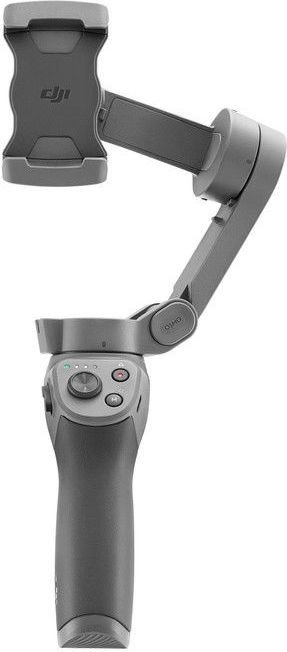
The DJI Osmo Mobile 3 is a compact, foldable 3-axis gimbal that transforms a smartphone into a stabilized camera for smooth, professional-looking video. Lightweight and ergonomic, it’s designed for creators who want stable footage on the go without bulky rigs. The gimbal supports portrait and landscape orientations, underslung and side-grip modes, and mounts to tripods or accessories via a 1/4"–20 port.
Using the DJI Mimo app, Osmo Mobile 3 unlocks features such as ActiveTrack 3.0 for subject tracking, Story mode templates, Hyperlapse, Timelapse, Pano, Slow Motion (iOS), and on-device camera controls. ActiveTrack 3.0 uses head-and-shoulder and face detection to keep people centered and supports gesture and one-press activation for hands-free tracking. The joystick, trigger, zoom slider, and M/shutter buttons on the handle provide direct, tactile control—allowing quick mode switching, recentering, lock and sport modes, and portrait/landscape toggles.
Battery life is competitive for its class: a 2450 mAh (7.2 V) 18650 Li-ion pack charges in about 2.5 hours (with a 10 W adapter) and offers up to 15 hours runtime under ideal conditions. The gimbal can charge a phone via its USB-A port, and the USB-C port is used for its own charging. Built-in battery indicators, system LEDs, and Bluetooth Low Energy 5.0 connectivity make device management straightforward. Firmware updates are handled through DJI Mimo and typically take a few minutes; the app guides activation, updates, and calibration.
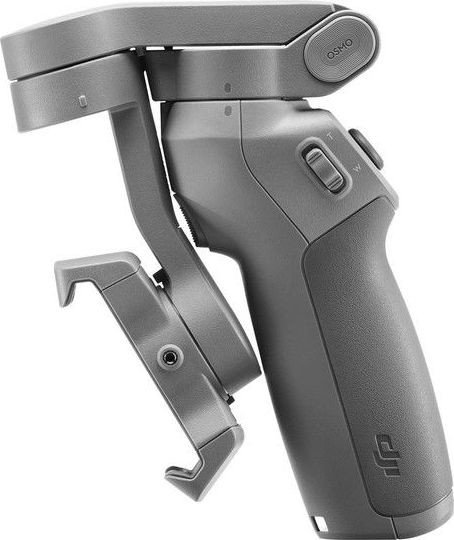
Mounting and balancing are recommended while the gimbal is powered off: adjust the phone holder, use anti-slip pads if needed, and fine-tune left/right and tilt balance so the phone holds level when released. The manual emphasizes safe folding and storage (fold when powered off and align axis markers), as well as routine maintenance and calibration to avoid drift. The mechanical ranges, controllable speed, compatible phone sizes, and temperature/charging specs are clearly defined for reliable operation across environments.
Whether shooting vlogs, travel videos, or action sequences, the Osmo Mobile 3 pairs intuitive hardware controls with a capable app to make cinematic mobile videography accessible.
Notes
- Balance the phone before powering on for best performance.
- Keep battery above 15% before firmware updates.
- Use DJI Mimo for full features: ActiveTrack, Story templates, and advanced camera settings.
Search for :pdfCount Manuals online


Type-in Brand or Model