
Dimplex DX 521 Manual
PDF manual · 55 Pages
English



Quick check
Incorrect answer, please try again.
Chat with your Dimplex DX 521 manual using AI
Get instant AI answers from your Dimplex DX 521 manual
Ask anything about the Dimplex DX 521. Answers come from this manual, with the pages they are based on.
DX 521 Maintenance Schedule
Disconnect from mains and let cool. Wipe outside with a soft damp cloth. Do not use scouring powder or furniture polish.
Dust accumulations inside the device can be removed from the outside using a vacuum cleaner.
Ask a Question
Do you recommend DX 521?
Yes NoFrequently Asked Questions
Children aged 8 and over can use it if supervised. Children 3 to 8 can switch it on or off if instructed and supervised but cannot clean it.
Is this answer helpful?
Hold PROG key for three seconds. Use +/- buttons to set hours, minutes, and weekday. Press ENTER to save the setting.
Is this answer helpful?
Frost protection activates when room temperature falls to 5 degrees Celsius or less in manual off or auto off blocks.
Is this answer helpful?
No, extension cables are strictly prohibited. Plug must be accessible and device connected directly to earthed socket.
Is this answer helpful?
Disconnect from mains. Wipe outside with soft damp cloth. Do not use abrasive powder. Remove dust from outside with vacuum.
Is this answer helpful?
The product is supplied with a two-year warranty according to guarantee conditions.
Is this answer helpful?
Overload protector switches off device if air circulation stopped. Disconnect power for minutes to cool before restarting.
Is this answer helpful?
Advantages and Disadvantages
Advantages

- Adjustable electronic controller features a clear display and multiple buttons for easy navigation of heating functions.
- Built-in frost protection activates automatically if room temperature drops to 5 degrees Celsius or less safely.
- Overload protector switches the device off automatically if air circulation is interrupted preventing dangerous overheating.
- Weekly automatic programming offers four time blocks per day allowing customized scheduling for energy efficiency.
- Keypad lock function prevents unauthorized changes to temperature settings ensuring safer operation for users.
Disadvantages

- Using extension cables is strictly prohibited to prevent electrical hazards and ensure safe installation standards.
- Installation requires a minimum clearance of 500 millimeters in front for unobstructed air intake and safety.
- Children under 3 years of age must be constantly supervised or kept away to prevent potential accidents.
- Rooms containing flammable substances like solvents should not operate this device to avoid dangerous situations.
- No factory default time blocks exist in automatic mode requiring manual setup for weekly programming initially.
Product Specification
Power
2kW (230V)
Color
White
Heat settings
2 heat settings (1200/2000W)
Features
Overheat protection, Frost protection, Auto shut-off (Tilt sensor), Thermostat control
Protection class
IP20
Mounting type
Freestanding
Dimensions
23.03x17.44x9.17 in (WxHxD)
Weight
8.27 lbs
Product Description
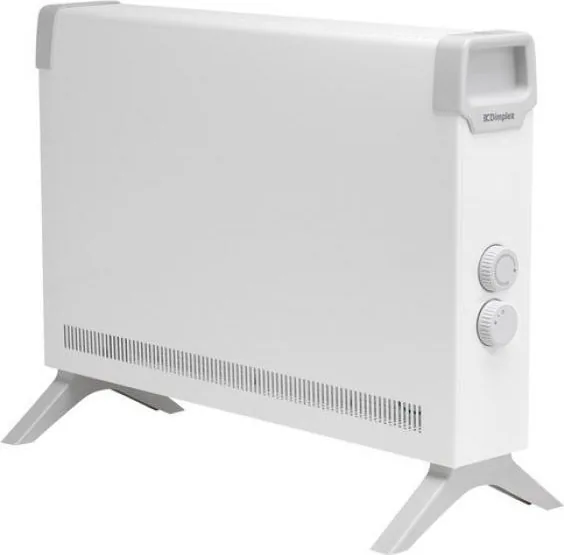
Understanding the Glen Dimplex DX 521 Pedestal Convector Manual
When selecting heating equipment for residential space, understanding the Glen Dimplex DX 521 Pedestal Convector Manual is crucial for performance. This guide outlines operational procedures to maintain efficient room heating. The appliance is engineered for use within enclosed rooms only, providing reliable warmth. Proper usage prevents overheating and ensures longevity. Users should keep instructions safe to share with future owners. The manual emphasizes device operation follows provided information.
Operational Controls and Programming
The system features an adjustable electronic controller with a display screen. Users can navigate five buttons to manage functions. The MODE button allows switching between manual operation and automatic weekly programming. The PROG key facilitates setting the current time. Users must press keys for three seconds to enter settings. Temperature settings adjust between 5 to 30 degrees Celsius. Heating levels vary from 0.8 kilowatts up to 3.0 kilowatts. This flexibility allows users to customize energy consumption. The automatic mode offers four time blocks per day copied across weekdays. Frost protection activates if temperature falls to 5 degrees Celsius or less during off times.
Safety and Installation Requirements
Installation must adhere to clearance distances for air circulation. The unit should be positioned horizontally on a vertical structure. Minimum clearance of 500 mm is needed in front. Do not install below a wall socket. Children under 3 years must be kept away. The device includes an overload protector switching off if circulation interrupted. Using extension cables is prohibited. The power supply cord must be replaced by qualified persons if damaged. Rooms with flammable substances like solvents should not operate this device.
Maintenance and Warranty Information
Regular maintenance keeps the unit clean. Disconnect power supply before cleaning with a soft damp cloth. Do not use abrasive powders. Dust inside removed from outside with vacuum. Key pad can be locked to prevent changes. Manufacturer provides a two-year warranty. At end of life, device requires recycling. Never dispose of in household waste. Dimensions measure 585 millimeters wide by 383 millimeters high. Weight ranges 3.8 to 4.5 kilograms. The manual ensures safe and reliable service for years.
Technical Data and Troubleshooting
If device emits no heat, check heating level. Verify fuse in switch box is on. Heat output varies 1.2 to 3.0 kilowatts. Standby mode consumption is 0.5 watts. Ensure plug is accessible. Contact specialist if faults persist. Mention the product number and production date found on the type plate. This ensures fast and accurate service responses. Always store the instructions with the device for future reference regarding technical specifications.
Search for 67,732 Manuals online


Type-in Brand or Model