
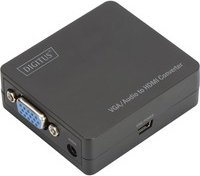
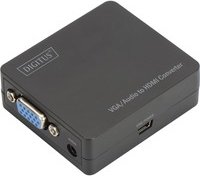
Digitus VGA/Audio to HDMI Adapter Manual
PDF manual · 4 Pages
English



Advantages and Disadvantages
Advantages

- Plug-and-play operation requires no drivers, enabling quick setup.
- Combines VGA video and stereo audio into a single HDMI output up to 1080p.
- Compact, lightweight design (60.5 x 54 x 20.5 mm; 42 g) for easy portability.
- Supports multiple PC and HDTV resolutions plus 12-bit per channel deep color.
- USB-powered—can be run from a display USB port or external USB adapter.
Disadvantages

- Requires a separate stereo audio connection; VGA alone provides no sound.
- Dependent on USB power; low-power USB ports may cause instability.
- Limited to 1080p max—no native 4K support for higher-resolution displays.
- No advanced scaling or EDID management; output depends on source compatibility.
- Analog-to-digital conversion may show minor artifacts with low-quality cables.
Ask a Question
Frequently Asked Questions
Yes. The adapter supports up to 1920x1080@60Hz, along with many other common PC resolutions listed in its specifications.
Is this answer helpful?
No drivers or software are required. The adapter is plug-and-play: connect VGA and stereo audio inputs, plug in HDMI out, and power it via the USB cable.
Is this answer helpful?
Power is supplied via the included USB power cable. You can connect it to a USB port on your display, a computer USB port, or an external USB power adapter.
Is this answer helpful?
VGA carries only video, so you must connect a separate stereo audio source to the adapter’s audio input. The adapter integrates that audio into the HDMI output.
Is this answer helpful?
Yes. It outputs a standard HDMI signal compatible with HDTVs, monitors, and projectors that accept HDMI input and common resolutions including interlaced and progressive formats.
Is this answer helpful?
The adapter operates between 0°C and 70°C and 10%–85% relative humidity (no condensation). Storage ranges are -10°C to +80°C and 5%–90% RH (no condensation).
Is this answer helpful?
The package typically includes the VGA+stereo-to-HDMI mini converter, a USB power cable, and a user manual.
Is this answer helpful?
Product Description

Digitus VGA/Audio to HDMI Adapter Manual
The Digitus VGA/Audio to HDMI Adapter converts analog VGA video and stereo audio into a single digital HDMI output, making it simple to connect older PCs, laptops, or other VGA devices to modern HDMI displays, TVs, or projectors. Compact and plug-and-play, this adapter merges VGA video and a separate 3.5mm audio feed into a 1080p-capable HDMI stream without drivers. Its small footprint and USB-powered design make it suitable for home, office, classroom, or on-the-go setups.
How it works
The adapter accepts a VGA video input and a stereo audio input, processes and digitizes the signals, and outputs HDMI supporting resolutions up to 1920x1080@60Hz. It supports common PC resolutions and HDTV formats, delivering combined audio/video over a single HDMI cable. Power is provided via a USB cable, so you can use a USB port on your display or an external USB power source.
Key benefits
Its plug-and-play operation eliminates software installs, while support for 12-bit per channel deep color and a 6.75Gbps transmission rate ensures clear video and consistent audio integration. The unit is lightweight and small (about 60.5 x 54 x 20.5 mm, 42 g), making it easy to carry in a laptop bag. With broad resolution compatibility and automatic conversion, it’s a practical solution for bridging legacy VGA equipment to modern HDMI displays.
Practical uses
Use the adapter for presentations, connecting older desktops to HDTVs for video playback, or linking legacy devices to projectors in meeting rooms. Its straightforward connections—VGA + audio in, HDMI out, and USB power—ensure quick setup. The device supports interlaced and progressive HDTV formats, and its operating range covers typical indoor environments.
Notes
- Ensure VGA and audio cables are fully seated; insert and extract gently to avoid connector damage.
- Power the adapter via the supplied USB cable; insufficient power sources may cause unstable output.
- While the adapter supports a wide range of resolutions, output quality depends on source signal and cable quality.
Search for 380 Manuals online


Type-in Brand or Model