
Digitus USB Extender over Cat 5 Manual
PDF manual · 2 Pages
English



Quick check
Incorrect answer, please try again.
Chat with your Digitus USB Extender over Cat 5 manual using AI
Get instant AI answers from your Digitus USB Extender over Cat 5 manual
Ask anything about the Digitus USB Extender over Cat 5. Answers come from this manual, with the pages they are based on.
Ask a Question
Do you recommend USB Extender over Cat 5?
Yes NoFrequently Asked Questions
Yes, it supports Mac OS versions 9.X and 10.X for full compatibility with peripherals without additional configuration.
Is this answer helpful?
No, the setup is driverless and works on plug and play operating systems automatically.
Is this answer helpful?
The unit extends connections up to 198 feet using standard network cables effectively.
Is this answer helpful?
It supports full speed 12 Mb/s as well as low speed 1.5 Mb/s transmission.
Is this answer helpful?
An optional external AC DC power adapter ensures reliable signal strength for long distances.
Is this answer helpful?
Cameras, printers, scanners, mice, keyboards, MP3 players, and other USB peripherals work well.
Is this answer helpful?
Yes, the active embedded integrated circuits buffer signals to prevent loss over distance.
Is this answer helpful?
Advantages and Disadvantages
Advantages

- Driverless plug and play installation
- Active integrated circuits prevent signal loss
- Extended range up to 198 feet
- Supports full and low speed USB devices
Disadvantages

- Requires power adapter for optimal performance
- Limited to USB 1.1 speed standards
- Dependent on Category 5 cable quality
- LED extinguishes without sufficient current
Product Specification
Type
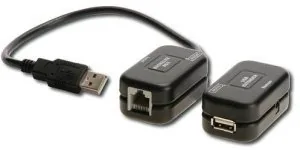
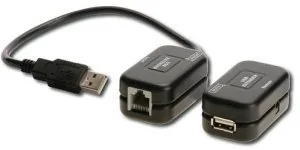
USB Extender via RJ-45 (196.85 ft)
Ports
1x USB-A 1.1 (Plug, Transmitter), 1x USB-A 1.1 (Jack, Receiver)
Color
Black
Warning
Network cable not included!
USB Notation
Link
Product Description
Unlocking Long Distance USB Connections
Expanding beyond the standard one meter limit of traditional connections, this device serves as a robust bridge between your host computer and peripheral hardware. It utilizes existing network infrastructure to transmit signals reliably. You do not need additional software drivers to set it up. The integrated circuits on both ends manage data buffering and signal amplification actively. This active approach prevents degradation over distance unlike passive splitters. Referencing technical outlines for the Digitus USB Extender via RJ-45, USB 1.1, Active, up to 60m Manual system ensures you utilize the full capabilities effectively.
Technical Capabilities
The system operates on the Universal Serial Bus 1.1 specification standard. It supports full speed transfer rates of 12 Mb/s as well as low speed options at 1.5 Mb/s. Signal loss prevention is a key benefit of the embedded transceivers. This flexibility allows connection of various peripherals including video cameras, printers, and storage devices. Users can extend cable runs significantly without losing data integrity. The maximum reachable distance spans approximately 198 feet using standard category five cables. It works with Windows nine eight SE or ME. Windows two thousand and XP are compatible. Mac OS versions nine X through ten X support functionality.
Installation and Usage
Setting up this solution requires minimal technical expertise. Simply plug the local unit into an available USB port on your computer. Connect the remote unit to the desired peripheral device. Link the two units using a category five or better network cable. The LED indicators show operational status clearly. Power management features automatically adjust transmission based on current draw requirements for optimal performance. A power adapter is optional but recommended for long distances. The unit draws twenty mA supply current under normal operation.
Operating Conditions
Reliability is paramount for extended hardware setups. The device operates within temperatures ranging from zero degrees Celsius to forty degrees Celsius. Storage conditions allow for much colder environments down to minus forty degrees Celsius. It is built for durability and meets safety certifications like CE and FCC. Local and remote units are designed to work seamlessly together.
Ideal Applications
This hardware is perfect for surveillance setups where cameras are mounted high on walls. It works well for connecting printers in separate rooms where cabling is difficult. Office environments benefit from centralized computer usage with peripherals stationed elsewhere. It also supports audio players and input devices like mice and keyboards. Cost effectiveness drives adoption in home and small business environments. Users gain flexibility without significant installation costs.
Note: Ensure power adapter is used for sufficient current in long runs.
Search for 67,732 Manuals online


Type-in Brand or Model