
Digitus USB-C to HDMI Multiport Adapter silver/white Manual
PDF manual · 4 Pages
English



Advantages and Disadvantages
Advantages

- Compact, lightweight design ideal for travel and mobile productivity.
- 4K HDMI output (4Kx2K@30Hz) for presentations and media on larger screens.
- Two USB 3.0 ports with SuperSpeed 5Gbps data transfer and backward compatibility.
- Gigabit Ethernet (10/100/1000Mbps) for stable wired network connections.
- Plug-and-play USB-C connectivity with hot-swap support on compatible hosts.
Disadvantages

- HDMI output limited to 30Hz at 4K, not suitable for high-refresh gaming.
- USB ports supply up to 900mA per port, which may not power some high-draw devices.
- No dedicated USB-C PD passthrough charging — limited power features compared to full docks.
- Depends on host device USB-C video alt mode support for HDMI functionality.
- Limited size may restrict thermal handling during heavy sustained use.
Ask a Question
Frequently Asked Questions
The adapter works with USB-C equipped devices that support USB-C alternate mode for video, including many modern laptops like MacBook Pro, Chromebooks with USB-C, and other USB-C enabled notebooks. Full functionality requires host support for video output over USB-C.
Is this answer helpful?
The HDMI output supports resolutions up to 4Kx2K at 30Hz. For lower resolutions such as 1080p, standard refresh rates (60Hz) are typically supported, but high-refresh 4K (60Hz) is not supported by this adapter.
Is this answer helpful?
Each USB 3.0 port can provide up to 900mA when one port is in use, allowing charging and data transfer for many phones and peripherals. However, high-power devices or certain external drives may require more current or an external power source.
Is this answer helpful?
Most modern operating systems will recognize the adapter via plug-and-play for HDMI and Ethernet. In some cases, you may need to manually set or adjust IP settings for Ethernet or install a driver provided by the host OS for full compatibility.
Is this answer helpful?
Yes, the adapter holds FCC and CE certifications, indicating compliance with relevant regulatory standards. It is designed for typical operating temperatures and humidity levels; follow manufacturer guidelines to avoid interference or environmental issues.
Is this answer helpful?
This adapter supports 4K@30Hz which is adequate for video, productivity and casual gaming. Competitive or high-frame-rate gaming usually requires 60Hz or higher at target resolution, so this adapter may not meet those performance needs.
Is this answer helpful?
The package typically includes the main Digitus USB-C to HDMI Multiport Adapter unit and a user manual. Verify the contents on delivery to ensure you received both items.
Is this answer helpful?
Product Description

Digitus USB-C to HDMI Multiport Adapter silver/white Manual
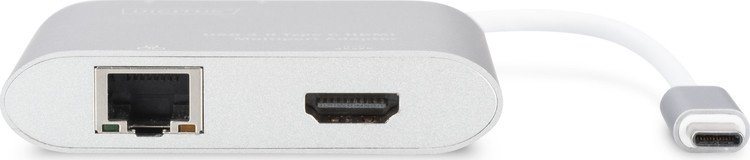
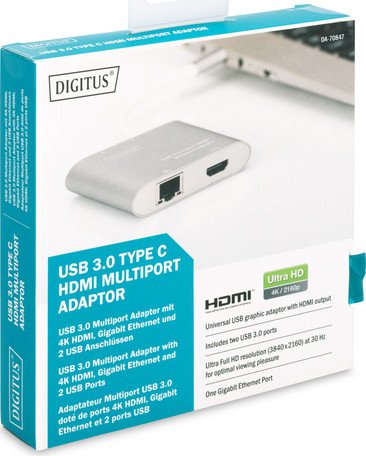
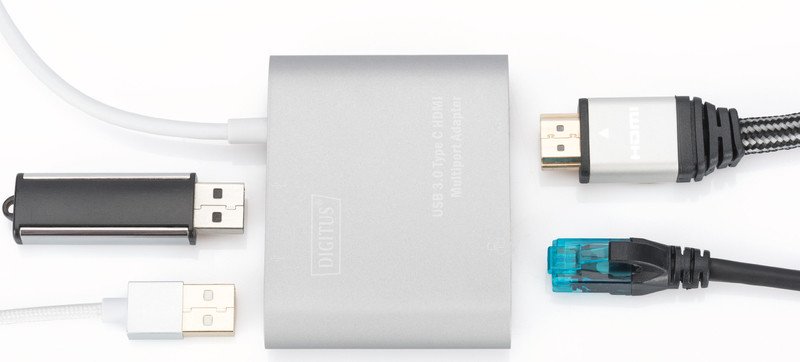
Discover the Digitus USB-C to HDMI Multiport Adapter in an elegant silver and white finish — a compact hub designed to expand the connectivity of modern USB-C laptops and tablets. This lightweight adapter combines a USB-C input with an HDMI port, two USB 3.0 ports and a Gigabit Ethernet jack, making it ideal for professionals, students and travelers who need display, network and peripheral access from a single dongle.
The adapter supports HDMI output up to 4Kx2K at 30Hz, letting you mirror or extend your laptop screen to a larger monitor or HDTV for presentations, streaming or multitasking. Two USB 3.0 ports deliver SuperSpeed data transfer up to 5Gbps and remain backward compatible with USB 2.0 devices. Each USB port can supply power to connected peripherals (max 900mA per port when one port is in use), enabling simultaneous charging and data exchange for devices like external drives, keyboards or mice.
A built-in Gigabit Ethernet port provides reliable wired networking at 10/100/1000Mbps, useful in environments with unstable Wi‑Fi or where low latency and higher throughput are needed. The adapter offers plug-and-play convenience with hot-swap capability on compatible USB-C hosts, including recent MacBook Pro and Chromebook models, and most other USB-C enabled notebooks.
Physically compact at roughly 95 x 41 x 17 mm and weighing just under 45 grams, it’s easy to toss in a bag for mobile workflows. The unit is designed for typical office and home conditions (operating temperature 0°C to 45°C) and meets FCC/CE regulatory standards. Setup is straightforward: connect the USB-C male plug to your host, attach HDMI to your display, plug USB devices into the USB 3.0 ports, and connect the Ethernet cable to your network — then configure IP settings if required.
While offering great flexibility, note that HDMI is limited to 30Hz at 4K and the adapter’s power output on USB ports is constrained to 900mA each. For users requiring higher refresh rates, additional power delivery or native Thunderbolt features, a more feature-rich dock may be preferable. For typical productivity, presentation and travel use, the Digitus adapter is a practical, portable and affordable connectivity solution.
Notes
- Supports up to 4Kx2K@30Hz HDMI output.
- USB 3.0: up to 5Gbps, backward compatible with USB 2.0.
- Gigabit Ethernet: 10/100/1000Mbps.
- Compact design: 95x41x17 mm, 44.9 g.
- Certifications: FCC, CE.
Search for 380 Manuals online


Type-in Brand or Model