
Digitus USB-C to DisplayPort Adapter silver/white Manual
PDF manual · 3 Pages
English



Advantages and Disadvantages
Advantages

- Compact anodized aluminum body — durable and lightweight for travel.
- Plug-and-play operation — no drivers or external power required.
- Supports up to 3840x2160 @ 30Hz and MST for multi-monitor setups.
- Gold-plated connectors improve signal reliability and corrosion resistance.
- Audio passthrough supports LPCM, DTS, and Dolby Digital formats.
Disadvantages

- Maximum 4K performance limited to 30Hz, not suitable for 60Hz workflows.
- Requires host device with DisplayPort Alternate Mode over USB-C.
- 20 cm cable length may restrict monitor placement options.
- Incompatible with devices that only support MHL or SlimPort via USB-C.
- Functionality depends on host GPU and monitor capabilities; no internal scaling.
Ask a Question
Frequently Asked Questions
No. This adapter supports up to 3840 x 2160 at 30Hz. For 4K at 60Hz you need an adapter or cable and host device that explicitly support 4K@60Hz over DisplayPort Alt Mode or a DisplayPort 1.2+ connection.
Is this answer helpful?
No drivers are required. The adapter is plug-and-play when connected to a host device that supports DisplayPort Alternate Mode over the USB-C port.
Is this answer helpful?
Only if the smartphone or tablet supports DisplayPort Alt Mode over USB-C. Many devices use other protocols like MHL or SlimPort and will not output DisplayPort; verify your device specifications first.
Is this answer helpful?
Yes, it supports Multi-Stream Transport (MST) for daisy-chaining additional DisplayPort monitors, provided your source device and monitors support MST and the bandwidth limitations of the adapter.
Is this answer helpful?
Compatible with USB-C devices that implement DisplayPort Alt Mode, such as some MacBook models, Chromebook Pixel, Lenovo Yoga, ASUS Zenbook/ROG models, Dell XPS, and HP EliteBook series. Check your device specs to confirm DP Alt Mode support.
Is this answer helpful?
Yes. When the source device provides audio over DisplayPort, the adapter passes through high-precision audio formats like LPCM, DTS, and Dolby Digital to the DisplayPort-equipped monitor or AV device.
Is this answer helpful?
No external power is required. The adapter draws required power from the host USB-C port and operates without additional power sources.
Is this answer helpful?
Product Description

Digitus USB-C to DisplayPort Adapter silver/white Manual
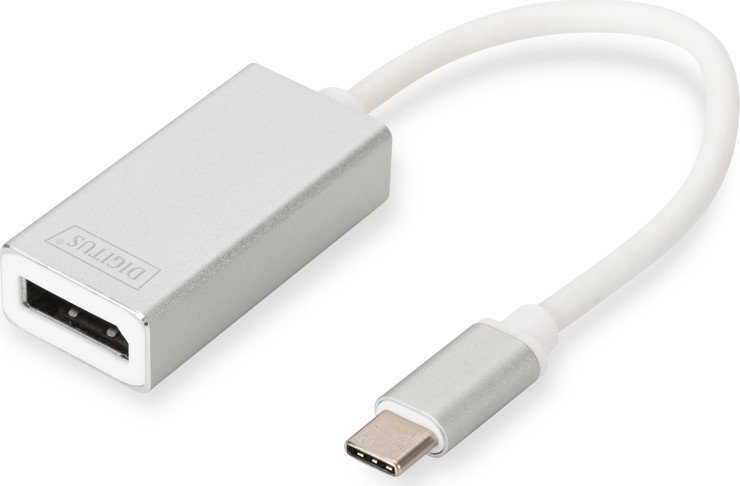
The Digitus USB-C to DisplayPort Adapter in silver/white converts a USB-C (DisplayPort Alt Mode) output into a DisplayPort connection, enabling laptops and other USB-C devices to drive external displays up to 4K. Compact and lightweight, the adapter uses a VL100 chipset and an aluminum body with anodized finish for durability and a clean aesthetic that matches modern notebooks. Its short 20 cm cable and small housing make it travel-friendly while providing reliable connectivity for presentations, extended desktops, or mirrored displays.
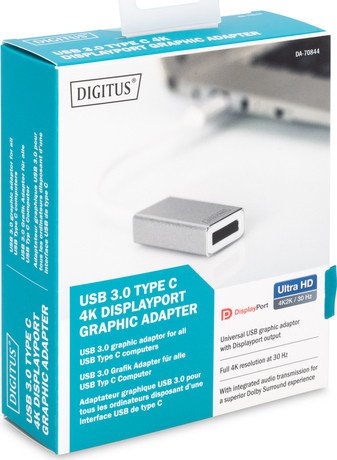
This plug-and-play adapter requires no external drivers or power, making it straightforward for quick setups. It supports resolutions up to 3840 x 2160 at 30Hz and Multi-Stream Transport (MST) for daisy-chaining compatible monitors. Audio passthrough for high-precision formats (LPCM, DTS, Dolby Digital) is supported when the source device provides the audio stream via DisplayPort Alt Mode.
The adapter is well-suited to devices like MacBook (12" Retina), Chromebook Pixel, various Lenovo Yoga and ASUS models, Dell XPS, HP EliteBook, and other USB-C devices that implement DisplayPort Alternate Mode. Note that not all USB-C devices support DP Alt Mode; some smartphones or tablets may use MHL or SlimPort instead and will not output DisplayPort over USB-C.
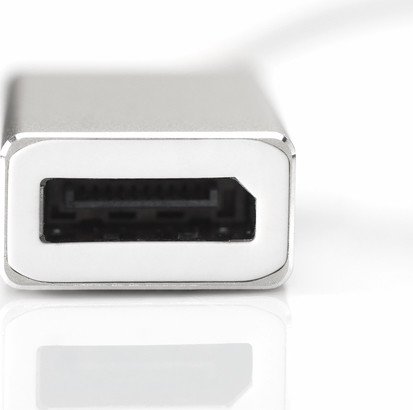
Product highlights include gold-plated USB-C/DisplayPort connectors for stable signal transfer, an anodized aluminum shell for heat dissipation and scratch resistance, and compliance with European directives for electromagnetic compatibility and RoHS. The device ships with the adapter and a user manual.
Notes
- Requires a host device that supports DisplayPort Alt Mode over USB-C.
- Max resolution: 3840 x 2160 @ 30Hz; check source device and monitor capabilities for best results.
- No driver installation or external power needed.
- May not work with devices that only support MHL or SlimPort on their USB-C port.
Pros and Cons Summary
Pros:
- Compact, travel-friendly aluminum design
- Plug-and-play; no drivers or external power
- Supports 4K (3840x2160) and MST daisy-chaining
- Gold-plated connectors for reliable signal quality
- Audio passthrough for common high-precision formats
Cons:
- 4K limited to 30Hz, not 60Hz
- Requires device support for DisplayPort Alt Mode
- Short cable may limit placement flexibility
- Not compatible with MHL- or SlimPort-only devices
- Limited to single DisplayPort output (dependent on host)
Search for 380 Manuals online


Type-in Brand or Model