
Digitus DS-55100 Manual
PDF manual · 5 Pages
English



Quick check
Incorrect answer, please try again.
Chat with your Digitus DS-55100 manual using AI
Get instant AI answers from your Digitus DS-55100 manual
Ask anything about the Digitus DS-55100. Answers come from this manual, with the pages they are based on.
Ask a Question
Do you recommend DS-55100?
Yes NoDo you recommend DS-55100?
Yes No
Lukas Hoffmann
8 months ago
Is this HDMI extender compatible with CAT5e and CAT7 cabling over 50 meters, and does it handle patch panels or direct runs better?

Manual.ly
8 months ago
Thank you for your question. Performance relies on cable quality. Most users experience success up to 50m with direct runs. Some reports indicate patch panels or poor connectors may cause signal loss. We recommend high-quality CAT5e or CAT6 cables. If you face issues, check ports and ensure power supply is stable. Many customers note excellent image quality without repeaters. For specific setups, our support team can assist with diagnostics.
Frequently Asked Questions
The device extends HDMI up to 50 meters using CAT-6 cables for optimal performance.
Is this answer helpful?
Yes, the extender supports 3D video transmission without degradation to the final display.
Is this answer helpful?
Use shielded CAT-5e or CAT-6 cables to ensure the high transmission quality required.
Is this answer helpful?
Yes, it supports uncompressed 2 channel audio such as LPCM for high fidelity.
Is this answer helpful?
It uses a 5V DC power supply with a maximum consumption of 5W per unit.
Is this answer helpful?
No, each kit is designed for one specific transmitter and one specific receiver connection.
Is this answer helpful?
It supports 480i, 576i, 720p, and 1080p resolutions at 50 or 60Hz frequencies.
Is this answer helpful?
Advantages and Disadvantages
Advantages

- Extension up to 50 meters without signal loss
- Supports Full HD 1080p and 3D video resolutions
- Auto-adjustment eliminates manual equalization concerns
- HDCP pass through ensures content protection compliance
- Compatible with standard CAT-5e and CAT-6 cables
Disadvantages

- Requires external 5V DC power adapters for both units
- Performance heavily reliant on shielded cable quality
- Single video signal pair per transmitter and receiver set
- Not rated for outdoor or wet environments
- Limited to specific vertical frequency ranges only
Product Specification
Type
Extender
Features
Active
Product Description
Unlocking Full Range Video Transmission
The Challenge of Long Distance HDMI
HDMI signals naturally degrade quickly over standard copper conductors. Many users struggle to extend video feeds beyond ten meters without significant quality loss. This scenario demands a robust solution for home theater enthusiasts and business presenters. We recommend consulting the Digitus Video Extender HDMI over CAT5 up to 50 meters Manual for the full technical details. This device bridges the gap between source and display without compromising image quality or fidelity.
Features and Performance
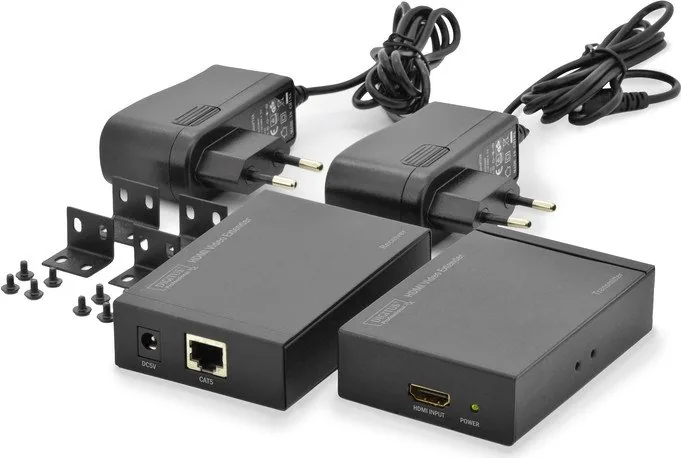
The DS-55100 model utilizes standard network cabling to transport audio and video signals securely. You can achieve up to fifty meters of reach while maintaining Full HD resolution. It supports 1080p resolutions and handles 3D content effortlessly without latency. Bandwidth capabilities ensure data passes through the cable without delay or data loss. Auto-adjustment features simplify the setup process significantly for all users. You do not need to calculate cable length manually for signal compensation anymore. HDCP pass through ensures content protection remains intact during active transmission.
Installation and Usage
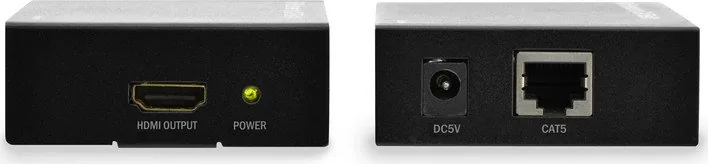
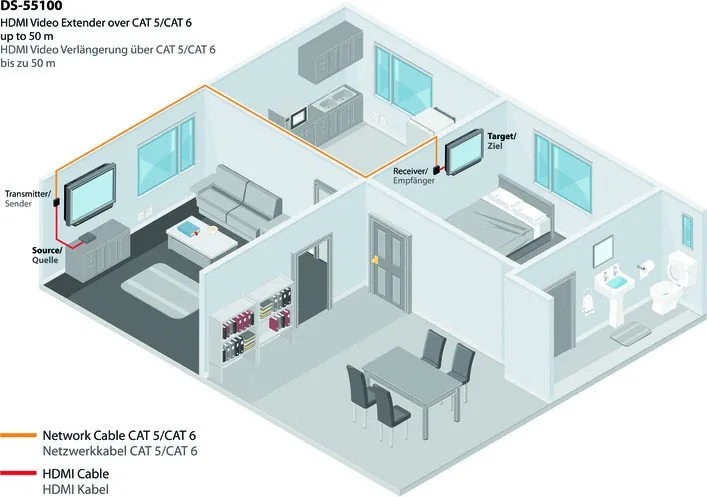
Setting up the system involves connecting a transmitter and receiver unit together. You plug the transmitter into your source device like a gaming console or Blu-ray player. A network cable connects the two units together to carry the data. Finally, the receiver connects to your TV or projector screen. Power adapters are necessary for both ends of the connection to function. Shielded CAT-5e or CAT-6 cables are recommended for the best results possible. Lower quality cables might suffer from interference or signal breaks at maximum distances.
Technical Specifications
The device supports uncompressed audio channels such as LPCM for high fidelity. Vertical frequency ranges work with standard 50Hz or 60Hz refresh rates. Operating temperature ranges allow usage in various indoor environments safely. Storage temperature limits protect the electronics when not in use. Certification includes CE and FCC standards for international compliance. The package includes mounting brackets which help secure the hardware neatly in place. The amplifier bandwidth reaches 2.25Gbps for smooth high frequency handling.
Conclusion
Reliable video transmission is crucial for modern entertainment systems and professional applications. This extender solves common distance limitations effectively for growing setups. It maintains color depth and audio fidelity throughout the entire path. Whether for a large conference room or a sprawling home theater, the device provides flexible placement options. You will enjoy seamless video playback without the hassle of expensive infrastructure upgrades. Upgrading your setup ensures better visual results for everyone involved. Proper maintenance extends the operational life of all connected equipment significantly.
Search for 67,732 Manuals online


Type-in Brand or Model
Martin Schulz
7 months ago
Will this HDMI extender work over Cat 5e and Cat 7 cables for distances up to 50 meters without signal issues?
Manual.ly
6 months ago
Yes, the Digitus HDMI Extender (DS-55100) is compatible with Cat5e, Cat6, and Cat7 Ethernet cables. Independent testing and user reviews indicate successful transmission up to the rated 50 meters with stable 1080p video quality. Most users confirm it works seamlessly with standard patch cables. One user reported issues with structured cabling, suggesting direct patch connections may be preferable for CAT7 setups. Power consumption is low at under 1 Watt per unit. If you experience signal loss, checking cable integrity and ensuring tight connections is recommended.