
Digitus DS-55100-1 Manual
PDF manual · 8 Pages
English



Quick check
Incorrect answer, please try again.
Chat with your Digitus DS-55100-1 manual using AI
Get instant AI answers from your Digitus DS-55100-1 manual
Ask anything about the Digitus DS-55100-1. Answers come from this manual, with the pages they are based on.
Ask a Question
Do you recommend DS-55100-1?
Yes NoFrequently Asked Questions
The extender supports up to Full HD 1080p at 60Hz. It handles 480i/p, 576i/p, 720p, 1080i/p and 3D, with a video bandwidth of 225MHz (10.2Gbps). It does not support 4K resolutions.
Is this answer helpful?
No. The kit supports Power over Cable (PoC): plug the provided 5V/2A power supply into the transmitter only. The transmitter will supply power to the receiver over the CAT cable; do not power the receiver separately.
Is this answer helpful?
Use CAT6, CAT6A or CAT7 UTP/STP cable wired to IEEE-568B. The recommended operational range is 15–50 meters. Cables that are too short or too long may cause display issues or degraded quality.
Is this answer helpful?
The EDID dip switch lets you preset typical output formats (e.g., 720p@50Hz, 1080p@60Hz) or select a mode to read and save the EDID of a display connected to the transmitter’s loop-out. After changing EDID settings, power-cycle or reset the transmitter to apply them.
Is this answer helpful?
Try pressing the receiver’s LENGTH button to auto-adjust for cable length, verify IEEE-568B wiring, ensure the transmitter has an HDMI input signal, check HDMI cable connections, and confirm the CAT cable uses solid copper conductors.
Is this answer helpful?
No. This extender requires a direct point-to-point CAT6/6A/7 connection between transmitter and receiver. It is not designed to operate over switches or routers.
Is this answer helpful?
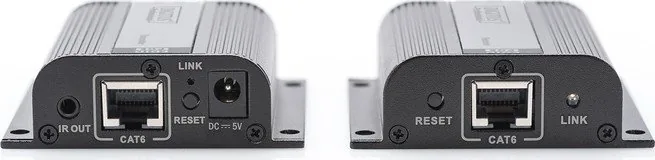
Plug the IR blaster into the TX IR OUT and the IR receiver into the RX IR IN. Position the blaster emitter close to the source device’s IR window; you can then control the source device from the receiver location using the source’s remote.
Is this answer helpful?
Advantages and Disadvantages
Advantages

- Extends uncompressed Full HD 1080p@60Hz video up to 50 meters over a single CAT6/6A/7 cable.
- Power over Cable (PoC) simplifies installation by powering the receiver from the transmitter.
- EDID switch plus HDMI loop-out enables resolution and audio format control and EDID capture from a local display.
- Includes IR blaster and IR receiver extension cables for remote control from the receiver side.
- Plug-and-play design with metal housings, low power consumption (<3W) and wall-mountable cases.
Disadvantages

- Limited to Full HD (1080p); no support for HDMI 2.0/4K resolutions.
- Not compatible with switches or routers; requires a direct point-to-point CAT cable.
- Optimal performance depends on cable quality and recommended length range (15–50m).
- EDID management may require device reboots and manual switching for correct resolution negotiation.
- IR range and placement can be sensitive; emitter must be close to source IR window for reliable control.
Product Specification
Type
Extender
Features
active
Product Description
Digitus Video Extender HDMI over CAT6 up to 50 meters, up to 50m Manual
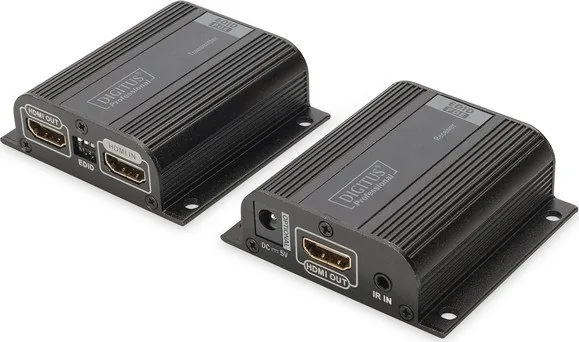
The Digitus Video Extender HDMI over CAT6 up to 50 meters, up to 50m Manual delivers a practical, plug-and-play solution for extending Full HD (1080p@60Hz) HDMI signals across a single CAT6/6A/7 cable up to 50 meters. Designed for home theaters, conference rooms, classrooms, and digital signage, the kit includes a transmitter (TX) with an HDMI loop-out and EDID switch, a receiver (RX) powered via PoC (Power over Cable), IR blaster and IR receiver extension cables for remote control, and a single 5V/2A power supply. With uncompressed, zero-latency transmission and support for PCM, AC3 and DTS audio formats, it preserves audio-visual quality over longer runs without complicated configuration.
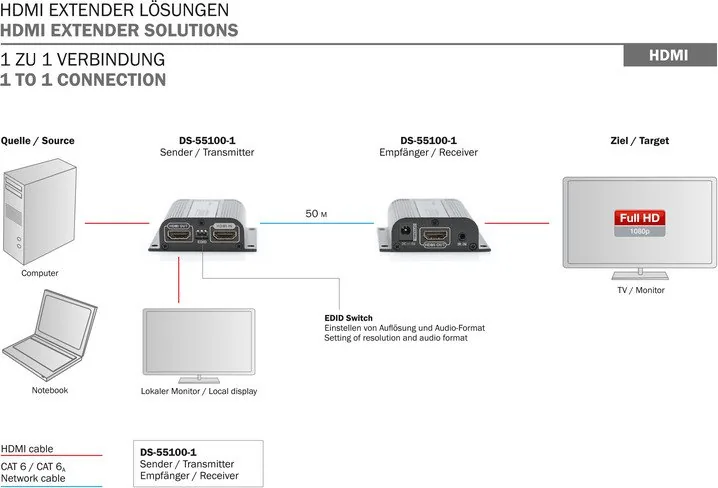
The transmitter’s EDID switch enables easy control of output resolution and audio format, including preconfigured settings like 720p@50Hz, 1080i@60Hz and 1080p@60Hz, plus a mode to read and store the EDID of a locally connected display via the loop-out HDMI port. PoC simplifies installation by powering the receiver from the transmitter, meaning only the transmitter requires a direct power connection. IR pass-back keeps control intuitive: place the IR emitter near the source’s IR window and use the remote from the receiver location to control connected devices.
Mechanically compact and robust, both TX and RX come in metal housings with wall-mountable cases and screws. The extender is tolerant of typical indoor environments (0–40°C operating temperature) and consumes under 3W per unit. The product ships with a concise set of accessories to get systems up and running quickly: transmitter, receiver, IR cables, power supply and user manual.
Installation is straightforward: connect the source to TX via HDMI, connect the display to RX, link TX and RX with a CAT6/6A/7 cable (IEEE-568B wiring recommended), and power the transmitter. A LENGTH button on the receiver helps adapt the unit to differing cable lengths; for best results keep cable length within the recommended 15–50 meter range. Avoid hot-plugging during operation and use the provided 5V power supply or a matching adapter.
Notes:
- Recommended cable: shielded CAT6/6A/7 following IEEE-568B for interference reduction.
- Use the EDID switch and loop-out to lock desired resolution from the source.
- PoC requires powering only the transmitter; do not power the receiver separately.
- Keep cable runs within 15–50m for optimal image quality.
Search for 67,706 Manuals online


Type-in Brand or Model