
Digitus DS-30201-5 Manual
PDF manual · 4 Pages
English



Quick check
Incorrect answer, please try again.
Chat with your Digitus DS-30201-5 manual using AI
Get instant AI answers from your Digitus DS-30201-5 manual
Ask anything about the Digitus DS-30201-5. Answers come from this manual, with the pages they are based on.
Ask a Question
Do you recommend DS-30201-5?
Yes No
Lukas Schneider
9 months ago
Does this FireWire controller card work with Windows 8.1? My PC is not recognizing it. What can I try to get it working?

Manual.ly
9 months ago
Many users report it works out of the box on Windows 10 and under Linux (e.g., Ubuntu). For Windows 8.1, recognition often depends on driver installation. Please install the correct FireWire (1394) controller driver first (from the manufacturer or the included media/online download), then reboot and check Device Manager for an unknown device. Try reseating the card and, if it uses a specific slot type, use a different compatible slot. Also update Windows 8.1 and chipset drivers, then restart. If the card still is not detected, Windows 8.1 may be unsupported for your exact card/revision, and we can help if you share the card model and your PC specs.
Frequently Asked Questions
It expands a desktop computer with three FireWire ports, making it useful for connecting older IEEE 1394 devices such as camcorders, audio hardware, and external peripherals.
Is this answer helpful?
It is designed for a PCI Express x1 slot, so it fits standard PCIe expansion layouts without needing a large interface.
Is this answer helpful?
Yes. The card provides two 1394a ports and one mini FireWire port, giving users flexible connection options for different cable types.
Is this answer helpful?
The product details state that no driver is required for many supported Windows versions, which simplifies setup and reduces installation effort.
Is this answer helpful?
The bundle includes the FireWire PCIe card, a 4-pin to 6-pin FireWire 400 cable, a low-profile bracket, and a manual.
Is this answer helpful?
Yes, if the computer has a free PCIe x1 slot. However, it is mainly valuable for systems that still need FireWire support for older devices.
Is this answer helpful?
Advantages and Disadvantages
Advantages

- Adds three FireWire ports through a single PCIe x1 slot.
- Supports up to 400 Mbps for common FireWire devices.
- Low-profile bracket included for compact PC cases.
- No driver needed on many supported Windows systems.
Disadvantages

- FireWire is a legacy interface with limited modern use.
- Speed is modest compared with current high-speed standards.
- Best value depends on owning compatible FireWire devices.
- Manual installation and hardware setup may be needed.
Product Specification
External
2x FireWire (6-pin, 1394a), 1x FireWire (4-pin, i.LINK)
Internal
N/A
Interface
PCIe x1
Power supply
Power supply only via connection
Special features
low profile PCB, incl. low profile bracket
USB notation
Link
Product Description
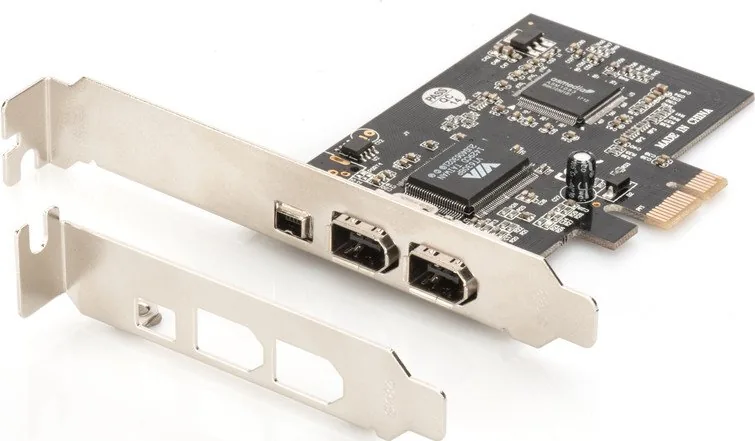
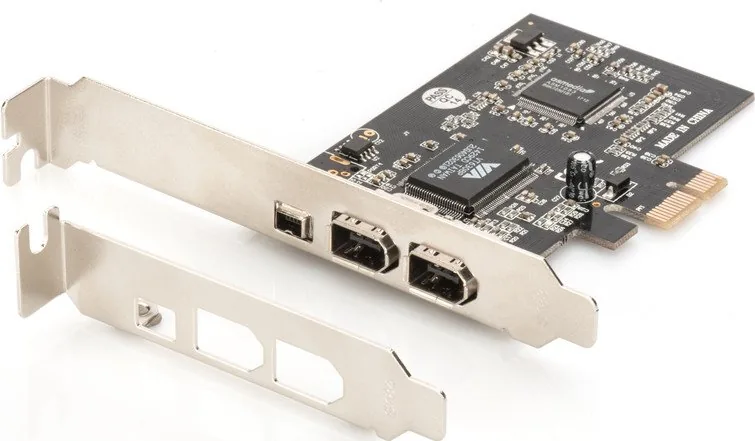
Digitus DS-30201-5: A Practical 3-Port FireWire PCIe x1 Expansion Card
The Digitus DS-30201-5 is a compact FireWire expansion solution designed for users who still rely on IEEE 1394 devices. Built for a PCIe x1 slot, it adds three FireWire connections to a desktop system and helps extend the life of camcorders, audio interfaces, external drives, and other legacy peripherals. For content creators and technicians alike, it offers a straightforward way to bridge older hardware with a more modern computer platform.
What makes it useful?
This card follows the 1394 Open HCI and PCI Express Base specifications, which means it is built around established standards rather than niche compatibility. It supports data rates up to 400 Mbps, giving it enough speed for common FireWire workflows such as video capture, audio transfer, and device synchronization. The inclusion of two 1394a ports plus one mini port adds flexibility for mixed cabling setups, while the shared port design keeps the card compact and efficient.
Another strong point is the plug-and-play approach. According to the product details, no separate driver installation is required for many Windows versions, which makes setup easier for users who want a fast installation process. The card also supports a wide range of operating systems, including older Windows editions and Mac systems, making it a versatile choice for mixed environments and service work.
Inside the package
The bundle includes the PCIe FireWire card, a 4-pin to 6-pin FireWire 400 cable, a low-profile bracket, and a manual. That low-profile option is especially helpful for slim desktop cases, where space can be limited. The manual also outlines the installation steps clearly, starting with powering down the computer and ending with securely mounting the card and reconnecting the system.
A smart fit for legacy workflows
While newer systems have moved away from FireWire, many professional and home setups still depend on it. The Digitus DS-30201-5 is a practical way to keep those devices in service without complicated configuration. It is not about flashy features; it is about reliable connectivity, broad compatibility, and simple expansion.
Notes
- Best suited for users with existing FireWire equipment.
- Low-profile bracket improves case compatibility.
- Driver-free installation can save time on supported systems.
Search for 67,706 Manuals online


Type-in Brand or Model
Peter Kurz
7 months ago
Does this FireWire controller card work with Windows 8.1? Mine is not recognized in Device Manager even though it is listed as supported.
Manual.ly
7 months ago
Windows 8.1 support can depend on the exact FireWire chipset and whether the correct driver is installed. Please try: 1) Install the vendor driver for the card first (or the recommended Windows 8.1 driver if provided), then reboot. 2) Update your motherboard/chipset drivers and restart. 3) Check BIOS/UEFI settings for any 1394/FireWire option and ensure it is enabled. 4) Unplug the card, open Device Manager, remove any unknown/1394 devices, then reinstall the card and choose Scan for hardware changes. 5) Test with a different FireWire device/cable. If it still shows no detection, send us the exact card model and a screenshot of Device Manager so we can confirm the correct driver.