
Digitus DS-30000-1 Manual
PDF manual · 7 Pages
English



Quick check
Incorrect answer, please try again.
Chat with your Digitus DS-30000-1 manual using AI
Get instant AI answers from your Digitus DS-30000-1 manual
Ask anything about the Digitus DS-30000-1. Answers come from this manual, with the pages they are based on.
Ask a Question
Do you recommend DS-30000-1?
Yes No
Kristina Mayer
5 months ago
What should I do if the included Linux driver causes system crashes?

debitis_delectus
6 months ago
Does this device work reliably with the standard Linux kernel without requiring custom modules that might cause crashes?

Manual.ly
6 months ago
Our product is designed to be compatible with the standard Linux kernel. However, some users have reported instability when using third-party modules found online. We recommend using only the official drivers provided on our website or contacting our support team for a verified driver package to ensure system stability.
Josiah Rosenbaum
4 months ago
I found a Linux driver module online but it crashes my computer regularly. Is there an official stable version available?
Luca Weber
4 months ago
Does this device work with the standard Linux kernel without installing extra drivers?
Manual.ly
4 months ago
Linux compatibility may depend on the kernel version and hardware configuration. While some systems detect the device immediately, others may require an additional driver module. Please check the manufacturer's supported kernel versions before purchase, as unofficial modules can cause stability issues.
Luca Weber
5 months ago
Does this device work with the standard Linux kernel, or are extra drivers required?
Manual.ly
5 months ago
Linux compatibility may depend on the distribution and kernel version. Some systems detect the device immediately, while others may require an additional driver module. Please check the manufacturer's current Linux driver support before purchase, as unofficial modules can cause instability or system crashes.
Max Simpson
4 months ago
Does this device work reliably with a standard Linux kernel, or do I need an additional driver?
Manual.ly
4 months ago
Linux compatibility may depend on the kernel version and the specific hardware configuration. Some users report immediate detection, while others required an extra kernel module and experienced stability issues. Please check for an officially supported driver before purchase and test it with your distribution's current kernel.
Megan Mitchell
4 months ago
Does this adapter work with the standard Linux kernel, or are additional drivers required?
Manual.ly
4 months ago
Compatibility can vary by Linux distribution and kernel version. While some systems detect the device immediately, others may require a separate driver module. Please check the chipset, your distribution, and kernel version before installation. If an external module is needed, use a maintained driver compatible with your kernel, as unsuitable modules may cause instability or system crashes.
Lars K.
4 months ago
Does this device work with a standard Linux kernel, or is an additional driver required?
Manual.ly
4 months ago
Linux compatibility can depend on the distribution, kernel version, and hardware revision. While some systems detect the device immediately, others may require a separate driver or module. Please check the manufacturer's current Linux driver and compatibility information before purchase, and avoid unofficial modules if they cause system instability.
Luca Bernardi
3 months ago
Does this device work reliably with a standard Linux kernel, or are extra drivers required?
Manual.ly
3 months ago
Linux compatibility can vary by distribution and kernel version. While some systems may recognize the device immediately, others may require an additional driver module. Please check the supported kernel versions and use only the recommended driver, as unofficial modules may cause instability or system crashes.
Ray Moore
3 months ago
Does this adapter work reliably with a standard Linux kernel, or do I need to install an additional driver?
Manual.ly
3 months ago
Linux compatibility may depend on the kernel version and the specific hardware configuration. Some systems detect the device immediately, while others may require a separate driver module. Before purchasing, please check the supported kernel versions and use the manufacturer-provided driver where needed. If an external module causes crashes, update your kernel and driver, or contact support with your distribution and kernel version.
Krystina Windler
5 months ago
Does this device work with a standard Linux kernel, or are extra drivers required?
Manual.ly
5 months ago
Compatibility may depend on the Linux distribution and kernel version. Some systems detect the device immediately, while others may require an additional driver module. Please check the manufacturer's current Linux driver and kernel compatibility information before purchase, as unofficial modules can cause instability.
Asa Legros
3 months ago
Does this device work reliably with a standard Linux kernel, or do I need to install an additional driver?
Manual.ly
3 months ago
Linux compatibility may depend on your kernel version and the specific hardware configuration. While some systems detect the device immediately, others may require a separate driver module. Please check the manufacturer's current Linux driver and compatibility information before purchase, as unofficial modules can cause instability.
Jacob Walker
6 months ago
Does this device work reliably with a standard Linux kernel, or is an additional driver required?
Manual.ly
6 months ago
Linux compatibility may depend on the kernel version and hardware configuration. Some users report immediate detection, while others needed a separate driver module and experienced instability. Please check the manufacturer's current Linux driver and supported kernel list before purchase.
Luca Werner
4 months ago
Does this device work reliably with a standard Linux kernel, or are extra drivers required?
Manual.ly
4 months ago
Linux compatibility may depend on the kernel version and available driver support. Some users report immediate detection, while others needed an additional module and experienced instability. Please check the chipset, supported kernel versions, and use a current distribution before purchase.
Donna Kelly
3 months ago
I found a driver module online but it causes my computer to crash regularly. Is there an official stable driver available?
samson87
5 months ago
Does this device work reliably with the standard Linux kernel, or is a specific driver required that might cause system instability?
Manual.ly
5 months ago
Thank you for your feedback. While our product is designed to be compatible with standard Linux kernels, some hardware configurations may require additional modules. We recommend checking the latest compatibility list on our website. If you experience crashes, please contact our support team so we can provide a stable driver version or troubleshooting steps.
Andrew Butler
5 months ago
Are there any known issues with Linux drivers causing system freezes?
LinuxUser92
3 months ago
Does this device work reliably with the standard Linux kernel, or is it prone to crashes?
Manual.ly
3 months ago
While the product description mentions compatibility with the standard Linux kernel, some users have reported instability. If you experience crashes, we recommend checking for specific third-party drivers or modules that may offer better stability on your system.
linux_user_de
4 months ago
Is this device truly compatible with the standard Linux kernel without requiring custom drivers?
Manual.ly
4 months ago
While the product is designed for broad compatibility, some Linux distributions may require specific kernel modules. We recommend checking our support page for the latest driver updates or contacting us if you experience stability issues.
Vincent Adams
5 months ago
Why does the device cause system crashes on Linux despite being advertised as kernel-compatible?
kody21
3 months ago
Does this device work reliably with the standard Linux kernel without causing system crashes?
Manual.ly
3 months ago
While the product description states it runs on the standard Linux kernel, some users have reported instability. If you experience frequent crashes, we recommend checking for specific driver modules compatible with your system version or contacting our support team for a stable driver solution.
ea43
4 months ago
Are there known issues with Linux drivers that cause computer crashes?
Selina Palmer
4 months ago
Is this device fully compatible with the standard Linux kernel without requiring external drivers that might cause system instability?
Manual.ly
4 months ago
Our product is designed to work seamlessly with most modern Linux distributions using built-in kernel modules. However, compatibility can vary depending on your specific hardware configuration and kernel version. If you encounter issues, we recommend updating your kernel or contacting our support team for a verified driver package tailored to your system.
tempora_dolor
3 months ago
Why does the description claim standard kernel support when it actually crashes my computer?
Frequently Asked Questions
This card supports Windows XP, Vista, 7, 8, 8.1, and 10 in both 32-bit and 64-bit versions. It also works with Linux kernels 2.6.x, 3.x, and 4.x.
Is this answer helpful?
The Digitus DS-30000-1 features two independent RS-232 serial ports, allowing simultaneous connection to multiple legacy devices.
Is this answer helpful?
Yes, the package includes a low-profile mounting bracket specifically designed for compact or Small Form Factor (SFF) computer cases.
Is this answer helpful?
The card supports data transmission speeds of up to 115200 bits per second (bps) per port using the RS-232 protocol.
Is this answer helpful?
Yes, you must have administrator privileges on your operating system to successfully install the drivers for this PCIe card.
Is this answer helpful?
Absolutely. The card supports both hardware and software flow control to ensure reliable data transmission.
Is this answer helpful?
Advantages and Disadvantages
Advantages

- Dual RS-232 ports with high-speed transfer up to 115200 bps
- Broad OS compatibility including Windows XP to 10 and Linux
- Integrated 256-byte FIFO buffers prevent data loss
- Supports flexible parity and bit format configurations
- Includes low-profile bracket for versatile case sizes
Disadvantages

- Requires physical installation inside the computer case
- Drivers must be manually installed from CD or downloaded
- Limited to PCIe x1 slot availability
- No USB alternative included in the package
- Does not support Thunderbolt or newer PCIe standards
Product Specification
External
2x serial
Internal
N/A
Interface
PCIe 2.0 x1
Chipset
AX99100
Power Supply
Power supply only via connection
USB Notation
Link
Product Description
Digitus DS-30000-1 PCIe 2.0 x1: Unlocking Legacy Serial Connectivity
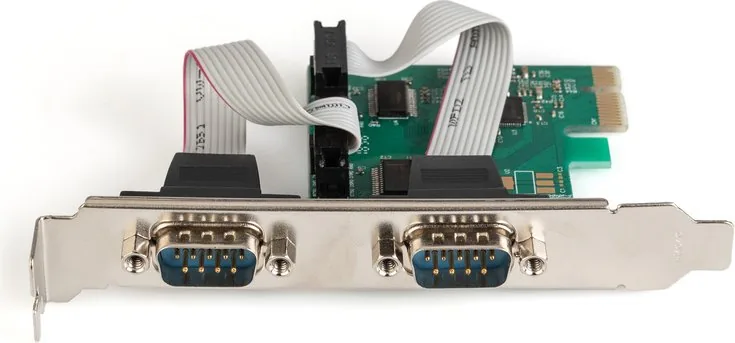
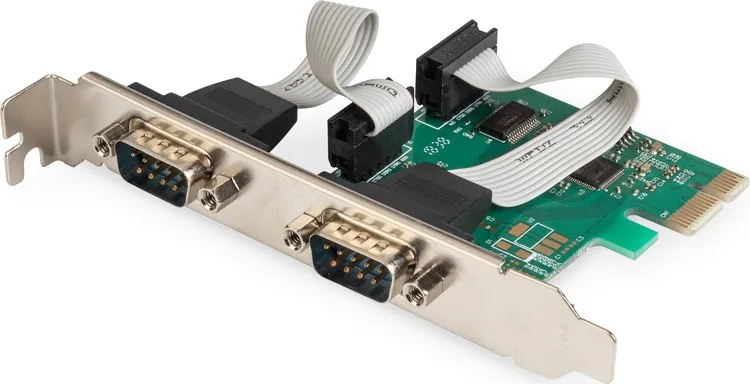
The Digitus DS-30000-1 PCIe 2.0 x1 card is a robust solution designed to breathe new life into modern computers that lack native serial ports. As industrial equipment, legacy hardware, and specialized peripherals often rely on RS-232 connections, this expansion card provides a seamless bridge between contemporary systems and older technology. It functions as a single-chip solution that fully integrates the PCIe 2.0 Gen 1 endpoint controller, ensuring stable and efficient data transmission without consuming excessive system resources.
At the heart of this device lies a dual-port RS-232 interface capable of handling high-speed communication up to 115200 bps. The card supports comprehensive flow control mechanisms, including both hardware and software options, which are critical for maintaining data integrity during complex transfers. Whether you are connecting to CNC machines, medical devices, or network switches, the flexibility of this card allows for precise configuration of bit formats, parity settings, and custom baud rates via internal PLLs. Each port features a 256-byte deep FIFO buffer, significantly reducing the risk of data loss under heavy load.
Compatibility is a major strength of the Digitus DS-30000-1. It works seamlessly across a wide range of operating systems, including various versions of Windows from XP through Windows 10, as well as Linux kernels ranging from 2.6.x to 4.x. This broad support ensures that users can deploy the card in diverse environments without worrying about driver incompatibility. The installation process is straightforward, requiring only an available PCI Express x1 slot and standard administrative privileges to install the drivers provided on the included CD.
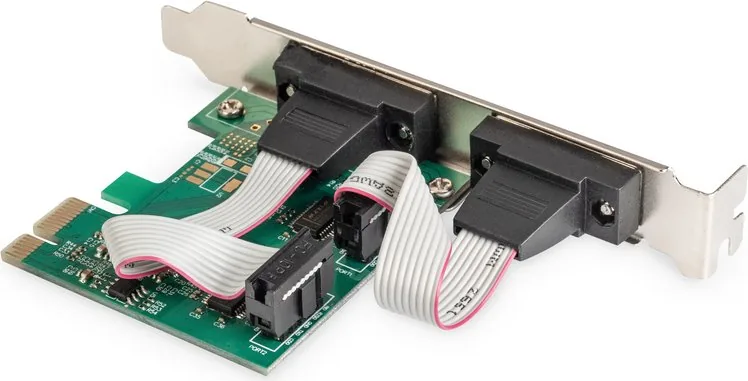
The package includes the expansion card itself, a low-profile mounting bracket for smaller chassis, a user manual, and the necessary driver CD. With its support for power management features and wake-on-LAN capabilities, this card also helps maintain energy efficiency when the system is idle. It is an essential tool for IT professionals and hobbyists who need reliable serial connectivity in a modern computing environment.
Key Notes
- Supports Slow IrDA mode for infrared communication.
- Includes full modem control signals for advanced peripheral management.
- Designed for both full-height and low-profile cases.
Search for 67,732 Manuals online


Type-in Brand or Model
LinuxUser88
5 months ago
Is this device truly compatible with the standard Linux kernel without needing external modules?
Manual.ly
4 months ago
Our product is designed for plug-and-play compatibility with standard Linux kernels. However, some older or specific hardware configurations may require additional drivers. If you experience instability or crashes, we recommend checking our official support page for the latest stable driver versions or contacting our technical team for a customized solution.