


Digitus DS-23200-2 Manual
PDF manual · 24 Pages
English



Quick check
Incorrect answer, please try again.
Chat with your Digitus DS-23200-2 manual using AI
Get instant AI answers from your Digitus DS-23200-2 manual
Ask anything about the Digitus DS-23200-2. Answers come from this manual, with the pages they are based on.
Ask a Question
Do you recommend DS-23200-2?
Yes NoFrequently Asked Questions
The DS-23200-2 controls up to eight directly connected computers from one local console. With a two-level cascade configuration, it can manage up to 128 computers.
Is this answer helpful?
The switch supports one VGA or SVGA monitor, one USB keyboard, and one USB mouse. Optional PS/2 keyboard and mouse console connections are also available.
Is this answer helpful?
You can select a computer using its front-panel port button, through the on-screen display, or with configured keyboard hotkeys. The active port LED turns green.
Is this answer helpful?
Yes. It supports USB and PS/2 keyboard and mouse interfaces on connected computers, allowing it to work in mixed hardware environments when the correct KVM cable sets are used.
Is this answer helpful?
The maximum supported video resolution is 1920 x 1200 at 60 Hz for local operation. Use a monitor and connected computer video settings that are compatible with this limit.
Is this answer helpful?
Yes. The switch supports hot-swapping for computer connections. When reconnecting a computer cable, return it to the same KVM port. PS/2 devices on the console side should not be hot-plugged.
Is this answer helpful?
Remote management is available through an optional IP module. The module requires installation, network configuration, and connection to the desired network before remote control can be used.
Is this answer helpful?
Advantages and Disadvantages
Advantages

- Controls up to eight computers from one VGA, USB keyboard, and USB mouse console.
- Supports mixed USB and PS/2 computer connections for legacy and newer systems.
- Offers front-panel switching, OSD control, configurable hotkeys, and Auto Scan.
- Supports 1920 x 1200 resolution at 60 Hz and provides online and active-port LEDs.
- Cascading supports up to 128 computers, with optional IP remote management expansion.
Disadvantages

- Requires model-specific KVM cable sets, which may need to be purchased separately.
- PS/2 keyboard and mouse connections at the console cannot be hot-plugged.
- Optional IP remote access requires an additional module and network configuration.
- Cascaded setups need separate OSD hotkey settings to prevent control conflicts.
- The local console uses VGA, which may require adapters for modern display-only environments.
Product Specification
Ports
8
Monitor
VGA
Keyboard/Mouse
PS/2 & USB
Audio
N/A
LAN
N/A
Resolution
1920 x 1200 @ 60 Hz
Product Description
Digitus DS-23200-2 8-port KVM switch Manual
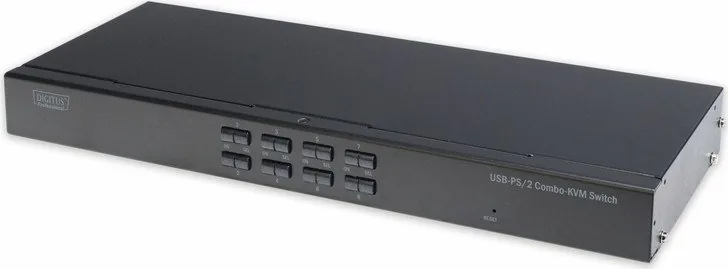
The Digitus DS-23200-2 8-port KVM switch is designed for administrators and users who need to manage several computers from one practical workstation. A single console with a VGA monitor, USB keyboard, and USB mouse can control up to eight connected systems, reducing desk clutter and avoiding the cost of separate displays and input devices for every machine.
Flexible USB and PS/2 connectivity
This KVM switch supports USB and PS/2 keyboard and mouse connections on the computer side, making it suitable for mixed environments that include newer and legacy hardware. Each computer connects through a dedicated KVM cable set, while the local console uses VGA video plus USB or optional PS/2 input connections. The unit supports a maximum video resolution of 1920 x 1200 at 60 Hz, helping preserve a clear desktop image for maintenance, monitoring, and daily administration.
Straightforward switching and status monitoring
Users can select a computer directly with the front-panel buttons or through the on-screen display. Integrated LEDs make the current state easy to identify: red indicators show that a connected computer is online, while green indicators identify the port currently receiving KVM control. This combination is useful in server rooms, technical workspaces, test labs, and other installations where quick visual confirmation matters.
The on-screen display offers detailed control over connected systems. Ports can be selected by number or custom name, filtered by status, and marked for Quick View monitoring. An Auto Scan mode cycles through selected computers at configurable intervals from 3 to 60 seconds. Hotkey settings can also be adjusted, allowing users to open the menu or switch ports without reaching for the front panel.
Built for scalable administration
The DS-23200-2 supports cascading, enabling larger installations with up to 128 managed computers. This makes the switch a practical starting point for expanding environments. An optional IP remote-control module can provide network-based access when installed and configured, adding flexibility for remote management scenarios.
Hot-swap support allows computer connections to be added or removed without powering down the switch. For stable operation, computers should be reconnected to their original ports, and only compatible Digitus KVM cable sets should be used. The durable metal housing measures 432 x 155 x 44 mm and is suited to organized equipment installations.
Notes
- Use the supplied power adapter and keep the switch in a ventilated, dry location.
- Connect all equipment correctly and ensure proper grounding before installation.
- The default OSD administrator password is
admin; change access settings where appropriate. - PS/2 console keyboard and mouse connections are not intended for hot-plugging.
Search for 67,706 Manuals online


Type-in Brand or Model