
Digitus DA-70141 Manual
PDF manual · 2 Pages
English



Quick check
Incorrect answer, please try again.
Chat with your Digitus DA-70141 manual using AI
Get instant AI answers from your Digitus DA-70141 manual
Ask anything about the Digitus DA-70141. Answers come from this manual, with the pages they are based on.
Ask a Question
Do you recommend DA-70141?
Yes NoFrequently Asked Questions
The Digitus USB 2.0 Extender supports connections up to 50 meters when using high-quality Cat 5e or Cat 6 network cables.
Is this answer helpful?
No, this device is plug-and-play and does not require any software drivers for Windows or Linux operating systems.
Is this answer helpful?
You can connect various peripherals including webcams, printers, scanners, keyboards, mice, flash drives, and USB hubs.
Is this answer helpful?
No, the Cat 5e or Cat 6 patch cable is not included and must be purchased separately to complete the connection.
Is this answer helpful?
No, this specific model supports USB 2.0 speeds only and is not compatible with USB 3.0 or higher transfer rates.
Is this answer helpful?
Yes, it meets Class B EMC standards suitable for residential use, though shielded cables are recommended to prevent interference.
Is this answer helpful?
Advantages and Disadvantages
Advantages

- Extends USB connection up to 50 meters using standard Cat 5e/6 cables
- Plug-and-play operation with no driver installation required
- Supports multiple USB speeds including High-Speed 480 Mbit/s
- Includes external power adapter for stable device performance
- Compatible with Windows and Linux operating systems
Disadvantages

- Network patch cables are not included in the package
- Requires external power source for the upstream adapter
- Performance may degrade if unshielded cables are used
- Limited to USB 2.0 speeds rather than newer USB 3.0 standards
- May cause interference in residential areas if not properly shielded
Product Specification
Features
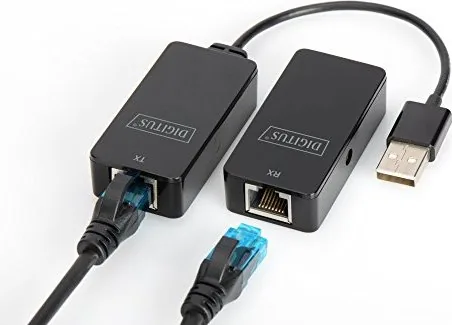
Active USB extender enables transmission over Cat-5e network cable (max. 164 ft)
Attention
Network cable not included!
USB spelling
Link
Product Description
Unlocking Extended USB Connectivity with the Digitus USB 2.0 Extender
In modern office and home environments, the physical limitations of standard USB cables often restrict how devices can be utilized. The Digitus USB 2.0 Extender, 2x 100Base-TX, USB 2.0, up to 50m Manual solution addresses this challenge by allowing users to connect USB peripherals over significant distances using existing network infrastructure. This device transforms a standard Cat 5e or Cat 6 Ethernet cable into a robust bridge for data and power, effectively extending the reach of your computer's USB ports.
The core functionality of this extender lies in its ability to support High-Speed, Full-Speed, and Low-Speed USB protocols simultaneously. Whether you need to place a webcam on a ceiling, a printer in a corner of a large room, or a scanner across an open floor plan, this adapter ensures that signal integrity remains intact over distances of up to 50 meters. By utilizing integrated USB 2.0 transceivers, the system prevents common signal losses associated with long cable runs, ensuring stable performance without the need for additional software drivers or complex configurations.
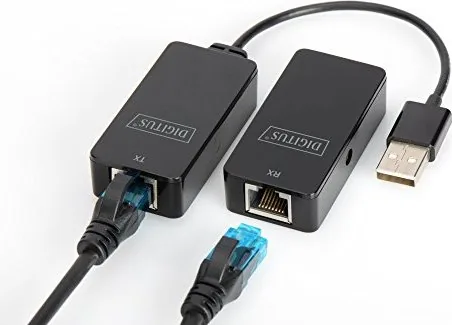
Installation is designed for simplicity, requiring no driver installation on Windows or Linux systems. The kit typically includes two adapters: one acting as the upstream interface connected to the host computer via a USB Type-A port, and the other serving as the downstream interface for the peripheral device. These connect via a standard network patch cable, which is not included but is commonly available. A dedicated 5V/1A power adapter is also provided to ensure sufficient power delivery to active devices, maintaining reliability even when connecting power-hungry peripherals like external hard drives or multifunction printers.
This solution is ideal for scenarios where moving the main computer unit is impractical or impossible. It supports a wide array of operating systems including legacy versions like Windows 98SE and modern distributions like Windows 7, 8, and various Linux kernels. The device complies with strict electromagnetic compatibility standards (EN 55022 Class B), making it safe for residential use while minimizing interference with other electronic equipment. For optimal results, the use of shielded network cables is recommended to further reduce potential noise.
Key Features and Benefits
The Digitus extender simplifies complex cabling setups by leveraging ubiquitous Ethernet technology. Its plug-and-play nature means users can expand their workspace connectivity instantly. The inclusion of a power supply ensures that the signal amplification does not drain the host computer's USB port, preserving resources for other tasks. Furthermore, the device's compliance with international safety standards guarantees a reliable product for both professional and personal applications.
Important Notes
Always use shielded Category 5e or higher cables to prevent radio frequency interference. If interference occurs in a residential setting, take appropriate corrective measures such as repositioning cables or adding ferrite cores. The device operates within a temperature range of 5°C to 45°C, so avoid exposing it to extreme heat or cold during operation.
Search for 67,706 Manuals online


Type-in Brand or Model