
Digitus DA-70135-2 Manual
PDF manual · 3 Pages
English


Quick check
Incorrect answer, please try again.
Chat with your Digitus DA-70135-2 manual using AI
Get instant AI answers from your Digitus DA-70135-2 manual
Ask anything about the Digitus DA-70135-2. Answers come from this manual, with the pages they are based on.
Ask a Question
Do you recommend DA-70135-2?
Yes NoFrequently Asked Questions
It allows two computers to share one USB device, such as a printer or scanner, without reconnecting cables every time you switch between PCs.
Is this answer helpful?
It is suited for common USB peripherals like printers, scanners, cameras, hubs, and similar USB 1.1 or USB 2.0 devices.
Is this answer helpful?
No special driver installation is highlighted. The switch is designed to be simple and user-friendly, which makes setup quick and practical.
Is this answer helpful?
The switch is made for two computers. Each PC connects through a USB-B port, while the shared peripheral connects through the USB-A port.
Is this answer helpful?
The manual lists support for Windows Vista, XP, and 2000, as well as Mac OS 9.2 and newer.
Is this answer helpful?
The package includes the main sharing switch unit, a manual, and two USB 2.0 connection cables, each 1.5 m long.
Is this answer helpful?
Advantages and Disadvantages
Advantages

- Lets two PCs share one USB peripheral without constant cable swapping.
- No extra driver downloads or complex setup steps are needed.
- Supports USB 1.1 and USB 2.0 devices for broad everyday use.
- Compact design and included cables make installation easier.
Disadvantages

- Only two computers can share the device, so it is not built for larger teams.
- It is best for simple peripherals, not advanced multi-user workflows.
- Compatibility is focused on older OS versions, not modern USB-C setups.
- Manual switching may be less convenient than automated network sharing.
Product Specification
Type
USB Sharing Switch
Ports
2
Features
Sharing Switch
Product Description
Digitus USB-B 2.0 Sharing Switch, 2-Port Manual
A practical USB sharing solution for two computers
The Digitus USB-B 2.0 Sharing Switch, 2-Port Manual is designed for users who want a simple way to let two PCs share one USB device. Instead of moving cables back and forth, you can keep a printer, scanner, camera, or other compatible peripheral connected and switch access as needed. It is a small device, but it can make a big difference in everyday workflow.
What makes this switch appealing is its straightforward approach. There is no need for complicated software bundles or long driver installations to get started. The interface is built to be user-friendly, so switching between computers can be done quickly and with very little effort. For home offices, small workgroups, or anyone managing a compact desk setup, that kind of simplicity is a real advantage.
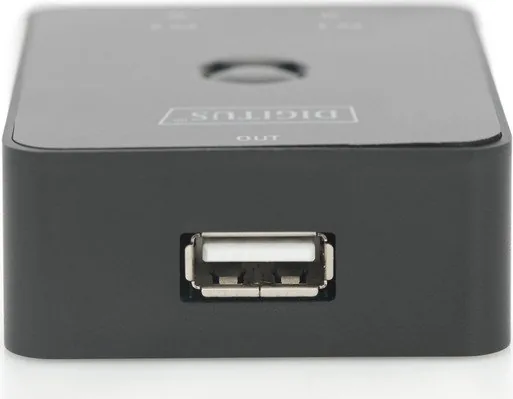
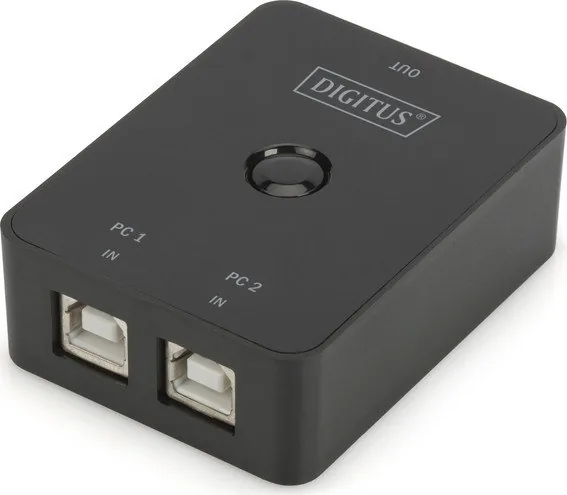
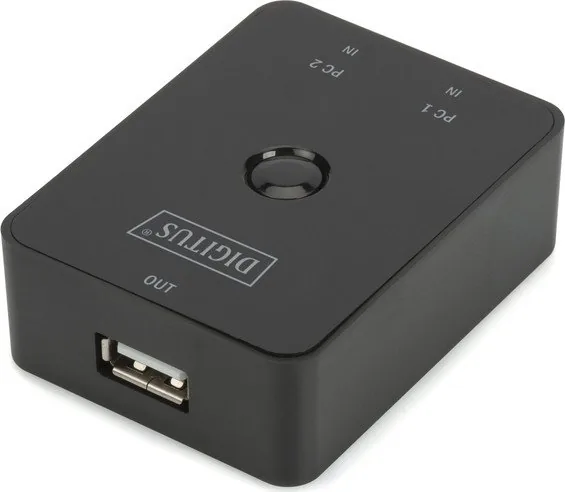
The hardware is equally practical. With two USB-B ports for the PCs and one USB-A port for the shared device, the layout is easy to understand and easy to wire. The switch supports USB 1.1 and USB 2.0 devices, following USB 2.0 specifications, which makes it a flexible choice for common peripherals. The included 1.5 m USB cables also help make installation more convenient, especially when the computers are not positioned right next to the device.
Because the switch works at the hardware level, it keeps everyday tasks predictable. You can dedicate one peripheral to multiple workstations without turning your desk into a cable maze. That makes it a clean fit for shared office environments, lab spaces, or any scenario where the same device needs to serve more than one machine.
Compatibility is another strong reason to consider it. The switch supports Windows Vista, XP, and 2000, along with Mac OS 9.2 and newer. That broad support can be useful in mixed or older environments where replacing perfectly good equipment is not necessary. Rather than buying a new printer or scanner for every workstation, users can share one reliable device and keep costs under control.
With a compact size of 69 × 42 × 20 mm, the switch remains discreet while still delivering a useful function. It is a practical solution for anyone who values order, convenience, and efficiency over complicated networking setups.
Notes
- Includes the main unit, a manual, and two 1.5 m USB 2.0 cables.
- Ideal for sharing one USB device between two computers.
- Especially useful for printers, scanners, hubs, and cameras.
- A cost-effective option for simple office and home setups.
Search for 67,706 Manuals online


Type-in Brand or Model