

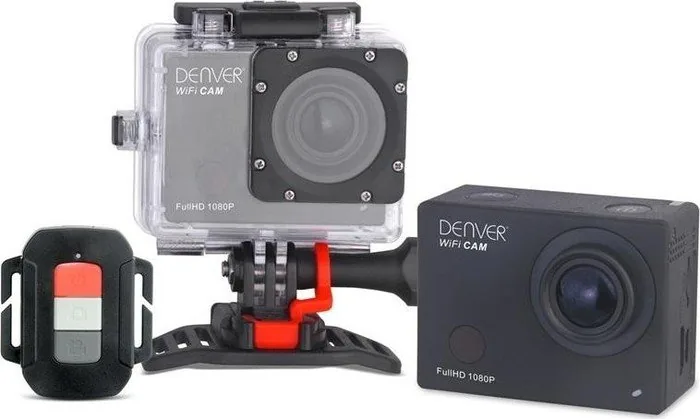
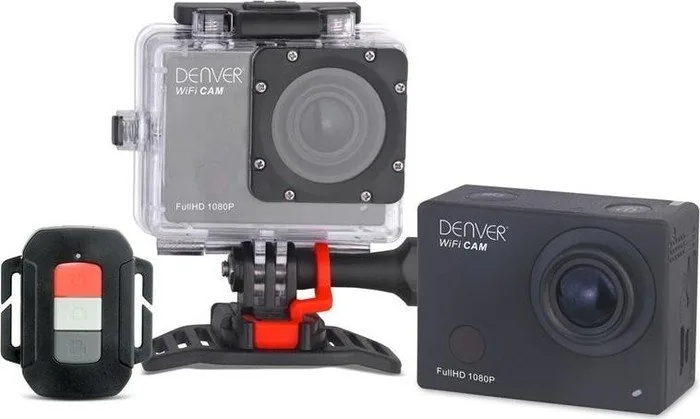
Denver ACT-8030W Manual
PDF manual · 3 Pages
English



Quick check
Incorrect answer, please try again.
Chat with your Denver ACT-8030W manual using AI
Get instant AI answers from your Denver ACT-8030W manual
Ask anything about the Denver ACT-8030W. Answers come from this manual, with the pages they are based on.
Ask a Question
Do you recommend ACT-8030W?
Yes NoFrequently Asked Questions
It is a compact action camera designed for recording video, taking photos, and using creative modes like slow motion and timelapse. It is suited for casual adventure, travel, and everyday moments.
Is this answer helpful?
No, it does not include internal memory. You need to insert a Micro SD card before using it, and a good-quality card is recommended for the best experience.
Is this answer helpful?
Yes. The camera supports Wi-Fi connection with the DENVER ACTION CAM 2 app on Android and iOS, letting you preview and manage recording from a mobile device.
Is this answer helpful?
It supports multiple video settings, including Full HD and HD options. It also includes slow motion and timelapse modes for more varied filming styles.
Is this answer helpful?
The camera has several modes, such as video, photo, and playback. You switch between them using the power/mode button while the device is on.
Is this answer helpful?
No. The remote can start recording, take a photo, or turn the camera off, but it cannot power the camera on. You must switch it on directly on the device.
Is this answer helpful?
Advantages and Disadvantages
Advantages

- Compact action camera with multiple video and photo modes for flexible everyday use.
- Supports slow motion and timelapse, adding creative options beyond standard recording.
- Wi-Fi app support makes previewing and controlling the camera more convenient.
- HDMI output and remote control improve sharing and hands-free operation.
Disadvantages

- No built-in memory, so a Micro SD card is required before filming.
- UHS cards are not recommended because compatibility may be limited.
- Battery life and recording time are limited, so longer sessions may need planning.
- Remote control cannot power the camera on, and it does not work during Wi-Fi use.
Product Specification
Effective Megapixels
8.0 Megapixels
Sensor
CMOS
Video function
H.264, 1920x1080@60p (16:9)
Photo resolution
JPEG (max. 3264x2448 Pixels, 4640x3480 interpolated)
Viewing angle
170 deg
Digital zoom
no
Display
2" LCD
Waterproof
up to 180.44 ft with housing
Removable storage
microSD/microSDHC
Connections
USB 2.0, HDMI
Wireless
Wi-Fi (WLAN)
Power supply
Li-Ion battery (1200mAh), USB
Color
black
Product Description
Denver ACT-8030W Manual: A Compact Action Camera for Everyday Adventure
The Denver ACT-8030W is a small action camera built for people who want flexible recording without a complicated setup. It combines video, photo, playback, and wireless control in one lightweight device, making it a practical choice for travel, sports, outdoor clips, and casual vlogging. The Denver ACT-8030W Manual highlights a camera that is simple to start with, yet offers enough features to explore creative shooting styles.
One of its most useful strengths is the variety of recording options. The camera supports Full HD and HD video modes, including choices such as 1080p and higher-frame-rate 720p settings for smoother motion. It also includes still photo capture with several resolution levels, so users can switch between quick snapshots and more detailed shots depending on the situation. A built-in 2.0-inch LCD screen helps with framing, previewing, and menu navigation.
For more creative use, the camera includes slow motion and timelapse functions. Slow motion can make action scenes more dramatic, while timelapse is ideal for showing changes over time, such as sunsets, city movement, or outdoor scenery. These features give the ACT-8030W more personality than a basic point-and-shoot device.
Connectivity is another strong point. With Wi-Fi support and the DENVER ACTION CAM 2 app on Android or iOS, users can preview footage and control the camera from a phone or tablet. The camera also works with a remote control for recording and photos, and it can output content to an HDTV through HDMI for larger-screen viewing.
The camera uses a Micro SD card for storage and does not include built-in memory, so planning ahead is important. Battery charging is done through USB, and the device is designed to give clear status feedback through indicator lights. In short, the ACT-8030W is a budget-friendly action camera that focuses on convenience, basic creativity, and easy sharing.
Notes
- Insert a Micro SD card before use.
- Wi-Fi control does not work at the same time as the remote.
- Charging usually takes a few hours.
- Recording may stop automatically when the battery is low or storage is full.
Search for 67,706 Manuals online


Type-in Brand or Model