
Deltaco DM430 Manual
PDF manual · 16 Pages
English



Quick check
Incorrect answer, please try again.
Chat with your Deltaco DM430 manual using AI
Get instant AI answers from your Deltaco DM430 manual
Ask anything about the Deltaco DM430. Answers come from this manual, with the pages they are based on.
Ask a Question
Do you recommend DM430?
Yes NoFrequently Asked Questions
You can change the DPI using the dedicated DPI button on the mouse or by downloading the software from the Deltaco website for more precise adjustments.
Is this answer helpful?
When the battery drops below 30 percent, the LED flashes red rapidly. If it goes below 10 percent, the mouse will automatically turn off to protect the battery.
Is this answer helpful?
Yes, the mouse works via USB receiver on any computer with a USB port, though some advanced software features may be optimized for Windows.
Is this answer helpful?
Press and hold the left button, right button, and wheel button simultaneously for one second until the LED flashes yellow, then insert the receiver into your PC.
Is this answer helpful?
No, the Deltaco DM430 is not waterproof. You must keep it dry and away from all liquids to prevent damage.
Is this answer helpful?
Hold the wheel button and the backward button for three seconds to toggle between 125Hz and 1000Hz based on the LED color.
Is this answer helpful?
Detailed warranty information is available on the official Deltaco website at www.deltaco.eu or by contacting their support team.
Is this answer helpful?
Advantages and Disadvantages
Advantages

- High-speed 1000Hz polling rate for responsive cursor movement
- Adjustable DPI settings for customized sensitivity control
- Smart power saving mode extends battery life during idle periods
- Eight customizable buttons including forward and back navigation
- Clear LED indicators provide real-time battery and connection status
Disadvantages

- Not waterproof so liquids must be kept away from the device
- Cannot be repaired by the user without voiding the warranty
- LED lights may drain battery faster if left on constantly
- Requires software installation for advanced polling rate adjustments
- Receiver pairing might need manual intervention in rare cases
Product Specification
Suitability
right hand
Keys
6 (total), 2 (main), 1 (top), 2 (left), 1 (scroll wheel click)
Scroll Wheel
1x 2-way
Tracking
LED-red/IR
Resolution
16000dpi, reducible to 400dpi
Sensor
PixArt PAW 3335
Switches
mechanical switches, Omron D2FC-F-7N, 20 million clicks
Polling Rate
1000Hz, adjustable to 500/250/125Hz
Lighting
RGB
Connection
wired (5.9ft), USB-A 2.0 or wireless (2.40GHz), USB-A (USB-A receiver), detachable cable (USB-C port)
Power Supply
battery (built-in, 600mAh), charging cable (USB-C)
Dimensions (WxDxH)
2.56x1.46x4.80in
Approximate Volume
4.70cu in (approximated shape)
Weight
3.53oz (without cable)
Features
thumb rest, battery level indicator
Product Description
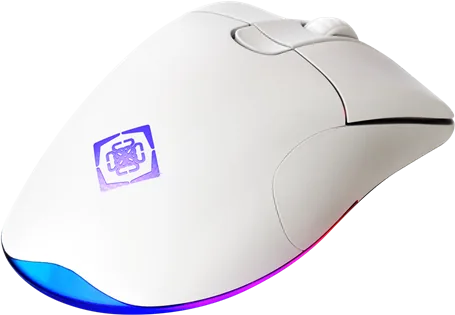
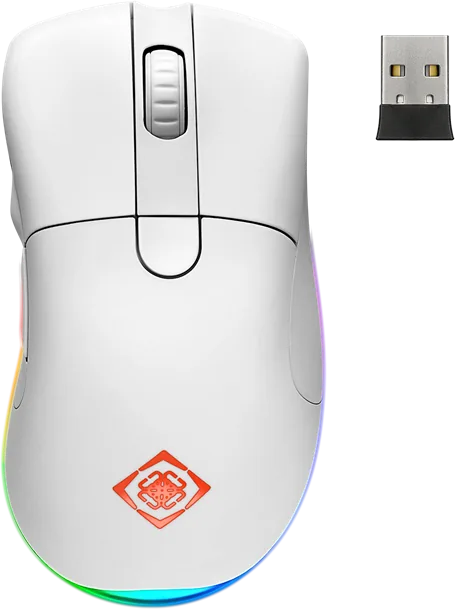
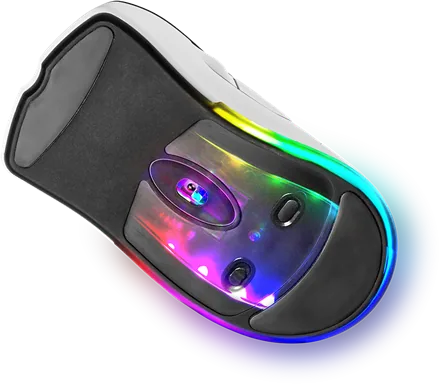
Elevate Your Gaming Experience with the Deltaco DM430 Wireless Mouse
The Deltaco DM430 Wireless Gaming Mouse is designed for players who demand precision, speed, and reliability without the clutter of cables. This sleek USB peripheral brings a modern aesthetic to your desk while delivering robust performance tailored for competitive gaming. Whether you are navigating complex maps or executing rapid-fire strategies, this mouse ensures every movement counts.
Equipped with an adjustable DPI button, users can instantly switch between sensitivity levels to suit different game genres. The default polling rate sits at a lightning-fast 1000Hz, but you can toggle it down to 125Hz for battery conservation or adjust specific rates via the dedicated software suite available on the Deltaco website. The device features eight programmable buttons, including forward and backward navigation keys that enhance productivity as well as gaming immersion.
Power management is seamless with intelligent sleep modes that activate after ten minutes of inactivity to preserve battery life. Visual indicators keep you informed: the LED status light flashes red when power drops below 30 percent and turns off automatically if the charge falls under 10 percent. During charging, the light shifts from yellow to solid green, providing clear feedback on your battery status. The mouse also features automatic LED dimming when moved, ensuring visibility only when needed.
Pairing is straightforward since the receiver comes pre-paired from the factory. However, if reconnection is necessary, a simple combination of left, right, and scroll buttons initiates the process quickly. Safety guidelines emphasize keeping the device dry as it is not waterproof, and users should avoid opening the unit to prevent voiding the warranty. With its ergonomic design and wireless freedom, the Deltaco DM430 stands out as a versatile choice for gamers seeking high performance and long-lasting battery life.
Search for 67,732 Manuals online


Type-in Brand or Model