
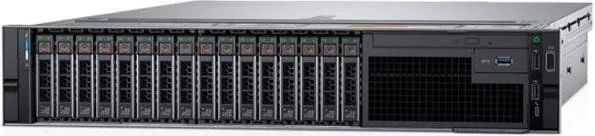
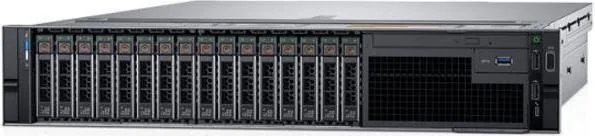

Dell PowerEdge R740 Manual
PDF manual · 19 Pages
English


Quick check
Incorrect answer, please try again.
Chat with your Dell PowerEdge R740 manual using AI
Get instant AI answers from your Dell PowerEdge R740 manual
Ask anything about the Dell PowerEdge R740. Answers come from this manual, with the pages they are based on.
Ask a Question
Do you recommend PowerEdge R740?
Yes NoFrequently Asked Questions
The R740 supports up to two Intel Xeon Scalable processors, each up to 28 cores. Certain high‑TDP CPUs have thermal and configuration constraints; consult compatibility guidance for supported TDPs and required cooling.
Is this answer helpful?
It supports multiple front drive configurations including up to 16 x 2.5" drives or up to eight 3.5" drives. Supported drive interfaces include SAS, SATA and Nearline SAS; NVMe/SSD support depends on specific model and controller options.
Is this answer helpful?
The system provides 24 DIMM slots and supports RDIMM, LRDIMM, NVDIMM-N and Intel DCPMMs. Maximum memory depends on DIMM type and CPU count (LRDIMM and DCPMM capacities permit multi‑TB configurations). Mixing of certain DIMM sizes/types is restricted.
Is this answer helpful?
Internal controller options include PERC H330, H730P, H740P, HBA330, S140 and BOSS-S1 for boot drives. External options include PERC H840 and 12 Gbit/s SAS HBAs. BOSS supports up to two M.2 SATA devices for OS boot.
Is this answer helpful?
Remote management is via iDRAC with RACADM and Redfish APIs. SupportAssist offers automated monitoring, diagnostics and support ticket creation. Dell OpenManage provides lifecycle and systems management tools; documentation and QRL provide quick access to resources.
Is this answer helpful?
Multiple PSU wattages (495 W–2400 W) and redundant options are available; high‑wattage PSUs may require 200–240 V input. Thermal limits vary by configuration—high‑TDP CPUs, dense drives or GPUs need appropriate heatsinks, fans and ambient temperature controls to avoid throttling.
Is this answer helpful?
Standard operating range is 10–35 °C and 10–80% RH; extended ranges allow 5–40 °C with limits. The server is rated for ISO Class 8 data center air filtration (MERV11/13 recommended) and has specific vibration, shock and altitude limits—follow these to ensure reliability.
Is this answer helpful?
Advantages and Disadvantages
Advantages

- High compute density with support for two Intel Xeon Scalable CPUs up to 28 cores each.
- Flexible storage: up to 16 x 2.5" or multiple 3.5" drive configurations supporting SAS/SATA/Nearline/SSD.
- Large memory capacity with 24 DIMM slots and support for RDIMM, LRDIMM, NVDIMM-N and DCPMMs (with rules).
- Extensive PCIe expansion (up to eight Gen3 slots via risers) for NICs, accelerators and storage cards.
- Comprehensive management: iDRAC, SupportAssist, OpenManage and QRL for streamlined support and firmware updates.
Disadvantages

- Complex compatibility rules for memory types (mixing restrictions) and persistent memory requiring specific CPU configs.
- High‑power PSUs and certain configurations require 200–240 V for full rated performance.
- GPU and some peripheral types have limited or unsupported configurations in specific thermal/temperature ranges.
- Extended temperature operation has operational limits and can impair performance; special precautions required.
- Particulate and gas pollution limits demand data center filtration (ISO Class 8 / MERV11–13) for reliability.
Product Specification
Expansion Slots
8x PCIe 3.0
Graphics
Matrox G200 - Onboard
Dimensions
2HE, 28.17in
Manufacturer Warranty
three years
Product Description
Dell PowerEdge R740 — Robust 2U Rack Server
The Dell PowerEdge R740 is a versatile 2U rack server built for demanding data center workloads, virtualization, and mixed storage/compute tasks. Designed to support up to two Intel Xeon Scalable processors (each up to 28 cores), the R740 balances high compute density with flexible I/O and storage options. It accommodates 24 DIMM slots for large memory footprints, various RAID controllers, and multiple PSU choices to meet redundancy and power requirements.
Key capabilities and design
Engineered for scalability, the R740 supports up to 16 x 2.5" drives or multiple 3.5" drive configurations, making it suitable for heavy storage or high‑IOPS flash deployments. Storage options include SAS, SATA, Nearline SAS, NVMe and SSDs (as supported), paired with internal controller choices such as PERC H330/H730P/H740P, HBA330 and the BOSS boot adapter. PCIe expansion via up to eight PCIe Gen3 slots (using risers) enables advanced networking, acceleration or storage offload cards.
Memory flexibility is strong: the system supports RDIMM, LRDIMM, NVDIMM-N and Intel DCPMM (with specific configuration rules), enabling capacities from modest setups to multi‑terabyte configurations for in‑memory or persistent memory workloads. Integrated network daughter card (NDC) options provide up to 10/25 Gbps connectivity and allow additional PCIe NICs.
Power and cooling are engineered for data center conditions. Multiple PSU classes (495 W to 2400 W) and redundant options are available, and thermal guidance ensures proper cooling for high‑TDP CPUs and GPU configurations where supported. Environmental specifications cover standard and extended operating ranges, vibration and shock limits, and particulate/gas pollution limits to protect long‑term reliability.
Deployment and management
The R740 integrates with Dell management tooling including iDRAC for remote management, SupportAssist for automated support, and OpenManage suites for inventory, firmware and lifecycle management. Quick Resource Locator (QRL) and documentation resources streamline setup, troubleshooting and driver/firmware updates.
Notes
- Ensure correct CPU, memory and riser combinations to meet thermal and compatibility rules (some memory types and DCPMM/NVDIMM require two processors).
- Use appropriate power and cooling when deploying high‑TDP CPUs or dense drive/GPU configurations.
- Follow recommended data center air filtration (ISO Class 8 / MERV11–13) to avoid particulate/corrosion issues.
Search for 67,706 Manuals online


Type-in Brand or Model