
Dell Latitude 7200 2-in-1 Manual
PDF manual · 40 Pages
English


Quick check
Incorrect answer, please try again.
Chat with your Dell Latitude 7200 2-in-1 manual using AI
Get instant AI answers from your Dell Latitude 7200 2-in-1 manual
Ask anything about the Dell Latitude 7200 2-in-1. Answers come from this manual, with the pages they are based on.
Ask a Question
Do you recommend Latitude 7200 2-in-1?
Yes NoFrequently Asked Questions
The Latitude 7200 2-in-1 uses a 12.3-inch FHD WUXGA touchscreen (1920x1280) with typical brightness around 400 nits and a 60Hz refresh rate. It is designed for frequent use in both office and mobile settings, with wide viewing-angle support listed in the specifications.
Is this answer helpful?
The system supports LPDDR3 memory with a minimum configuration of 4GB and maximum configuration of 16GB. The text indicates memory is soldered to the system board, meaning upgrade possibilities depend on what configuration you start with.
Is this answer helpful?
Yes. The platform supports a one Solid-State Drive (SSD) using the M.2 2230 form factor. The interface is listed as PCIe 3 x4 NVMe, with capacities supported by the spec up to higher limits than 256GB.
Is this answer helpful?
This Latitude configuration includes fingerprint reader security options enabled through BIOS settings. The provided materials describe fingerprint match-on-chip security and pairing with other protections like TPM 2.0 and Secure Boot-related features, helping secure access to the device.
Is this answer helpful?
Use Windows search for Recovery, then choose Create a recovery drive. You will be prompted by User Account Control. Select the option to back up system files, choose an empty USB flash drive (16GB minimum), and confirm deletion. The process may take up to an hour.
Is this answer helpful?
Yes. The text warns that if BitLocker is not suspended before updating the system BIOS, the system may not recognize the BitLocker key after reboot, which can trigger recovery key prompts and may lead to data loss or an operating system reinstall.
Is this answer helpful?
The F12 one-time boot menu helps you select a specific boot device without changing the BIOS boot order. It can also provide access to diagnostics and includes options such as BIOS Setup, diagnostics, and other recovery-related entries depending on availability.
Is this answer helpful?
Advantages and Disadvantages
Advantages

- Bright 12.3-inch touchscreen (typical 400 nits) with 60Hz refresh for clear, responsive use
- Thunderbolt 3-capable USB-C plus USB Type-A and DisplayPort support for versatile connections
- Fingerprint-reader security options paired with TPM 2.0, Secure Boot, and BIOS-level protections
- NVMe SSD support on M.2 2230 (PCIe 3 x4) plus scalable configurations (memory up to 16GB supported)
- Recovery-drive workflow and SupportAssist tooling for easier troubleshooting and system maintenance
Disadvantages

- Memory is soldered on the system board, so upgrade paths may be limited depending on your unit
- Available configurations (wireless, readers, and features) can vary by region and ordering options
- BIOS and system settings changes should be done carefully to avoid boot or configuration issues
- Operating system support in the provided materials centers on Windows 10
- Some advanced security and maintenance steps (like BIOS updates with BitLocker) require extra precautions
Product Specification
CPU
Intel Core i5-8365U, 4C/8T, 1.60-4.10GHz, 6MB+1MB Cache, 15W TDP, 10-25W cTDP, Codename "Whiskey Lake-U" (Coffee Lake, Intel 14nm++)
RAM
8GB DDR3L
Storage
256GB SSD (PCIe)
Graphics
Intel UHD Graphics 620 (iGPU), 24EU/192SP, 0.30-1.10GHz, Architecture "Gen 9.5" (Whiskey Lake GT2)
Display
12.3", 1920x1280, 188ppi, Multi-Touch, glare, Digitizer, 400cd/m2, Glass (Corning Gorilla Glass 5)
Ports
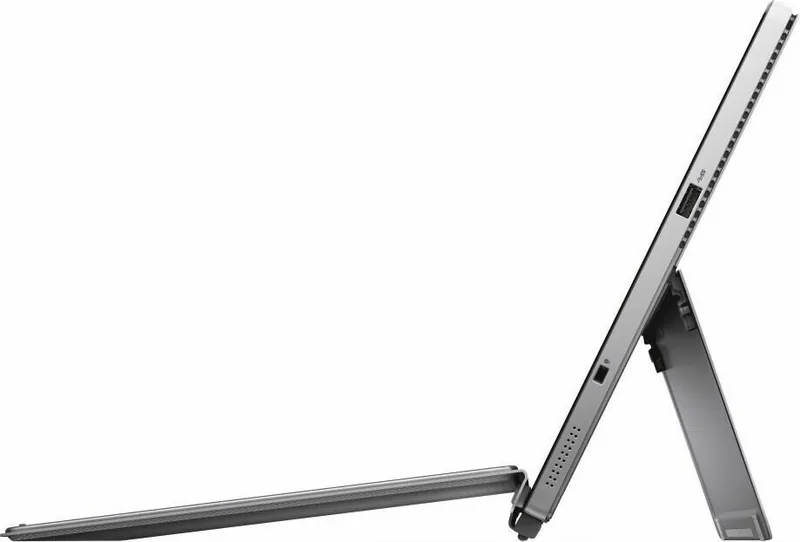
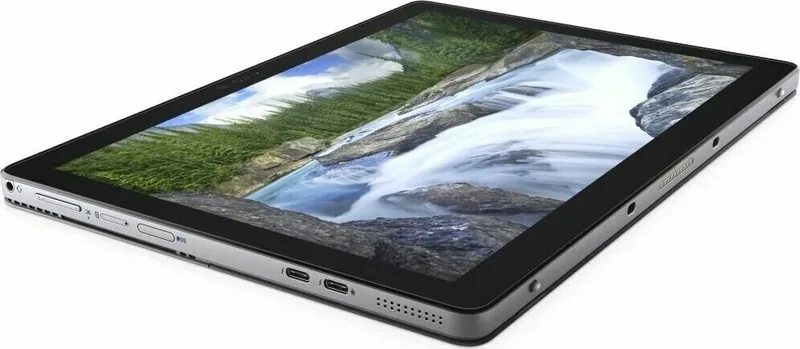
1x USB-A 3.0 (5Gb/s), 1x Thunderbolt 3 (40Gb/s, power connector, PD), 1x Thunderbolt 3 (40Gb/s), 1x 3.5mm jack
Wireless
Wi-Fi 5 (WLAN 802.11a/b/g/n/ac, 2x2, Intel 9560), Bluetooth 5.0
Navigation
N/A
SIM
N/A
Cellular
N/A
Networks
N/A
Card Reader
microSDXC (up to 128GB)
Webcam
5 Megapixel, IR camera (front), 8 Megapixel
Operating System
Windows 10 Pro 64bit
Battery
Li-Polymer, 2 cells, 38Wh
Dimensions
11.50x8.23x0.37in
Weight
1.88lb (Tablet)
Color
silver/black
Special Features
TPM 2.0, kickstand, light sensor, docking port, dock (keyboard, touchpad), fingerprint reader (rear)
Warranty
three years
Note
Different country versions possible.
Product Description
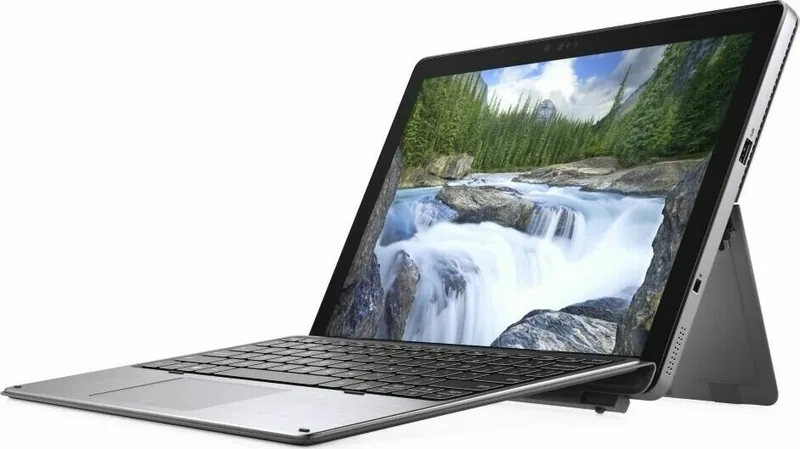
Dell Latitude 7200 2-in-1 (Core i5-8365U, 8GB RAM, 256GB SSD) with Fingerprint Reader
A versatile 2-in-1 built for modern work
The Dell Latitude 7200 2-in-1 brings a premium blend of portability and productivity, pairing Intel Core i5-8365U performance with a bright 12.3-inch touchscreen. With 8GB RAM and a 256GB SSD configuration, it is well-suited for everyday business tasks like email, spreadsheets, document work, and web-based collaboration.
What makes the Latitude line stand out is its focus on usability plus manageability. From the moment you power on, the system guides setup for Windows, encourages network connectivity for updates, and streamlines onboarding with Dell apps such as SupportAssist and Dell Update.
Smooth performance with responsive storage
On the hardware side, the i5-8365U uses integrated Intel UHD graphics and works alongside LPDDR3 memory (with configurations up to 16GB supported). Your 256GB SSD is based on the M.2 2230 PCIe NVMe platform, giving you fast boot and application loading for day-to-day workflows.
For peace of mind, the platform supports creating a USB recovery drive. A common recommendation is to keep an empty USB flash drive (16GB or larger) ready, so you can troubleshoot or repair Windows if you ever run into boot issues.
A bright display, practical ports, and flexible connectivity
The Latitude 7200 2-in-1 features a 12.3-inch FHD WUXGA (1920x1280) AR/AS touchscreen with typical brightness around 400 nits and a 60Hz refresh rate. Ports and expansion options are designed for mobility: Thunderbolt 3-capable USB-C (with Power Delivery and DisplayPort), USB Type-A with PowerShare, plus microSD support and optional SIM and smart card readers depending on configuration.
Security for work that needs protection
Security controls are a core part of the Latitude experience. This model supports a fingerprint reader and uses match-on-chip fingerprint security plus TPM 2.0. You also get options like Secure Boot and advanced BIOS security features, alongside physical protection options such as a Noble Wedge lock slot.
Notes
- For BIOS changes, use caution unless you are an expert user, since incorrect settings can cause problems.
- If BitLocker is enabled, it should be suspended before updating the BIOS to avoid recovery prompts.
- You can access a one-time boot menu with F12, which is useful for diagnostics and targeted booting.
Key highlights
- 12.3-inch FHD WUXGA touchscreen with typical 400 nits brightness for clear indoor and field work
- Core i5-8365U with 8GB LPDDR3 and SSD storage for fast everyday responsiveness
- Fingerprint reader plus TPM 2.0 for layered endpoint security
- Thunderbolt 3 USB-C with DisplayPort and Power Delivery for flexible docking
- USB recovery drive support to simplify Windows troubleshooting and repair
Search for 67,706 Manuals online


Type-in Brand or Model