
Dascom DP-581 BT Manual
PDF manual · 56 Pages
English



Quick check
Incorrect answer, please try again.
Chat with your Dascom DP-581 BT manual using AI
Get instant AI answers from your Dascom DP-581 BT manual
Ask anything about the Dascom DP-581 BT. Answers come from this manual, with the pages they are based on.
DP-581 BT Maintenance Schedule
In normal environments, clean the printer after printing a few rolls of paper or if there are voids in the printout. Use a cleaning pen and card or isopropyl alcohol.
For optimum performance and life, clean the Print Head and Platen Roller whenever you load new paper. Turn off printer and remove paper before cleaning.
Ask a Question
Do you recommend DP-581 BT?
Yes NoFrequently Asked Questions
Open the paper door, install spacers for 8-inch media if necessary, pull the leader out, and close the door firmly until it clicks into place to ensure proper feed.
Is this answer helpful?
Charging the battery can take up to 8 hours using the AC adapter. Using an external desktop charger may reduce this to 4 hours depending on the battery condition.
Is this answer helpful?
The printer supports a maximum paper width of 8.27 inches or 210mm, accommodating standard A4 and 8-inch wide rolls.
Is this answer helpful?
Yes, you can update the firmware via the web interface. Access the configuration mode and upload the firmware file to the printer memory.
Is this answer helpful?
Yes, the printer is compatible with Android tablets and smartphones, supporting drivers and utilities for direct printing capabilities.
Is this answer helpful?
Do not store a fully charged battery at temperatures above 4-40 degrees Celsius for long periods. Store between these ranges to maintain capacity.
Is this answer helpful?
Advantages and Disadvantages
Advantages

- Fast printing speed up to 11 pages per minute
- Web based configuration interface for easy setup
- Compatible with Windows and Android operating systems
- Supports extensive fonts and bar code types
- Durable PC-ABS case for rugged use
Disadvantages

- Charging is not supported via USB port
- Battery requires specific charging cycles for max capacity
- Limited to monochrome thermal printing
- Tablet support varies by operating system
- Battery should be removed for long-term storage
Product Specification
Type
mobile thermal printer
Technology
Direct Thermal
Print Resolution
203 dpi
Roll Diameter
2.00 in
Print Width
8.27 in
Print Speed
1.97 in/s
Memory
512MB (RAM), 256kB (Flash)
Connections
USB 2.0
Network
Bluetooth 4.0
Display
N/A
Emulation
ZPL, EPL, ESC/POS, CPCP, IPL, PostScript
Power Consumption
30W (typical)
Dimensions
12.01x4.21x2.52 in
Weight
3.53 lbs
Features
IP54 certified, Battery
Manufacturer Warranty
2 years
Note
Delivery without battery
Product Description
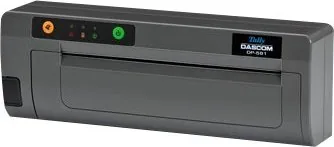
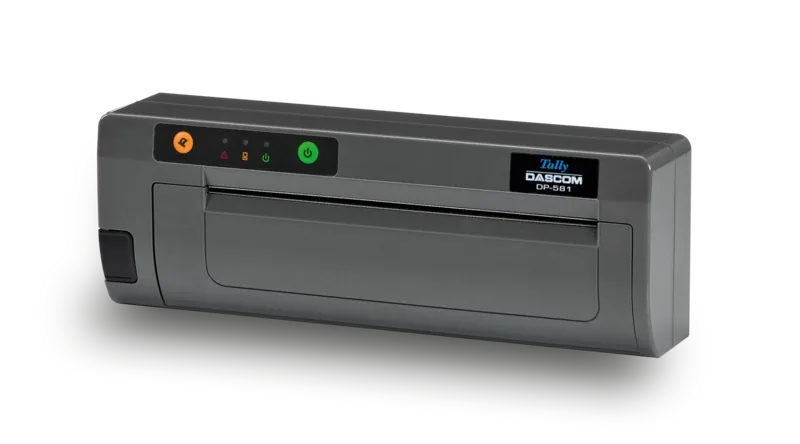
Overview of the Dascom Tally DP-581 BT Without Battery Direct Thermal Manual
This product line offers a robust solution for mobile printing environments. This device prints on special thermal media supplied in roll form up to 8 inches wide. All models are equipped with a USB port which supports cabled communications. All models support an optional internal Bluetooth or Wi-Fi interface. Configuration is quick and easy with a web based interface. The latest in battery technology provides for full shift printing in all modes. It is compatible with Windows and Android. Emulations allow the printer to be a drop-in replacement for nearly any mobile printer. The control panel is easy to read and simple drop-in paper loading is featured. It quickly prints a wide variety of tickets and receipts. Extensive fonts, character sets, bar codes and graphic capabilities are available. Printing speed reaches up to 11 pages per minute. You can perform a printer self test to ensure working order. Paper load instructions are clear. Battery installation involves removing screws. Charge via AC power adapter using the supplied accessory. The yellow LED shows solid ON while charging. Power on sequence involves the green LED and red LED lighting up. Battery volume below 5% shuts down the unit.
Technical Specifications and Features
Configuration area allows setup of connection parameters. Connectivity parameters include Bluetooth or WI-FI set up. IP address and subnets can be managed. Emulation modes include PRINTEK, ZPL, CPCL, ESCPOS, IPL, AUTOIMAGE, PDF, POSTSCRIPT, IMAGE. You can upload fonts and graphics to printer memory. Firmware updates are possible via the web interface. Factory defaults can be reset if needed. Maintenance includes cleaning the print head and platen roller. Battery care instructions maximize life. Troubleshooting covers general error conditions. The Dascom Tally DP-581 BT Without Battery Direct Thermal Manual details technical specifications. Printing resolution is 203 dpi. Power management uses a rechargeable 3 cell Lithium Ion battery. It is compliant with European standards and FCC Part 15 Class B. The casing is durable PC-ABS. Memory capacity includes 256 MB Flash and 512 MB DDR2. Environmental specs allow operation from minus 10 to 45 degrees Celsius. This product ensures reliable performance for ticketing and receipt printing needs in various environments.
Connectivity and Operation
The printer supports direct printing of PDF and Postscript. Wi-Fi configuration allows static or DHCP settings. Bluetooth pairing requires PIN 0000. Cleaning involves a thermal head pen. Operating temperature ranges from 10 to 45 degrees centigrade. Drivers available for XP and Windows. Printer setup via internal web interface accessible from tablets. Firmware can be upgraded to newer versions. Memory supports large graphic intensive print jobs. Durable case withstands normal use environments. Return authorization required for service. Accessories include data cables and straps. Mounting systems available for in-vehicle or cart.
Search for 67,732 Manuals online


Type-in Brand or Model