
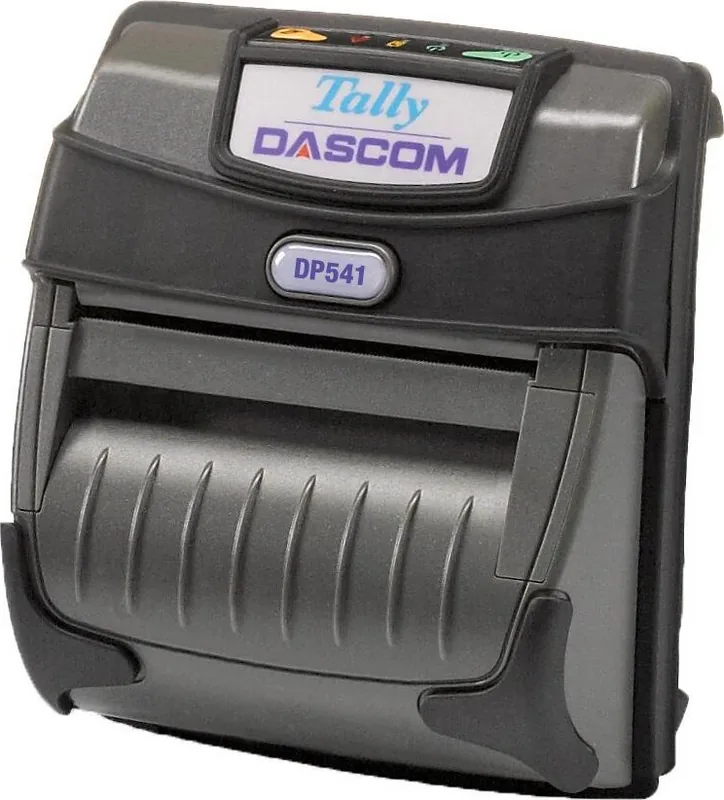
Dascom DP-541 SE BT Manual
PDF manual · 34 Pages
English



Quick check
Incorrect answer, please try again.
Chat with your Dascom DP-541 SE BT manual using AI
Get instant AI answers from your Dascom DP-541 SE BT manual
Ask anything about the Dascom DP-541 SE BT. Answers come from this manual, with the pages they are based on.
DP-541 SE BT Maintenance Schedule
Clean the Print Head, Platen Roller, Black Mark Sensor, and Tear Bar using a Thermal Head Cleaning Pen or cotton swabs with isopropyl alcohol.
Turn off the printer, open the door, and clean the white ceramic surface on the Print Head and the Platen Roller to ensure optimum performance.
Ask a Question
Do you recommend DP-541 SE BT?
Yes NoFrequently Asked Questions
Standard connectivity is USB 2.0 (USB‑C). Optional wireless interfaces include Bluetooth 4.0 (SPP and Personal Area Network modes) and Wi‑Fi 802.11b/g/n. The embedded web page allows configuration over USB, Bluetooth PAN or Wi‑Fi.
Is this answer helpful?
The DP-541 SE BT uses direct thermal rolls up to 4.125 inches wide and supports roll diameters up to 2.625 inches. Printing resolution is 203 dpi (8 dots/mm) with speeds up to 5 inches per second.
Is this answer helpful?
Use the printer’s embedded web interface to set Mark Seeking mode (Off, Front, Rear, Gap), adjust front/rear/gap sensor thresholds, mark width, backup and stop distances. The web UI shows live sensor brightness to help pick correct thresholds.
Is this answer helpful?
Turn the printer off, remove media, and clean the thermal head, black mark sensor, tear bar and platen roller using a thermal head cleaning pen or isopropyl‑moistened swabs. Clean regularly and whenever you change media to avoid voids or poor contrast.
Is this answer helpful?
The unit uses an 11.3V Li‑ion battery (approx. 2950 mAh). Charge new batteries at least four hours before first use and complete three full charge/discharge cycles to reach full capacity. Charge via the supplied AC adapter or vehicle adapter; charging may take up to 8 hours.
Is this answer helpful?
Yes. The DP-541 can directly print PDF and several image formats (PNG, JPG, BMP, SVG, TIFF) when the emulation is set to PDF, POSTSCRIPT or IMAGE, enabling printing from devices lacking native drivers.
Is this answer helpful?
Confirm the paper door is fully closed and the roll is installed correctly. Clean the sensors and platen roller, check mark thresholds in the configuration page, and perform a self-test. If the error persists, consult troubleshooting steps or contact your reseller for service.
Is this answer helpful?
Advantages and Disadvantages
Advantages

- Rugged IP54-rated housing and 6-foot drop survivability for harsh environments.
- Flexible connectivity: USB standard plus optional Bluetooth 4.0 (PAN/SPP) and Wi‑Fi 802.11b/g/n.
- Supports many emulations (ZPL, CPCL, ESC/POS, IPL) and direct PDF/image printing.
- Fast direct thermal printing at 203 dpi up to 5 ips with TrueType font support.
- Embedded web configuration for easy setup, firmware updates and diagnostics.
Disadvantages

- Direct thermal media is sensitive to heat and light and can fade over time.
- Battery runtime depends on usage; replacement batteries add recurring cost.
- Some advanced mobile platform instructions (tablet/smartphone) may require third-party apps or SDK work.
- Enterprise Wi‑Fi (EAP/certificates) may need additional configuration steps and certificates.
- Heavy or specialty media may require reducing max paper speed to avoid jams.
Product Specification
Type
mobile thermal printer
Technology
Direct thermal
Print resolution
203dpi
Roll diameter
2.63 in
Print width
4.09 in
Print speed
5.00 in/s
Memory
512MB (RAM), 256kB (Flash)
Ports
USB 2.0
Network
Bluetooth 4.0
Display
N/A
Emulation
ZPL II, EPL, ESC/POS, CPCL, PDF, PostScript
Power consumption
30W (typical)
Dimensions
6.10x2.72x5.71 in
Weight
1,499.14 lb
Special features
IP54 certified, Battery (Li-Ion, 2950mAh)
Manufacturer warranty
2 years
Product Description
Dascom Tally DP-541 SE BT, Thermal Direct Manual
The Dascom Tally DP-541 SE BT is a rugged mobile thermal direct printer designed for on-the-go receipt, ticket and label printing. Built for demanding environments, this 3–4 inch class printer combines durable hardware, flexible connectivity and easy configuration to serve retail, logistics, field service, and transportation applications. With USB as standard and optional Bluetooth or Wi‑Fi, the DP-541 SE BT adapts to modern mobile ecosystems including Windows, Android and Apple devices.
Featuring direct thermal printing at 203 dpi and speeds up to 5 inches per second, the DP-541 SE BT balances quality and throughput for high-volume mobile workflows. The device supports many emulations (ZPL, CPCL, ESC/POS, IPL and more) plus direct printing of PDFs and common image formats, enabling simple integration with existing systems and reducing the need for intermediate drivers. TrueType font support, extensive barcode options (1D and 2D), and up-loadable graphics make it easy to produce branded receipts and ticketing documents on the fly.
Ruggedness is central to the DP-541 SE BT: an IP54 rating resists dust and water ingress and the unit withstands repeated 6-foot drops to concrete. The compact housing includes a drop-in paper path for quick media changes, sensors for black-mark and gap detection, and simple controls (power and feed) with multi-color LEDs that show power, battery and fault states. The printer’s battery design aims for full-shift operation; it uses a rechargeable Li‑ion pack and supports in-use charging via AC or vehicle adapters.
Configuration is straightforward via an embedded web interface accessible over USB, Bluetooth Personal Area Network mode, or Wi‑Fi. The web UI exposes connectivity, imaging, device and sensor parameters, font management, graphics upload and firmware updates—letting administrators tune sensor thresholds, mark-seeking behavior, left margins, print contrast and more without specialized tools. For Windows PCs, Android and other platforms, Dascom supplies drivers and SDKs to ease integration; for tablet or smartphone printing the DP-541’s ability to handle graphic file types directly reduces dependency on platform drivers.
Maintenance is simple: routine cleaning of the thermal head, platen roller and sensors prevents print quality issues, while clear guidance on battery care and charging prolongs runtime. The manual includes troubleshooting tips, self-test procedures and diagnostics to isolate common faults such as paper jams, sensor misreads or power problems. Regulatory compliance and certifications (FCC Class B, CE, RoHS) make it suitable for broad deployments.
The Dascom Tally DP-541 SE BT is an ideal choice where portability, resilience and connectivity matter—offering flexible print language support, direct graphic printing, and enterprise-capable Wi‑Fi/Bluetooth options for streamlined mobile printing.
Notes
- Uses direct thermal media; avoid exposure to heat and sunlight to prevent fading.
- Supports a range of emulations—verify chosen emulation matches host software.
- Regularly clean the print head and sensors to maintain print quality.
- Follow local regulations for battery disposal and safety.
Search for 67,732 Manuals online


Type-in Brand or Model